75.5782.08 IXIO-ST 20230913 Page 11 of 12
TROUBLESHOOTING (cont.)
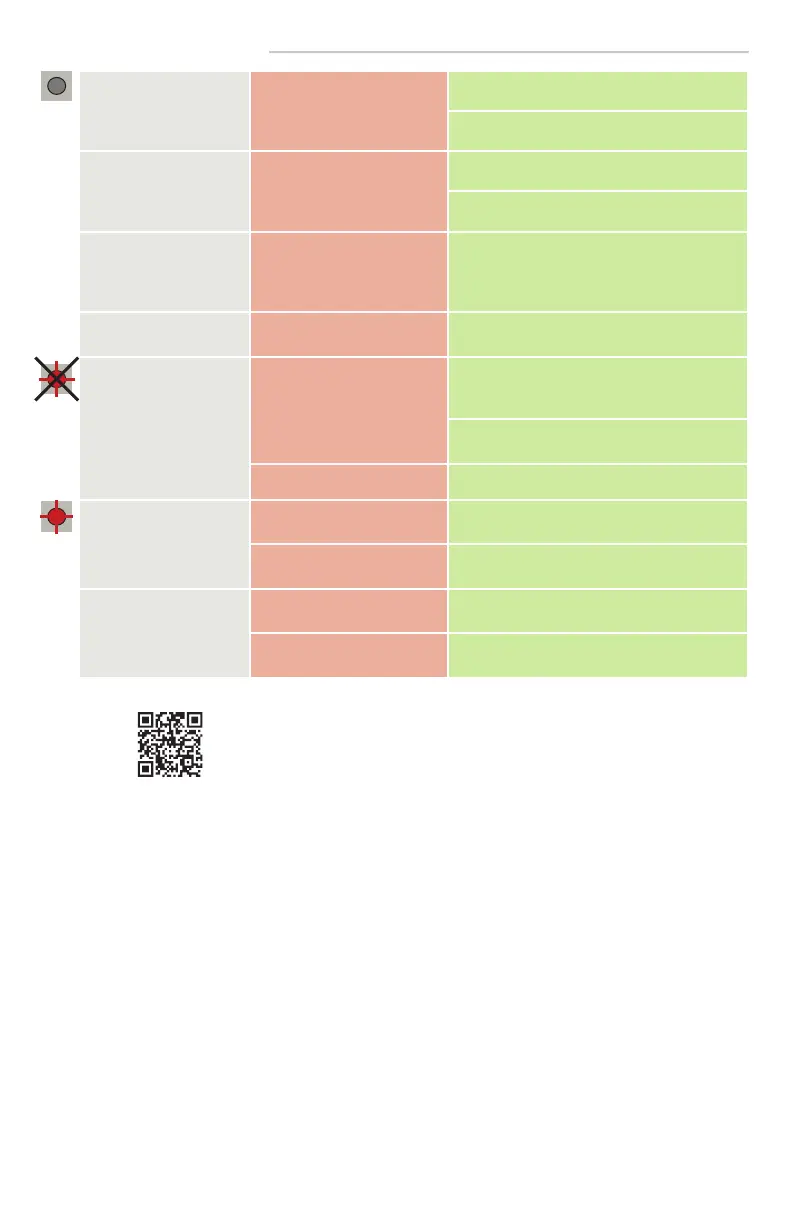
The LED and the LCD
displays are off
No power to sensor. Check wiring.
Check for correct power supply.
The reaction of the door
does not correspond with
the LED signal
Incorrect output configuration
/ wiring.
Check output configuration setting.
Check wiring.
Cannot access LCD menu
or change parameters via
remote control
The sensor is protected by a
password.
Enter the correct password. If you forgot the
code, cut and restore the power supply to
access the sensor without entering a password
during 1 minute.
Sensor does not respond
to remote control
Dead batteries. Replace batteries.
RED Visible External
Monitoring (Test
Indication LED) does not
flash
Monitoring installation/setup
error.
Verify door control is capable of monitoring
and the sensor monitoring wires are properly
connected to the door control.
Verify monitoring (TEST) is ON in the sensor
settings.
Sensor malfunction. Replace the sensor.
RED Visible External
Monitoring (Test
Indication LED) flashes
continuously
Wiring issue. Verify wiring.
Door control not set correctly. Verify door control monitoring set to Active
Low.
Door cycles open and
remains open
Door control monitoring set
to Active High.
Set door control monitoring to Active Low.
Safety output is set incorrectly. Set the safety output required for the door
control.
Can’t find your answer?
Visit www.beainc.com or scan QR code for Frequently Asked Questions!



 To Next Page