...
Page 4 of 12 75.5782.08 IXIO-ST 20230913
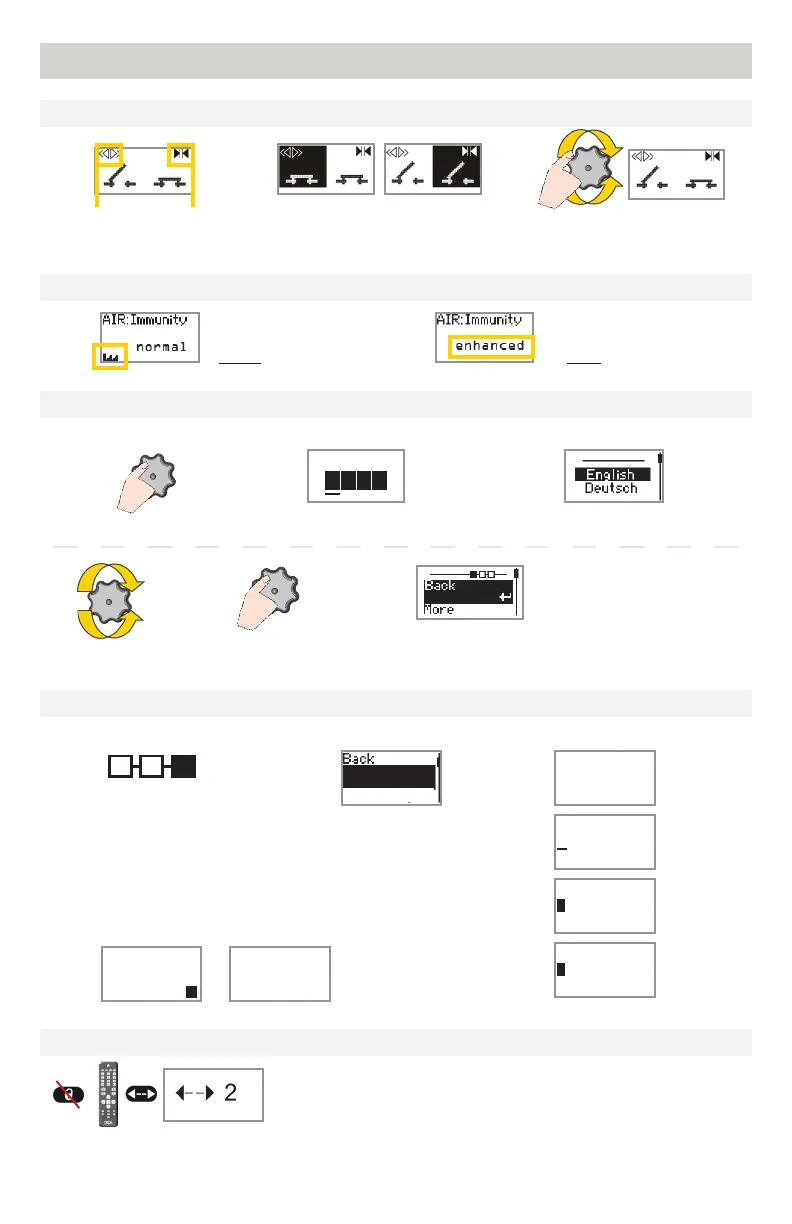
To adjust contrast, push and turn
the grey button simultaneously.
During normal function only.
Negative display = active output
= scroll = select
3) Select language before entering the first LCD menu.
During the first 30 seconds after power-on of the
sensor or later in the diagnostics menu.
Select Back to
return to previous
menu or display.
Select More to go to next level:
- basic settings (MENU 1)
- advanced settings (MENU 2)
- diagnostics (MENU 3)
1) Push to enter the LCD menu.
1) Navigate to menu 3 (Diagnostics). 2) Select "ZIP code". 3) Change the code as desired.
displayed value
=
factory value
displayed value
=
saved value
Activation
impulse
Safety
2) Enter password, if necessary.
Not during the first minute after
power-on of the sensor.
Password
X
X X X
ZIP code
V
To activate the new ZIP code, you must validate the last digit (see below):
v = valid ZIP code (values will be changed accordingly)
x = invalid ZIP code (no values will be changed)
v/x = valid ZIP code, but from a different product
*only available values
will be changed*
ZIP code
H24 1 56-KG4
01 0 800/02F
ZIP code
ID #
ZIP code
E24 1 56-KG4
01 0 800/02F
ZIP code
E24 1 56-KG4
01 0 800/02F
ZIP code
E24 1 56-KG4
01 0 800/02F
ZIP code
H24 1 56-KG4
01 0 800/02F
HOW TO USE THE LCD
DISPLAY DURING NORMAL FUNCTION
FACTORY VALUE VS. SAVED VALUE
NAVIGATING IN MENUS
CHANGING A ZIP CODE
VALUE CHECK WITH REMOTE CONTROL
See application note on ZIP CODE (76.0024).
Pressing a parameter symbol on your remote control displays the saved value
directly on the LCD screen. Additionally, the green LED will blink the number
of times that the parameter is set to. Do not unlock first.



 To Next Page