To Next Page


L
Lori BowenSep 1, 2025
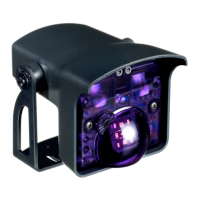
What to do if BEA IXIO-ST sensor is disturbed?
- TTimothy ChenSep 1, 2025
If the BEA Accessories sensor is disturbed, increase the IR-immunity filter to value 3.

What to do if BEA IXIO-ST sensor is disturbed?
If the BEA Accessories sensor is disturbed, increase the IR-immunity filter to value 3.
Why E8 ORANGE LED flashes 8 x on BEA Accessories?
If the E8 ORANGE LED flashes 8 times, it indicates that the IR power emitter is faulty and the sensor should be replaced.
Why E1 ORANGE LED flashes 1 x on BEA Accessories?
If the E1 ORANGE LED flashes once, replace the sensor.
What to do if the LED and the LCD display are off on BEA IXIO-ST Accessories?
If the LED and the LCD display are off, check the wiring.
Why is the orange LED flashing 1 time on my BEA Door Opening System?
If the orange LED on your BEA Door Opening System flashes once, it could be due to several reasons: * The power supply might be too low or too high. Check the power supply, using the diagnostics menu of the LCD. * A previous sensor in the daisy chain could be faulty. Try replacing the previous sensor in the chain. * The SDC setting might not match the actual product position. Ensure to lock the SDC position setting. * The sensor might not be receiving enough IR energy. Decrease the angle of the IR curtains. * External elements might be disturbing the sensor. Eliminate the cause of disturbance, such as lamps, rain cover, or ensure the door controller housing is properly grounded.
What to do if the red LED flashes quickly after assisted setup on BEA Door Opening System?
If the red LED on your BEA Door Opening System flashes quickly after an assisted setup, it means the sensor is detecting the door during the setup process. To resolve this, move the IR curtains away from the door and install the sensor as close to the door as possible.
How to unlock BEA Door Opening System if the LCD or remote control does not react?
If the LCD or remote control of your BEA Door Opening System isn't responding, it might be because the sensor is password protected. Try entering the correct password. If you've forgotten the password, cut and restore the power supply to access the sensor without needing a password for one minute.
What does it mean when the orange LED flashes 8 times on my BEA Door Opening System?
If the orange LED on your BEA Door Opening System flashes 8 times, it indicates that the IR power emitter is faulty. The suggested solution is to replace the sensor.
Mandates grounding of components and use of trained installers.
Emphasizes post-installation testing and voided warranty for unauthorized repairs.
Covers detection mode, IR technology, response times, and detection zones.
Diagnosing and resolving faults indicated by orange LED flashes.
Troubleshooting setup errors, vibrations, and door detection issues.
Resolving issues with unresponsive displays or lack of power.
Addressing door reaction inconsistencies and access control issues.
Troubleshooting external monitoring and safety output malfunctions.
 Power
Power| supply voltage | 12 V - 24 V AC, 50/60 Hz; 12 V - 30 V DC |
|---|---|
| power consumption | < 2.5 W |
| max contact voltage | 42 V AC/DC |
 Operating Environment
| mounting height | 6.5 ft to 11.5 ft |
|---|---|
| temperature range sensor | -31°F to +131°F |
| temperature range LCD | 14°F to +131°F |
Detection Technology| detection mode | Active infrared with background analysis |
|---|---|
| spot size | 5 cm x 5 cm |
| number of spots | max. 24 per curtain |