42
Part No. 6-847684-00 Rev. D01
Testing
Multi-Signal Module:
Press and hold front panel TEST button for
five seconds to initiate following sequence:.
• Audible alarm sounds briefly.
• All red and green indictors flash for five
seconds.
• Software revision is displayed as
follows:
- Expressed as a three digit number
(e.g. 1.0.2).
- Each digit of number is displayed
separately for two seconds and
separated from the next digit by a
brief flashing of all indicators.
- Each number is displayed in a
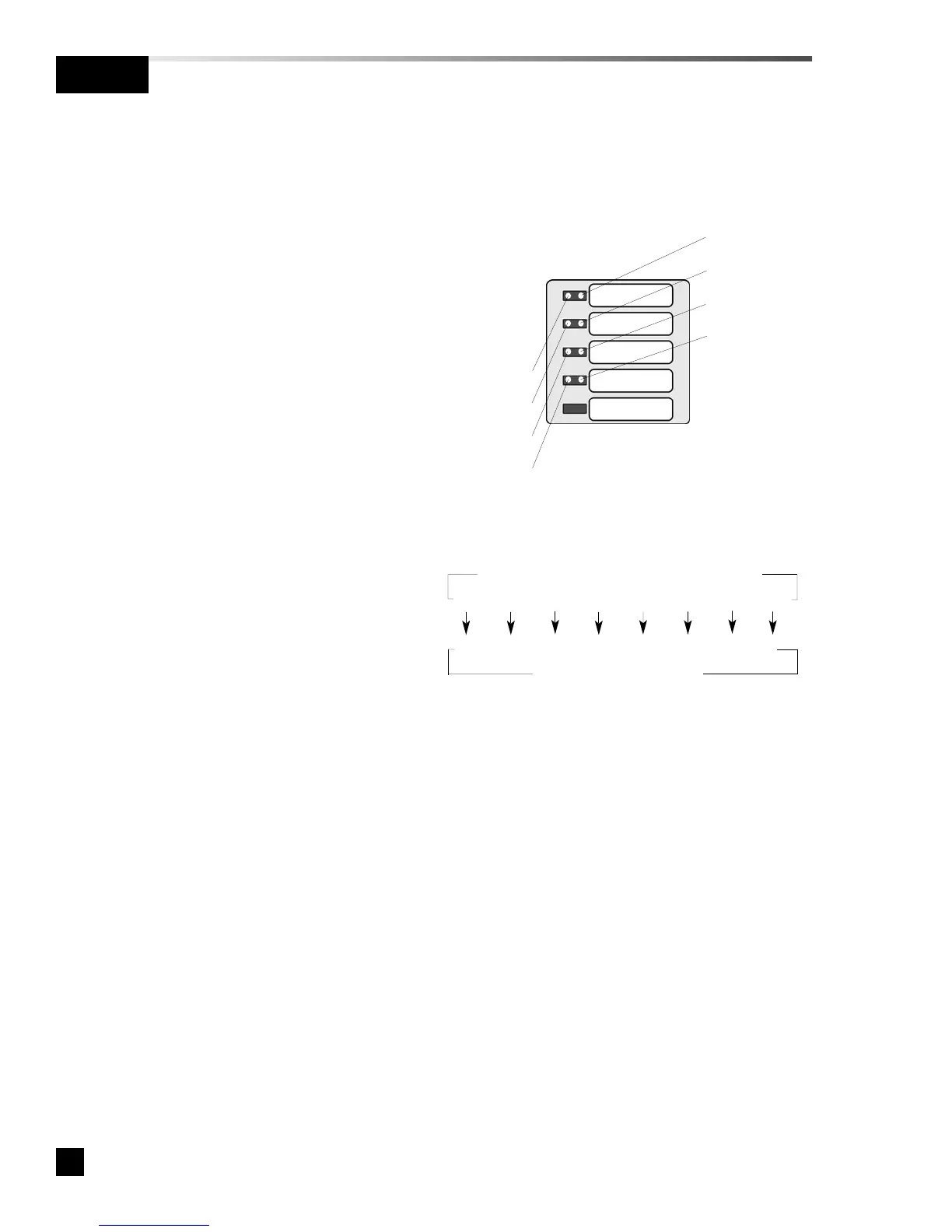
binary code where each multi-signal
module indicator has a binary value.
- Example: Software revision 1.0.2
would be displayed as follows:
• First digit is determined by two
second illumination of top left
indicator (bit 0 = number 1).
• All indicators quickly flash.
• Second digit is determined to be
0 because no indicators are
illuminated for two seconds.
• All indicators quickly flash.
• Third digit of is determined by
two second illumination of
second left indicator (bit 1 =
number 2).
• After all three digits of software revision
have been displayed, all indicators
illuminate for one second before
displaying current MEGA network
address.
• Current network address is displayed
for two seconds in a binary code where
each multi-signal module indicator has
a binary value.
• All indicators illuminate for one second
and module returns to monitoring
mode.
SIGNAL 1
SIGNAL 2
SIGNAL 3
SIGNAL 4
SIGNAL 5
Bit 4 (green)
Bit 0 (red)
Bit 1 (red)
Bit 2 (red)
Bit 3 (red)
Bit 5 (green)
Bit 6 (green)
Bit 7 (green)
Binary data represented by LED indicators
Bit 7 Bit 6 Bit 5 Bit 4 Bit 3 Bit 2 Bit 1 Bit 0
128 64 32 16 8 4 2 1
Numeric value of each bit



 To Next Page