GB Sound module MSM-1
25 BEIER-Electronic 18.01.2024
Installation of the sound module
To securely attach the sound module to the model, you can use self-adhesive Velcro
tape, which can be attached to the plastic cover of the MSM-1. When installing the
module, make sure that no components or conductor tracks on the circuit board
touch metal parts! This can lead to short circuits that can destroy the sound module
and devices connected to it.
Connection of the sound module
Always carry out all connection work with the supply voltage switched off!
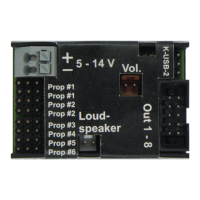
The gray 2-pin terminal block X1 is a spring-loaded terminal that allows the sound
module to be connected quickly and easily. To clamp or unclamp a cable, simply
press the clamp's operating lever from above with a small screwdriver. This opens
the clamp and the cable can be plugged in or unplugged. The cables should be
stripped of approx. 7 – 8 mm of insulation and ideally tinned before connecting.
Connection of the supply voltage (battery):
The sound module is designed for a DC voltage of 5 – 14 V. The positive pole is
connected to terminal X1/1 and the negative pole of the supply voltage is connected
to terminal X1/2. The cable cross section should be as large as possible (0.75 mm² -
1.5 mm²).
It is important to pay attention to the correct polarity of the supply voltage!
Reverse polarity can destroy the sound module!!!
The driving battery is usually used as the power supply. Ideally, use a suitable Y-
cable for the connection in order to supply the speed controller and sound module
with voltage from the battery at the same time.
If another battery is used as power supply for the sound module and not the
driving battery, then the negative poles of the two batteries should also be
connected to each other! This avoids any disruptions that may occur.
If the supply voltage has been connected correctly, the green LED on the module
lights up.
We strongly recommend installing the supplied fuse (4 A) in the positive cable of the
sound module, to avoid a major damage of your model and the sound module in the
event of an incorrect wiring or a defect.
Unfortunately, a fuse can never 100% protect all incorrect connections! Therefore,
please make sure that everything is connected correctly.


 To Next Page