GB Sound module MSM-1
18.01.2024 BEIER-Electronic 8
Setup – throttle and steering channel
When it comes to the signals for the speed controller, it is not clearly defined which
signal value of the RC receiver represents “forward” and which value represents
“reverse”. The same applies to the steering servo. A signal that means “left” for one
manufacturer is “right” for another manufacturer – and vice versa.
Therefore, almost all RC radios nowadays have the option of reversing (inverting) the
individual channels.
For the MSM-1, for example for the reversing light or the reversing warning, it is
important to know what kind of signal the receiver emits when reversing. The same
applies to the steering when activating and deactivating the indicators on the correct
side.
For this reason, the MSM-1 should be taught once where “forward” and where “left”
is. To do this, please carry out the following steps:
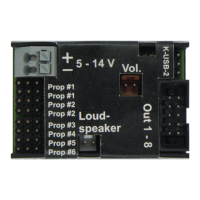
1. Connect the receiver gas/throttle channel to Prop #1.
2. Connect receiver steering channel to Prop #2.
3. Start the “Setup – Model selection” as described on page 6.
4. Wait 5 seconds until the 3 LEDs stop flashing quickly.
5. Briefly move the throttle stick from neutral to full throttle. Attention: The model
starts moving and the sound is activated!
6. Briefly move the steering stick from neutral to the maximum left.
7. Either wait 30 seconds until the setup ends automatically or disconnect the
MSM-1 from the power supply. This will save the settings.


 To Next Page