27
Appendix C
Controller Conguration Screens
Appendix C
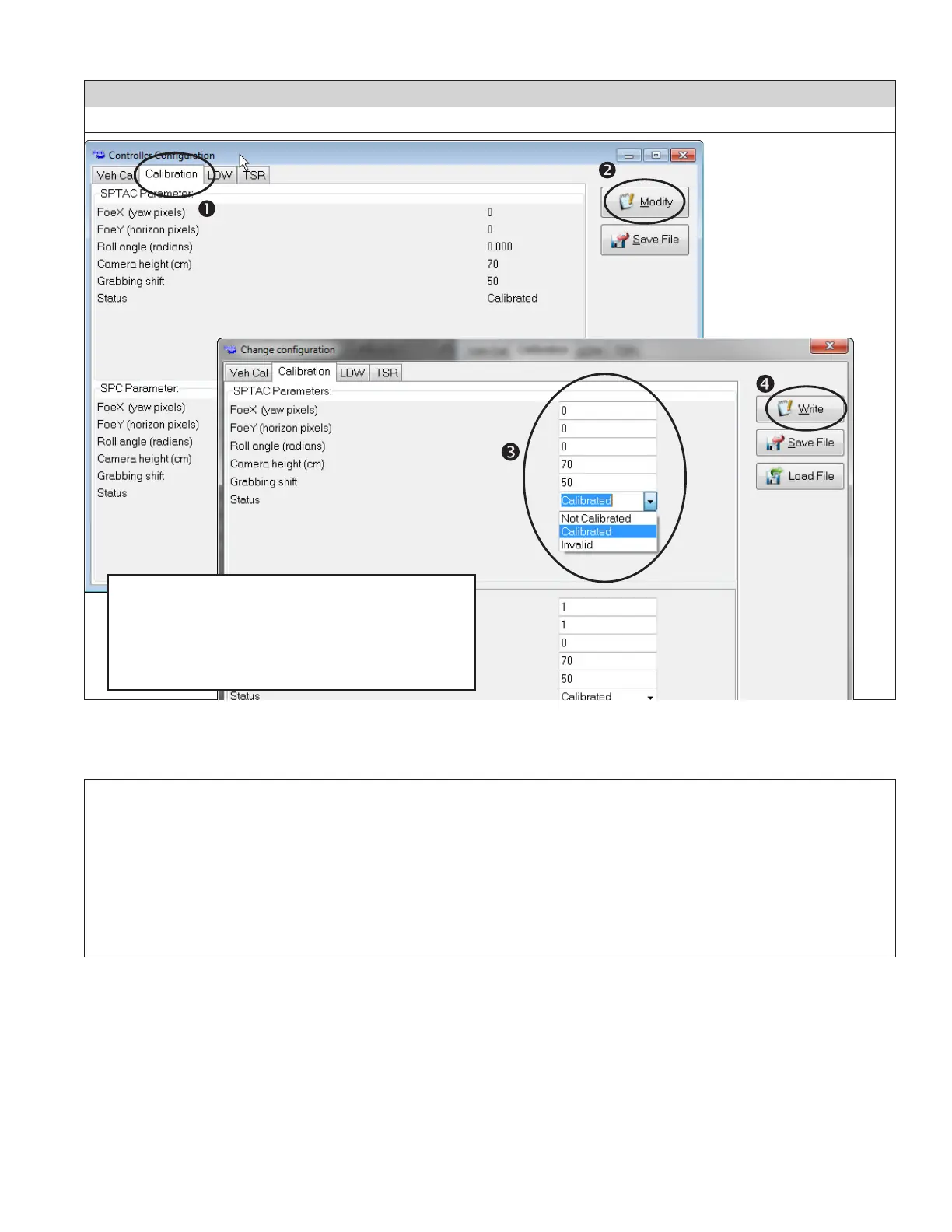
APPENDIX C - CONTROLLER CONFIGURATION CHANGES
When a camera needs to be calibrated for any
reason, contact the Bendix Tech Team (see below)
to request the correct values to write to the system
memory. Follow the sequence shown here to insert
the values and write them to the memory.
ADDITIONAL SUPPORT
Additional support at bendix.com / 1-800-AIR-BRAKE (1-800-247-2725), option 2
For the latest information, and to download the Bendix
®
ACom
®
Diagnostics software and its User Guide, visit the Bendix website
at bendix.com.
For direct telephone technical support, call the Bendix Tech Team at 1-800-AIR-BRAKE (1-800-247-2725), option 2. Follow
the instructions in the recorded message. Representatives are available 8:00 a.m. - 6:00 p.m. Monday - Thursday and
8:00 a.m. - 5:00 p.m. Friday, ET.
Email the Bendix Tech Team at techteam@bendix.com.
Reference Documents:
• The Bendix
®
Wingman
®
Fusion
™
Active Safety System (SD‑61‑4963)
• The Bendix
®
ESP
®
EC‑80
™
Controller (SD‑13‑4986)
• The SafetyDirect
®
by Bendix CVS Web Portal Processor (SD‑65‑21025)


 To Next Page