Operation
| 39 |
© Honeywell International Inc. Do not copy without express permission of Honeywell.
KFC 230 AeroCruze Autopilot Pilot's Guide
89000019-001
Rev 2 May 2019
TAKEOFF AND CLIMB TO ASSIGNED
ALTITUDE
SCENARIO: FLY RUNWAY HEADING, MAINTAIN 3,500
1 Use the aircraft heading bug to select the initial heading (e.g., 080°)
and use the autopilot Altitude Selector knob to select the altitude
(3,500 feet) before departure.
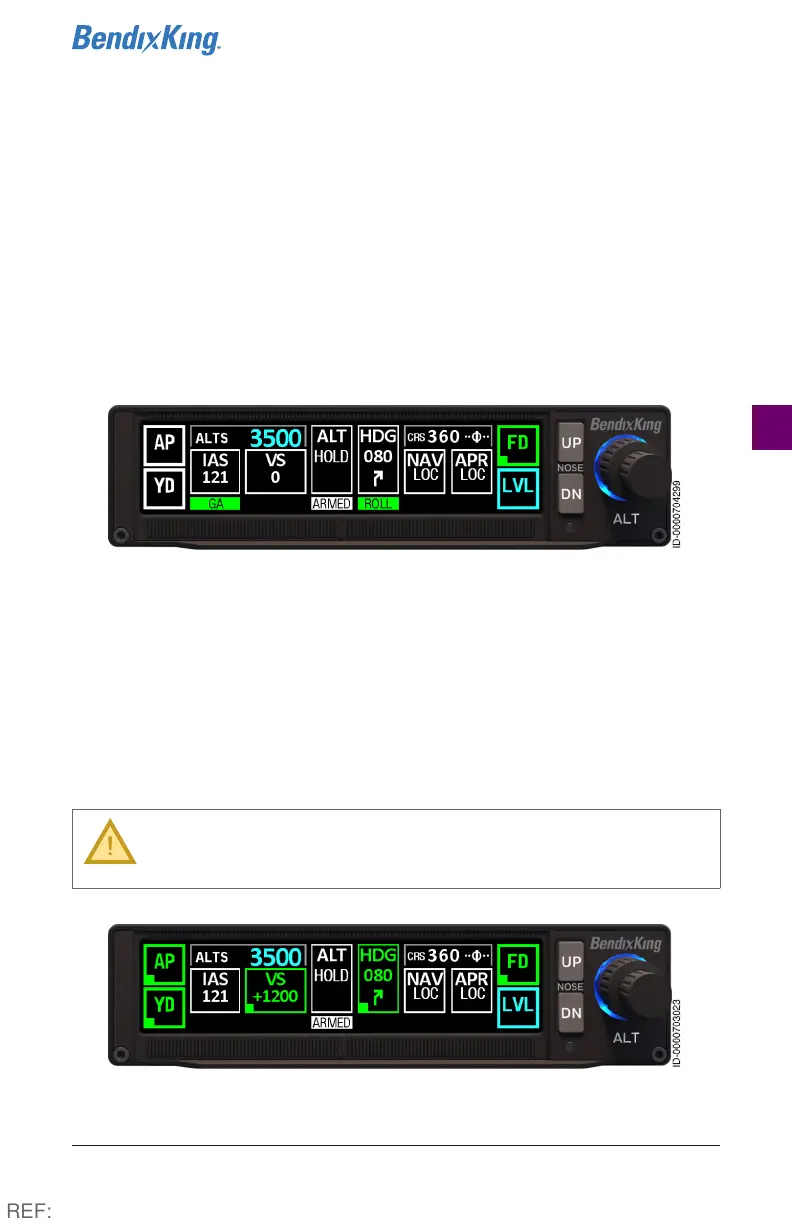
2 Press the TOGA button. The aircraft defaults to GA and Roll mode,
and the ALT HOLD button is armed.
Figure16 FD Before Takeoff, Steps 1-2
3 During the climb, press the HDG button. The flight director engages
in Heading mode, maintaining the selected heading (080°) and
current pitch attitude.
4 Above 400’ AGL, press the AP button.
5 Press the VS button. Current vertical speed (+1200) is captured.
Pitch is adjusted to maintain the selected vertical speed.
CAUTION: In VS mode, power must be controlled with the
throttle/thrust lever to maintain an airspeed. Caution
must be exercised so as to not induce a stall.
Figure17 Takeoff and Climb to Assigned Altitude, Step 3-5
REF:



 To Next Page