Operation
| 44 |
© Honeywell International Inc. Do not copy without express permission of Honeywell.
KFC 230 AeroCruze Autopilot Pilot's Guide
89000019-001
Rev 2 May 2019
LOCALIZER BACK COURSE
(COMPATIBLE DIGITAL HSI ONLY)
SCENARIO: NAVIGATING IN HEADING MODE (360°), INTERCEPT
THE LOC INBOUND COURSE (FINAL APCH CRS 303°)
1 With the autopilot in HDG mode, turn the heading bug to 360°.
2 Select Localizer as the navigation source. Turn the OBS to the
published LOC Front Course (123°). (See NAV radio pilot guide for
specific information.)
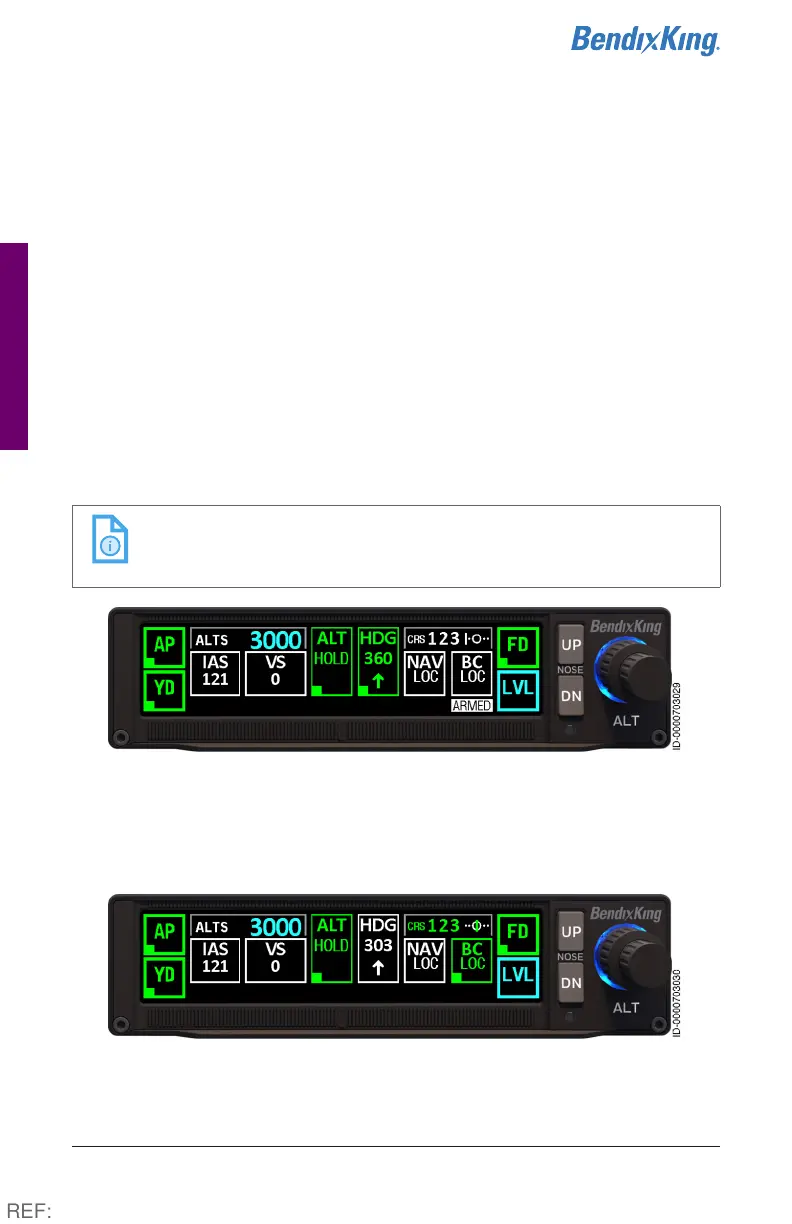
3 Press the APR button on the autopilot. Navigation source (BC LOC)
and the ARMED flag display in white. CRS (123) also displays in
white.
NOTE: Any course intercepts requiring a turn greater than
105° of a front course will automatically activate the
localizer back course.
Figure23 Localizer Back Course Steps 1-3
4 During the capture process, BC LOC displays in green and the
associated ARMED flag is removed. CRS (123) also displays in
green and the HDG information reverts to white.
Figure24 Localizer Back Course Step 4
REF:



 To Next Page