Operation
| 42 |
© Honeywell International Inc. Do not copy without express permission of Honeywell.
KFC 230 AeroCruze Autopilot Pilot's Guide
89000019-001
Rev 2 May 2019
PROCEDURE TURN
SCENARIO: NAVIGATING IN HEADING MODE (190°), INTERCEPT
THE LOC OUTBOUND COURSE
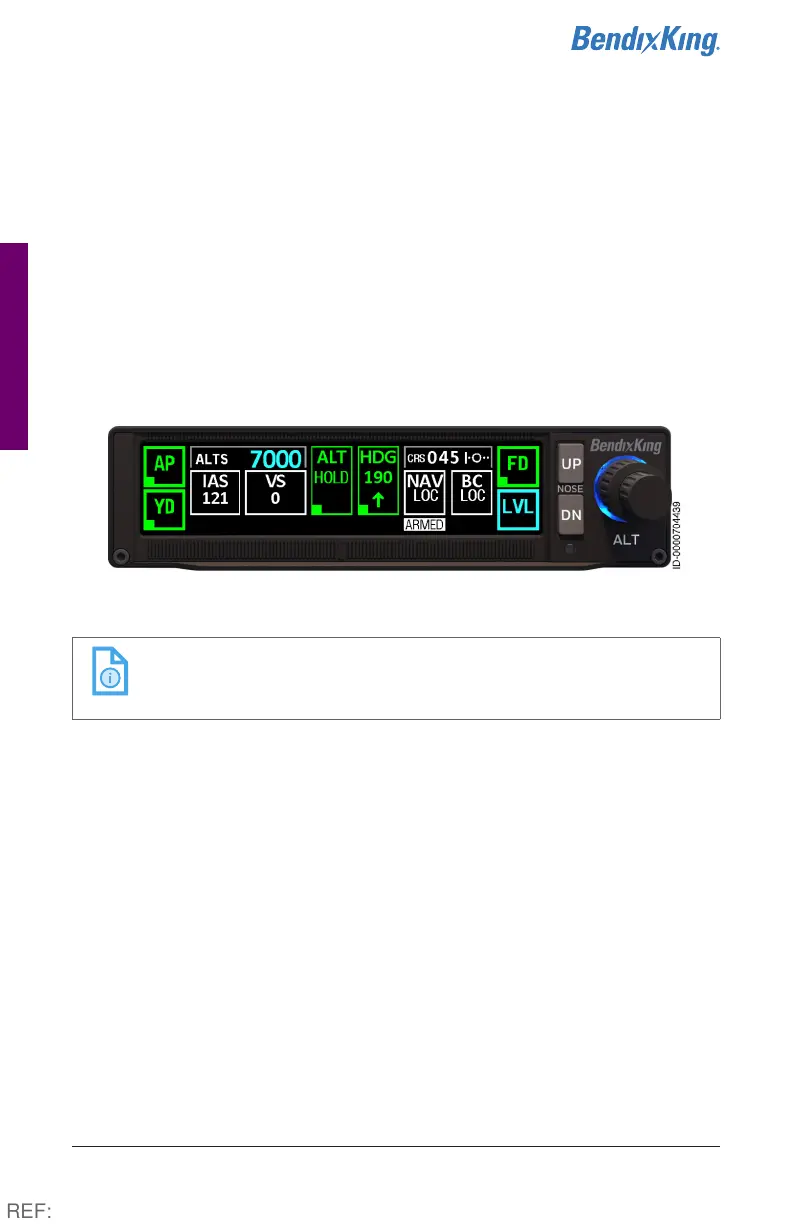
1 With the autopilot in HDG mode, turn the heading bug to 190°.
2 Select Localizer as the navigation source. Turn the OBS to the
LOC inbound course (045°). (See NAV radio pilot guide for specific
information.)
3 Press the NAV button on the autopilot. The navigation source (BC
LOC) and the ARMED flag display in white (digital HSI only).
Figure21 Procedure Turn, Steps 1-3
NOTE: Any course intercepts requiring a turn greater than
105° will automatically activate the localizer back
course.
4 During the capture process, the navigation source (BC LOC)
displays in green and the associated ARMED flag is removed.
5 To begin the procedure turn, select 270° on the heading bug and
press the HDG button. HDG, selected heading (270°), and direction
of turn are displayed in green. NAV information reverts to white.
6 To reverse direction on the procedure turn, turn the heading bug
left to 090° for a 45° intercept of the inbound course (045°). The
direction of the turn is also displayed in the box.
REF:



 To Next Page