System Overview
| 22 |
© Honeywell International Inc. Do not copy without express permission of Honeywell.
KFC 230 AeroCruze Autopilot Pilot's Guide
89000019-001
Rev 2 May 2019
PANEL CONTROLS
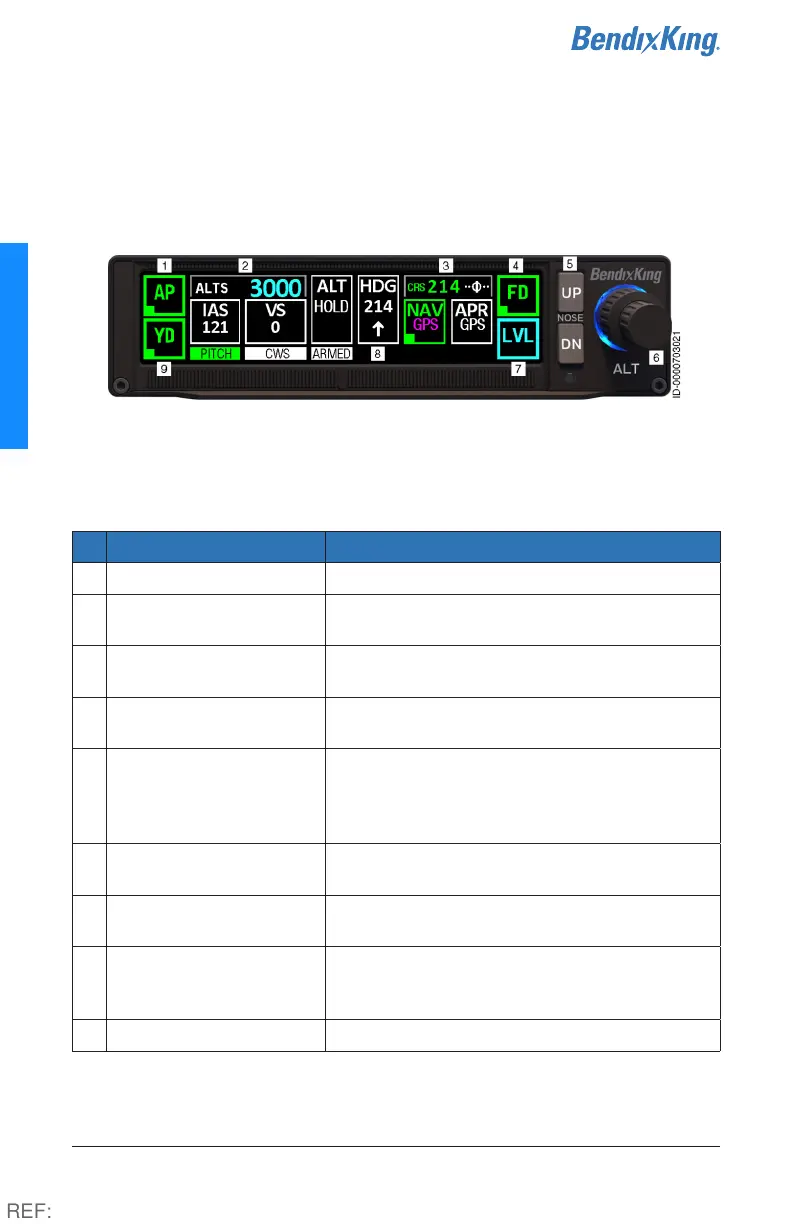
The KFC 230 touchscreen display offers convenience at the press of a
button. Modes are annunciated on the autopilot touchscreen with their
associated colors and text.
Figure 15 KFC 230 Controls
Table 1 KFC 230 Control and Function
# CONTROL ELEMENT FUNCTION
1
Autopilot Button Engages and disengages the autopilot.
2
Selected Altitude
Indicator
Displays the altitude target specified by the
pilot.
3
Course Deviation
Indicator
Displays the selected course and aircraft
deviation from the course.
4
Flight Director Button Engages/disengages flight director
guidance.
5
Up/Down Buttons Controls the vertical speed/indicated
airspeed/pitch reference for climbs and
descents. Also increases or decreases the
reference altitude in ALT mode.
6
Altitude Selector Knob Dual concentric knob – adjusts the altitude
target reference.
7
Level Button Places the aircraft in a zero bank and two
degrees pitch up reference.
8
Mode Buttons Set of six buttons (IAS, VS, ALT, HDG, NAV,
APR) – engage/disengage vertical and lateral
autopilot modes.
9
Yaw Damper Button Engages/disengages the Yaw Damper
REF:



 To Next Page