HD-14T Four Post Lift 30 P/N 5900037 — Rev. F — February 2022
Installing the Runways
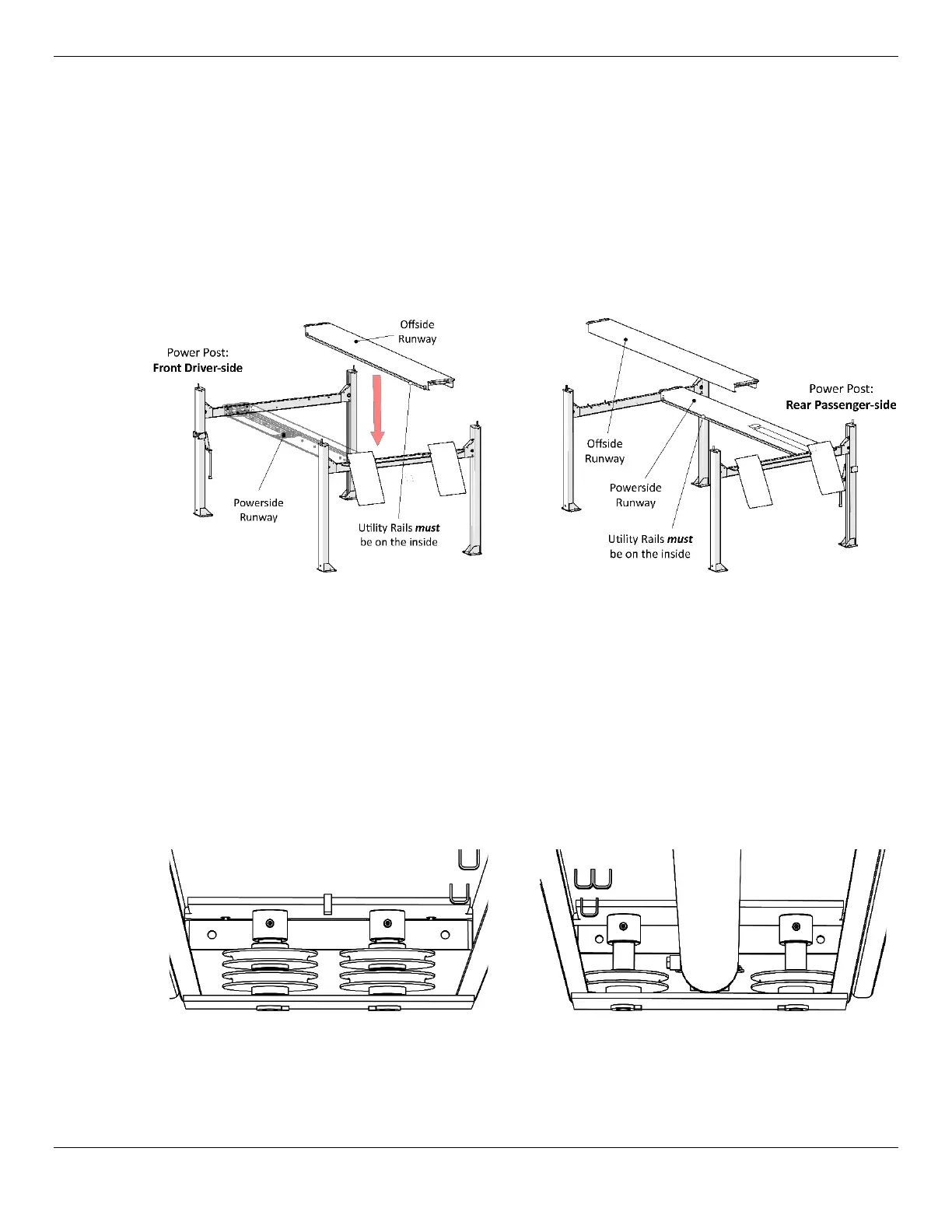
Your Lift has two Runways:
• Powerside Runway: Holds the Hydraulic Cylinder underneath it. Has a hole on the outside Rear
for the Flex Tube. Cable routing starts under the Powerside Runway.
• Offside Runway: The Offside Runway does not have a Hydraulic Cylinder under it, nor are there
any Lifting Cables under it. It can be installed in the wide or narrow setting.
The following drawing shows the correct orientation of the Runways for both Power Post locations.
Power Post:
Front Driver-side
Power Post:
Rear Passenger-side
Top View. Not drawn to scale. Not all components shown.
Use a Forklift or Shop Crane to raise the Runways and move them into position.
⚠ WARNING Pay close attention when moving the Runways into position; they are very heavy
and long, and could shift position or fall, potentially causing serious injury.
To install the Runways:
1. Correctly orient the Powerside Runway and the Offside Runway.
2. Make sure the Sheaves have been removed on both ends of the Powerside Runway.
Front of Runway:
Rear of Runway:
Keep the components close, you will be reinstalling them at the same location
with the same components later in the installation.
3. Use a Forklift or Shop Crane to pick up the Runways, one at a time, and move them into place.


 To Next Page