English
12
Introduction
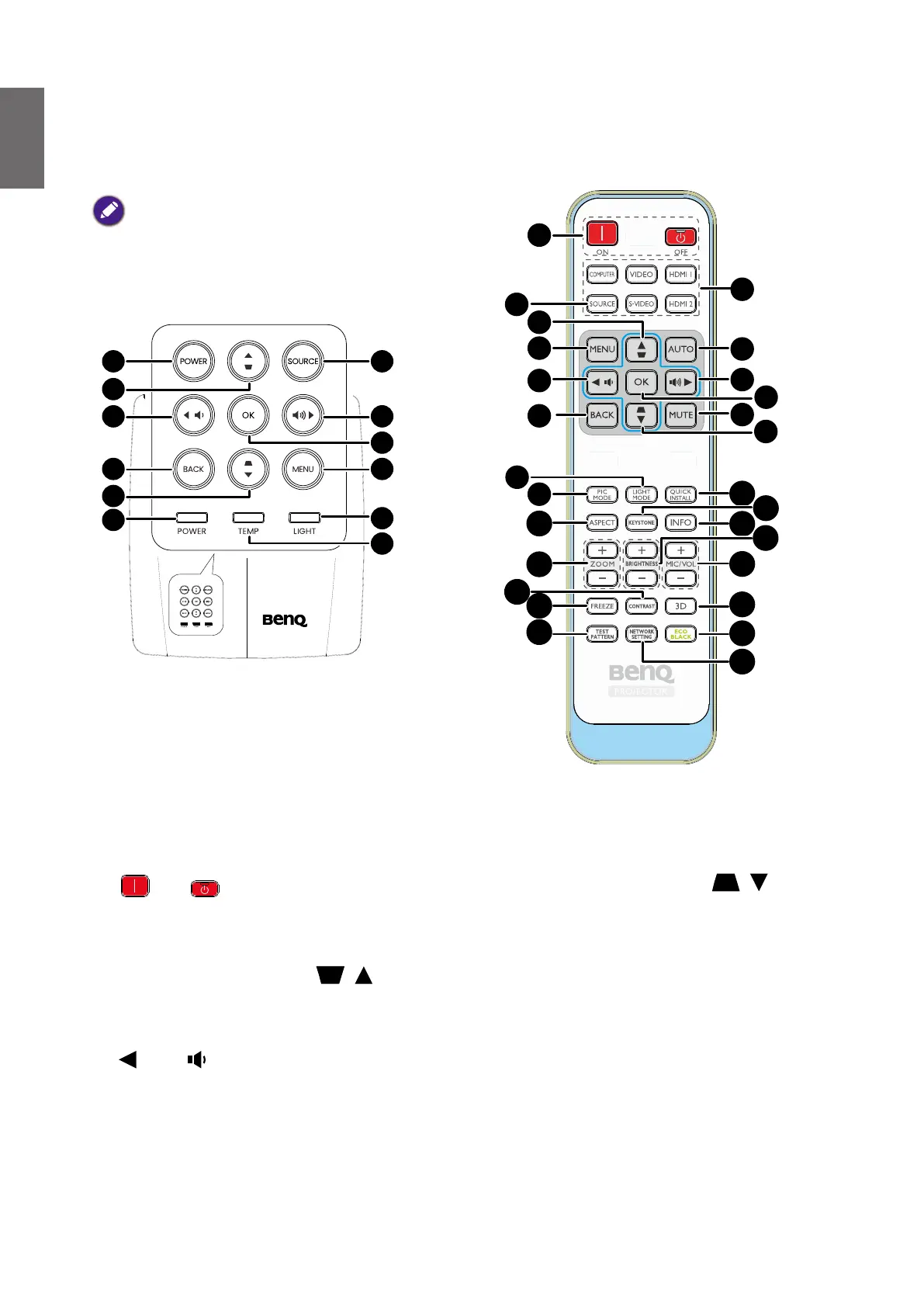
Controls and functions
Projector & Remote control
• All the key presses described in this document
are available on the remote control or
projector.**There is no Laser function of the
remote for Japan region.
• The remote control is without laser pointer in
Japan.
1. POWER
Toggles the projector between standby mode
and on.
ON/ Off
Toggles the projector between standby mode
and on.
2. Keystone/Arrow keys ( / Up)
Manually corrects distorted images resulting
from an angled projection.
3. Left/
Decreases the projector volume.
4. BACK
Goes back to previous OSD menu, exits
and saves menu settings.
5. Keystone/Arrow keys ( / Down)
Manually corrects distorted images
resulting from an angled projection.
6. POWER indicator light
Lights up or ashes when the projector
is under operation. See "Indicators" on
page 51 for details.
7. SOURCE
Displays the source selection bar. See
"Switching input signal" on page 31 for
details.
1
2
3
4
5
7
8
9
10
13
14
15
16
17
18
19
20
21
22
23
24
25
26
27
28
29
30



 To Next Page