English
27
Operations
Correcting 2D Keystone
2D Keystone function enables a wider projector installation area compared to conventional
projectors with limited positioning in front of the screen.
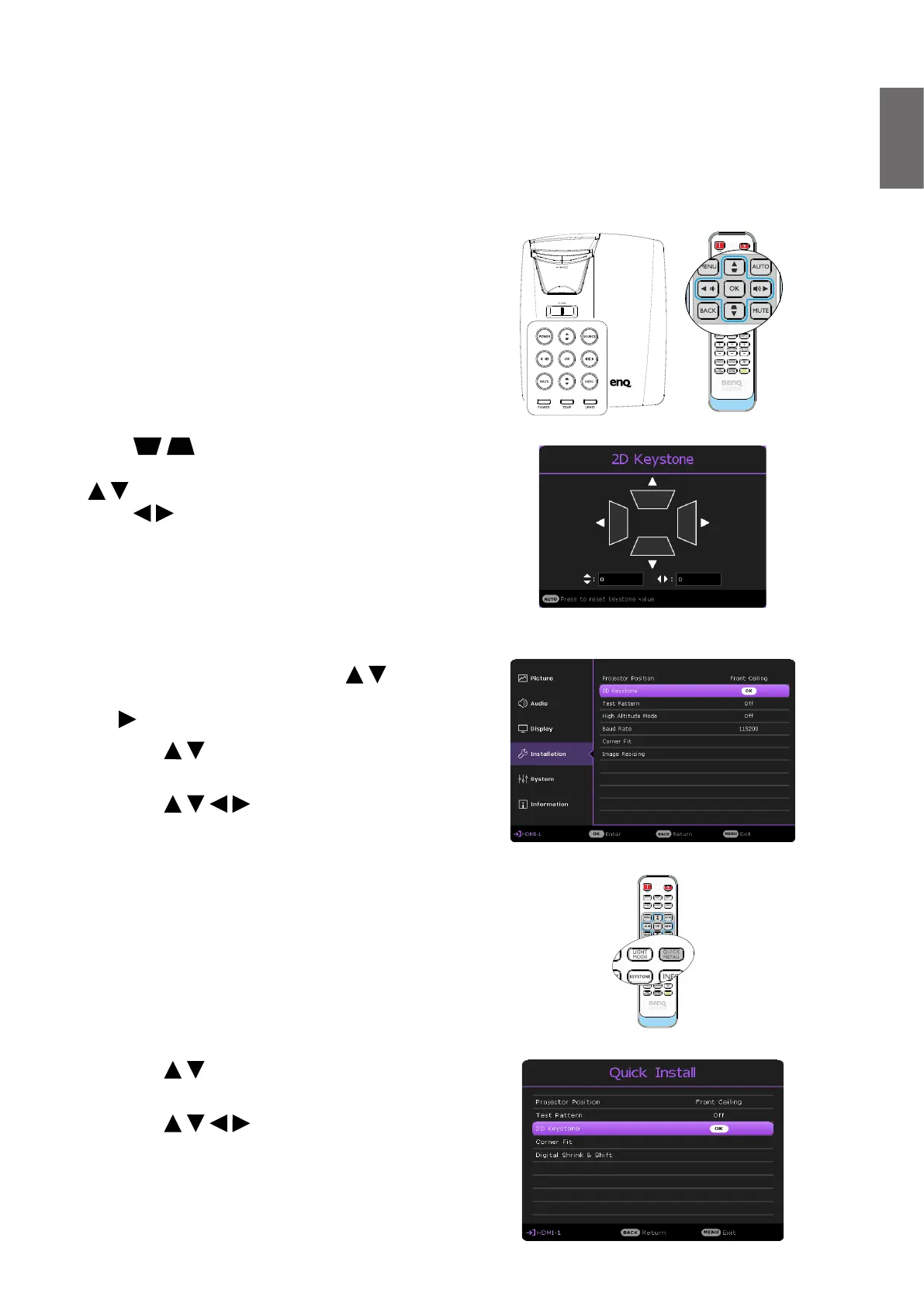
To correct this, you will need to manually correct it following one of these steps.
Press / on the projector or remote
control to display the 2D Keystone page. Press
/ to adjust vertical values from -15 to 15.
Press / to adjust horizontal values from -15
to 15.
• Using the OSD menu
1. Press MENU and then press / until the
Installation menu is highlighted and press
.
2. Press / to highlight 2D Keystone and
press OK. The 2D Keystone page displays.
3. Press / / / to adjust the keystone
values.
• Using the projector or remote control
• Using the QUICK INSTALL key
1. Press QUICK INSTALL on the remote
control.
2. Press / to highlight 2D Keystone and
press OK. The 2D Keystone page displays.
3. Press / / / to adjust the keystone
values.



 To Next Page