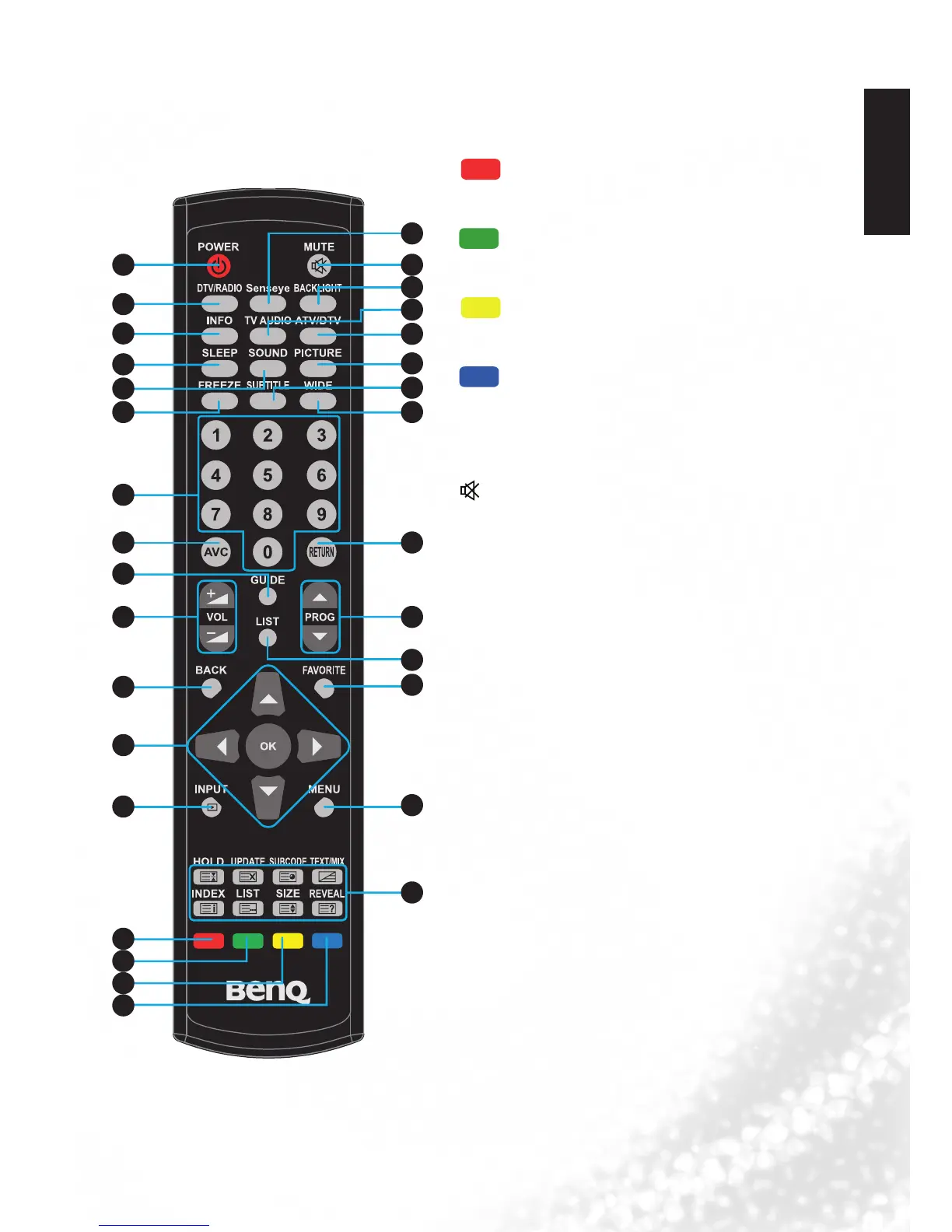
14. Red
Function key for teletext, program edit, or electric
program guide.
15.
Green
Function key for teletext, program edit, or electric
program guide.
16.
Yellow
Function key for teletext, program edit, or electric
program guide.
17.
Blue
Function key for teletext, program edit, or electric
program guide.
18.
Senseye
Press this button to display the senseye menu.
19.
MUTE
Press this button to mute the sound output. Press it
again to restore the sound output.
20. BACK LIGHT
Press this button to adjust your desired screen
backlight level.
21. TV AUDIO
•SelectsoundmodulationinATV.
•SelectaudiolanguageinDTV.
22. ATV/DTV
Swap between ATV/DTV. Swap to the last TV source
when in other source.
23. PICTURE
Press this button to select a desired preset picture
mode: Standard, Mild, User, Dynamic.
24. SUBTITLE
•ATV:Switchbetweenavailablesubtitlelanguages.
•DTV:Displaysubtitlelanguageselectionbox.
25. WIDE
Press this button to adjust the screen image aspect
ratio.
26. RETURN
Press to toggle between the current channel and the
previous one.
27. PROG
▼
/
▲
Press these buttons to sequentially change channels.
28. LIST
Display channel list.


 To Next Page