40 Maintenance
Replacing the lamp (FOR SERVICE PERSONNEL ONLY)
1. Turn the power off and disconnect the projector from the power outlet. If the lamp is hot, avoid
burns by waiting for approximately 45 minutes until the lamp has cooled.
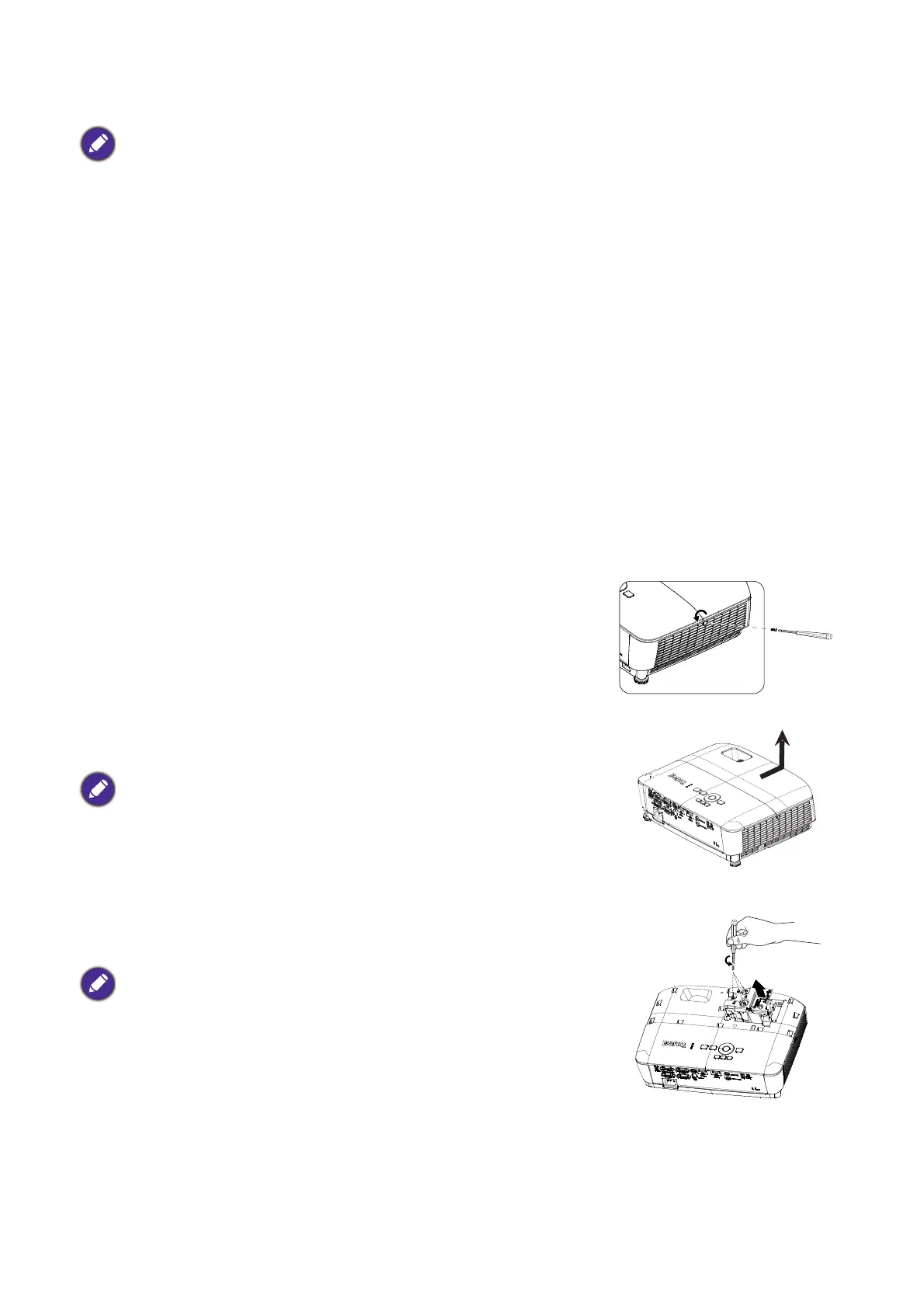
2. Loosen the screw on the lamp cover.
3. Remove the lamp cover by (a) sliding the cover toward the side
of the projector and (b) lifting it off.
4. Loosen the screws that secure the lamp.
5. Lift the handle so that it stands up. Use the handle to slowly pull
the lamp out of the projector.
• Hg - Lamp contains mercury. Manage in accordance with local disposal laws. See www.lamprecycle.org.
• If lamp replacement is performed while the projector is suspended upside-down from the ceiling, make sure that
no one is underneath the lamp socket to avoid any possible injury or damage to the human eyes caused by
fractured lamp.
• To reduce the risk of electrical shock, always turn the projector off and disconnect the power cord before
changing the lamp.
• To reduce the risk of severe burns, allow the projector to cool for at least 45 minutes before replacing the lamp.
• To reduce the risk of injuries to fingers and damage to internal components, use caution when removing lamp
glass that has shattered into sharp pieces.
• To reduce the risk of injuries to fingers and/or compromising image quality by touching the lens, do not touch the
empty lamp compartment when the lamp is removed.
• This lamp contains mercury. Consult your local hazardous waste regulations to dispose of this lamp in a proper
manner.
• To assure optimal performance from the projector, it is recommended that you purchase a BenQ projector lamp
for lamp replacement.
• Ensure good ventilation when handling broken lamps. We recommend that you use respirators, safety glasses,
goggles or face shield and wear protective clothing such as gloves.
• Do not turn the power on with the lamp cover removed.
• Do not insert your fingers between the lamp and the projector. The
sharp edges inside the projector may cause injuries.
• Pulling it too quickly may cause the lamp to break and scatter broken
glass in the projector.
• Do not place the lamp in locations where water might splash on it,
children can reach it, or near flammable materials.
• Do not insert your hands into the projector after the lamp is removed.
If you touch the optical components inside, it could cause color
unevenness and distortion of the projected images.
(a)
(b)


 To Next Page