Setting up the display 19
Connecting the digital input
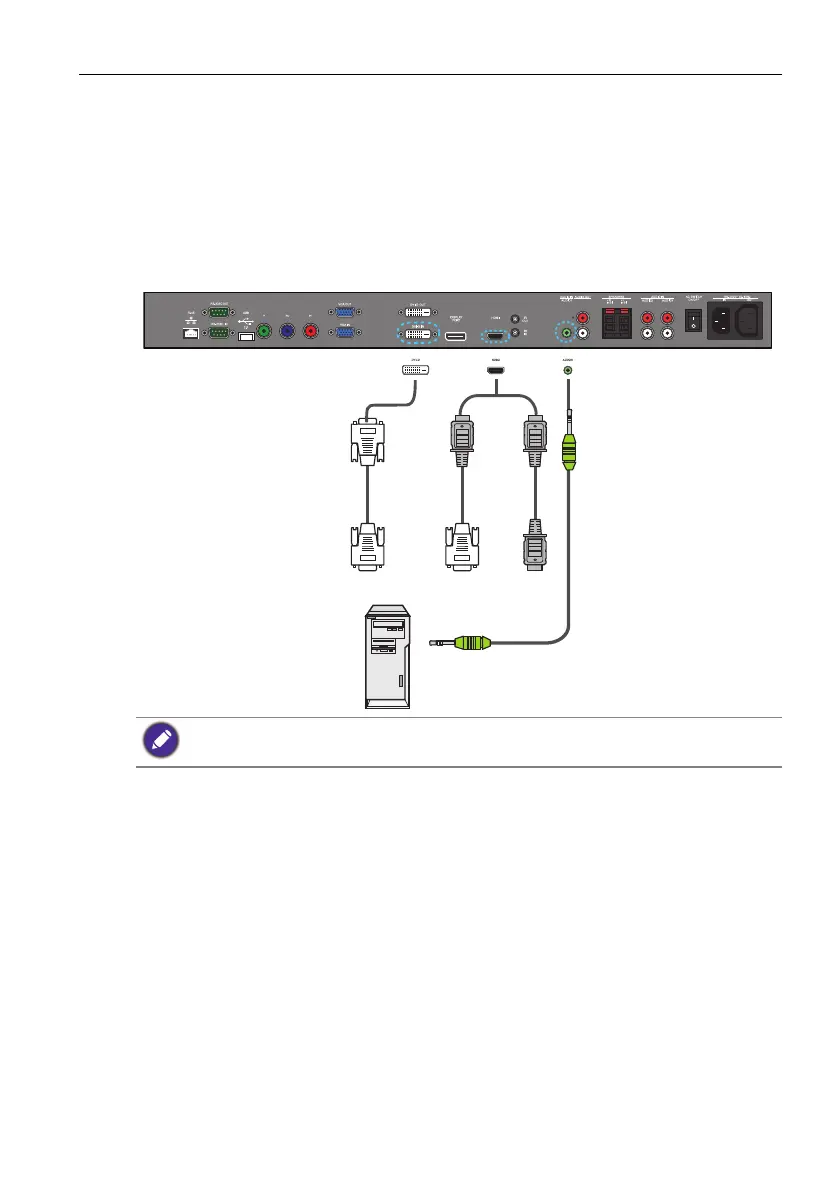
1. Connect the DVI-D IN jack on the display to the DVI-D output jack on a computer
using a DVI-D cable. If the computer has an HDMI output jack, connect the com-
puter’s HDMI output jack to the VIDEO IN (HDMI) input jack on the display using
an HDMI cable or a DVI-D to HDMI conversion cable.
2. Connect the computer’s audio output jack to the AUDIO IN (AUDIO1) jack on
the display using a suitable audio cable.
3. To view video image from this input, press the DVI or HDMI button on the remote
control.
• The cables are not supplied and should be purchased separately.
• The audio cable connection is not necessary if you are using the HDMI cable.
Audio cable
Computer
DVI-D cable
DVI-D to
HDMI
conversion
cable
HDMI
cable


 To Next Page