41
Appendix-A
How to clear the USB enumeration registry?
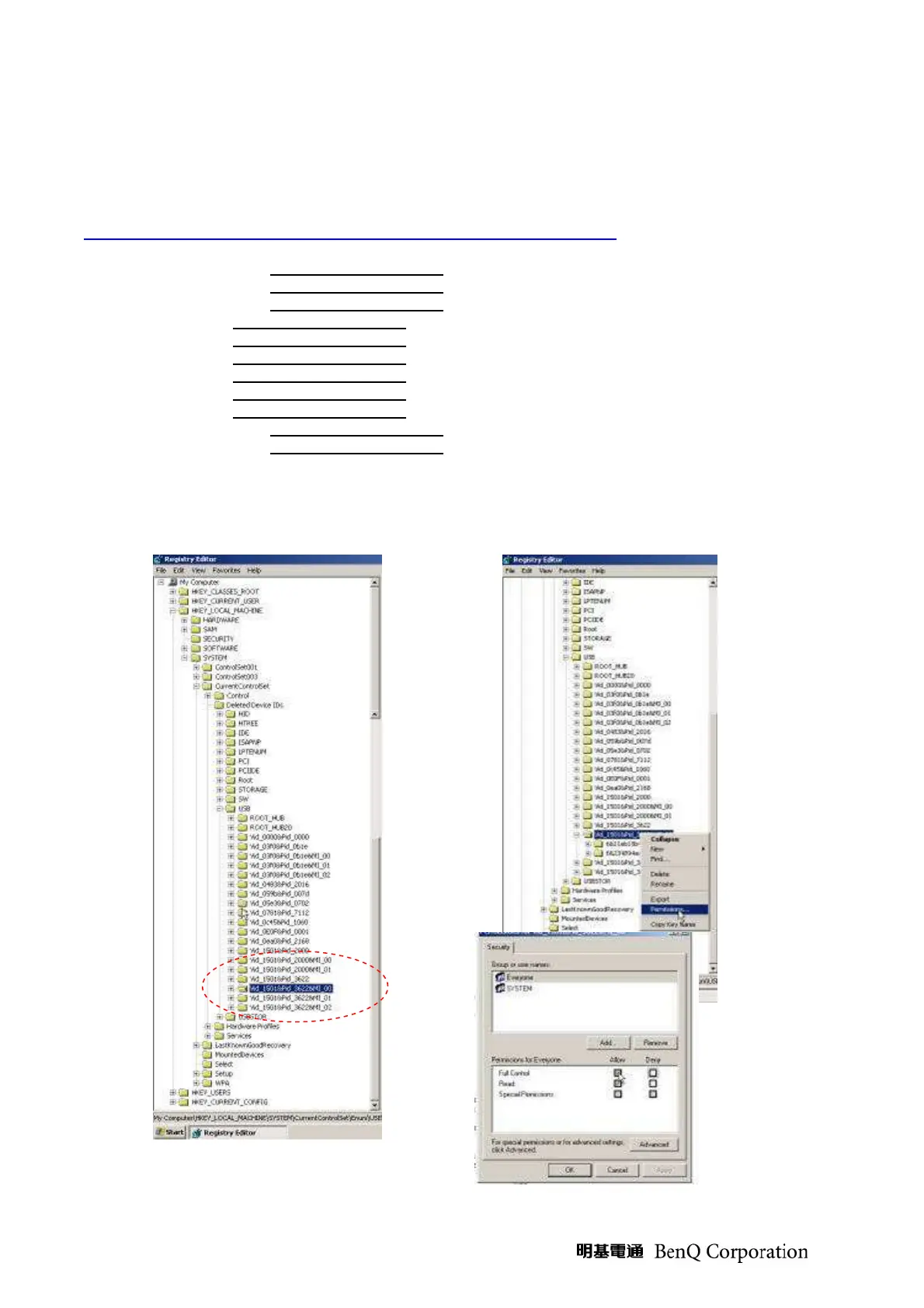
Run “regedit” and select the following items
HKEY_LOCAL_MACHINE->SYSTEM->CurrentControlSet->Enum->USB->
The E400/AV/DP2601 VID_1501&Pid_2601xxx
The AV/DP2618 series VID_1501&Pid_2618xxx
The AV/DP3618 series VID_1501&Pid_3618xxx
The DP3602 series VID_1501&Pid_3602xxx
The DP3616 series VID_1501&Pid_3616xxx
The DP3622 series VID_1501&Pid_3622xxx
The PR301x series VID_1501&Pid_2617xxx
The PR302x series VID_1501&Pid_3617xxx
The PR50xx series VID_1501&Pid_3622xxx
The EP77x series VID_1501&Pid_3622xxx
The DDP2230/243X series VID_1501&Pid_2230xxx
Press <Delete> and remove these registries. (You need the read/write privilege of the Windows registry to
delete it. Select the item and click right mouse will lead you to the Permissions dialog for applying the security
options)



 To Next Page