Section 3 — Installing the Hardware
11
3.2.5 Installing the Backplane
Install a backplane to one of the following:
• A flat surface
• A "G" or "T" type DIN-rail
• A Bently Nevada enclosure
If you order an enclosure with the interface system, the system will be shipped
with the backplane installed within the enclosure. This installation will use some
mounting kit hardware, specifically, those parts pertaining to a surface
installation.
3.2.6 Installing the Backplane onto a Surface
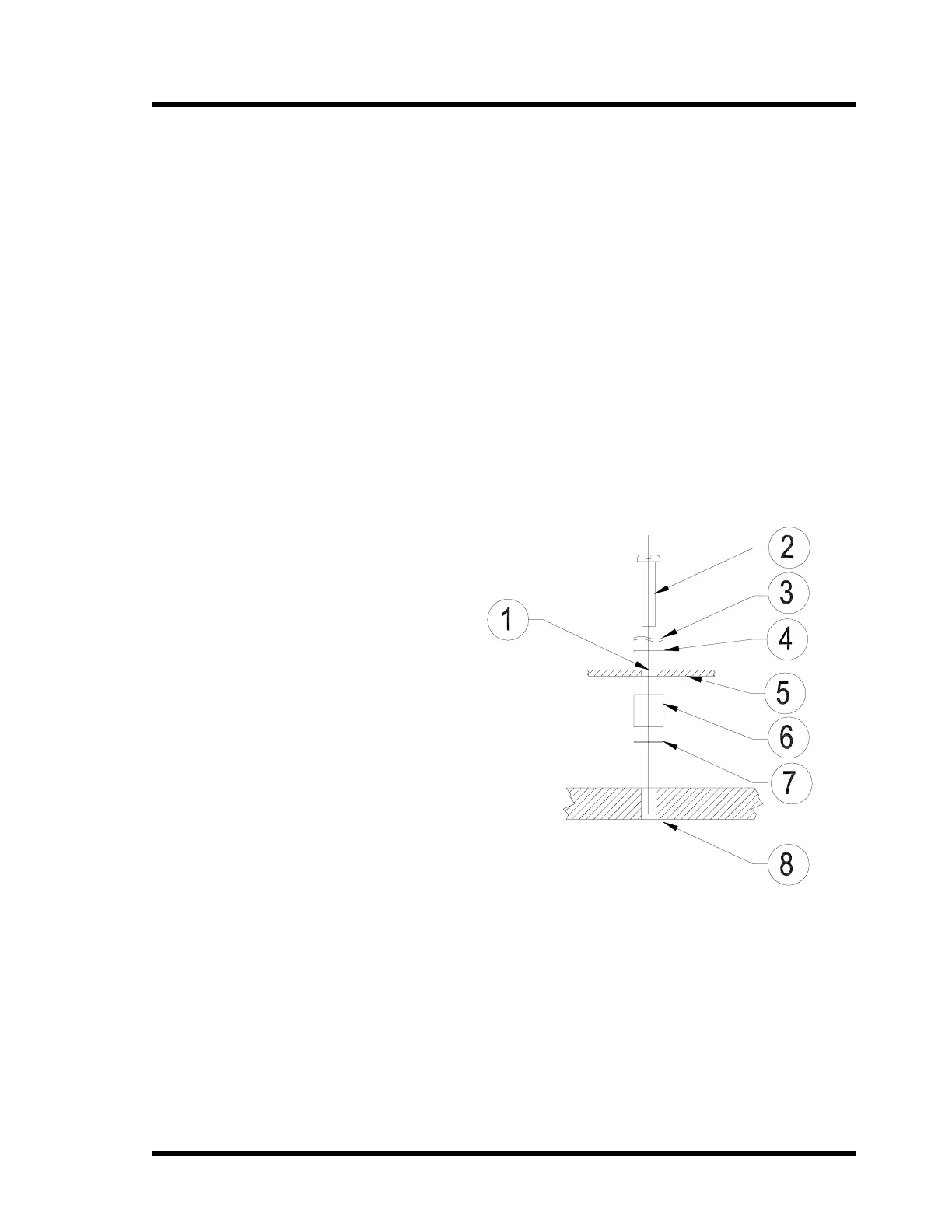
1. Drill and tap holes into the surface that the backplane will mount at the
locations marked "A". See page 15 for backplane dimensions.
1) Mounting
Hole “A”
2) M4 x 12mm
Screw
3) Locking
Washer
4) Plain Washer
5) Backplane
6) M4 x 10mm
Spacer
7) M4
Interference
Washer
8) Tapped
Mounting
Surface
2. Mount the backplane using the spacers and screws as shown.
3.2.7 Installing the Backplane onto a DIN-rail
The mounting hardware kit will have a combination "G" and "T" DIN-rail mount.
For simplicity, only a T-section illustration is shown. Both "G" and "T" DIN-rail
mounts follow the same procedure.
To attach the backplane to a "G" or "T" DIN-rail:



 To Next Page