4. Read out information prior to activation
(in sleep mode)
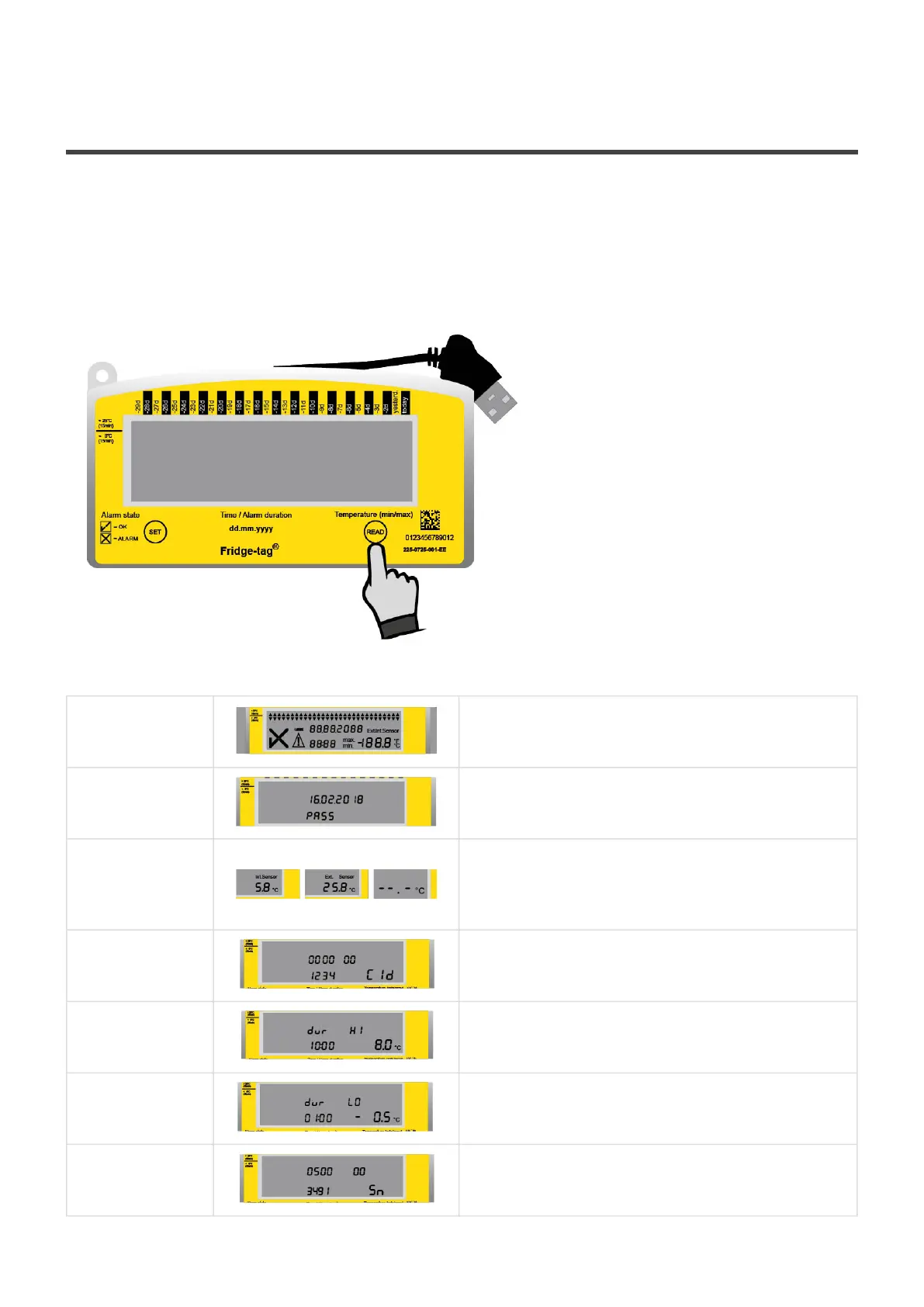
The following page shows which information will be indicated on the screen upon successive READ
button pressings while in sleep mode.
Note: After approx. 60 seconds without pressing any button on the Fridge-tag the devices goes back into
sleep mode; the display is blank again.
Press repeatedly READ to gather information.
After 1st
pressing of
READ
Display test:
all segments activated
After 2nd
pressing of
READ
Indication of date and production test
result: 16 February 2018/PASS (quality check
passed)
After 3rd
pressing of
READ
Indication of the current temperature and which
sensor is activated (internal/external).
Display shows —.-°C if external sensor is not
connected.
After 4th
pressing of
READ
Indication of configuration ID
(e.g. 1234)
After 5th
pressing of
READ
Indication of upper alarm settings.
Example shows duration and temperature limits: 10
hours, >+8°C, high
After 6th
pressing of
READ
Indication of lower alarm settings. Example
shows duration and temperature limits: 1 hour,
<–0.5°C, low
After 7th
pressing of
READ
Serial number of the device
Berlinger & Co. AG User Manual Fridge-tag - 1
Page 5 of 51



 To Next Page