EasyManua.ls Logo

Bernard Controls AQ3L - Configuring position indicator for counter-clockwise closing; 4 MANUAL OVERRIDE

Default Icon
64 pages
Print Icon
To Next Page IconTo Next Page
To Previous Page IconTo Previous Page
Loading...
English
5
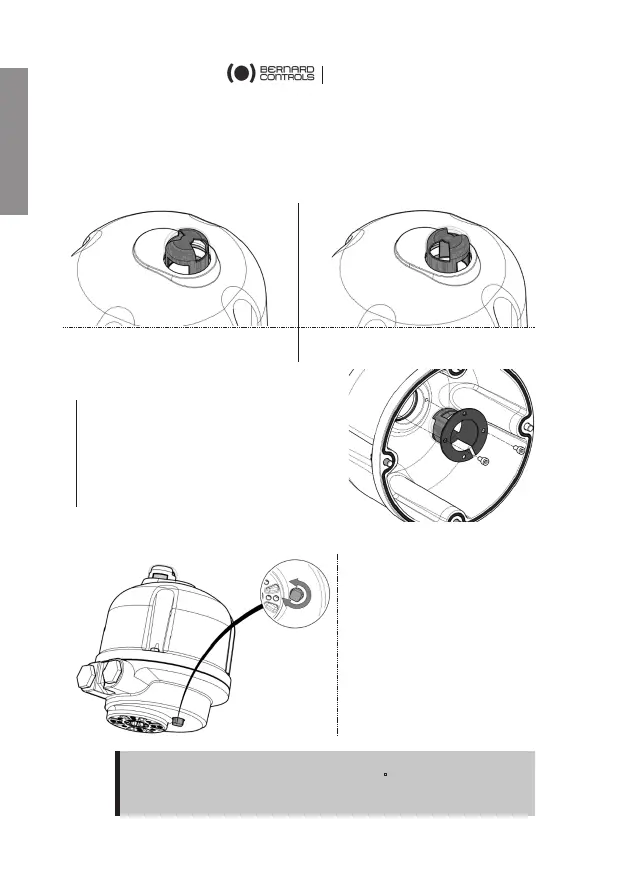
Configuring position indicator for counter-clockwise closing
As a standard, AQL actuator is configured to close clockwise. If the
actuator must close counter-clockwise, you can change orientation
of the position indicator cap.
Standard indicator orientation
for clockwise closing
Reverse indicator orientation
for counter-clockwise closing
How to change cap orientation
1. Disassemble the cover then the
cap.
2. Turn the cap 90°.
3. Reassemble the cap then the
cover.
4 MANUAL OVERRIDE

You can operate the
actuator manually using the
driving square under the
actuator.
Output will turn in the
direction
opposite to the
rotation applied.
Square size is 10mm.
!
Do not apply a torque higher than 6N
m to the square.
Check indicator when driving actuator with manual override
6

Table of Contents

Related product manuals