49
052815
Workbook 4—Embroidery Basics
BERNINA 770 QE
Embroidery Functions
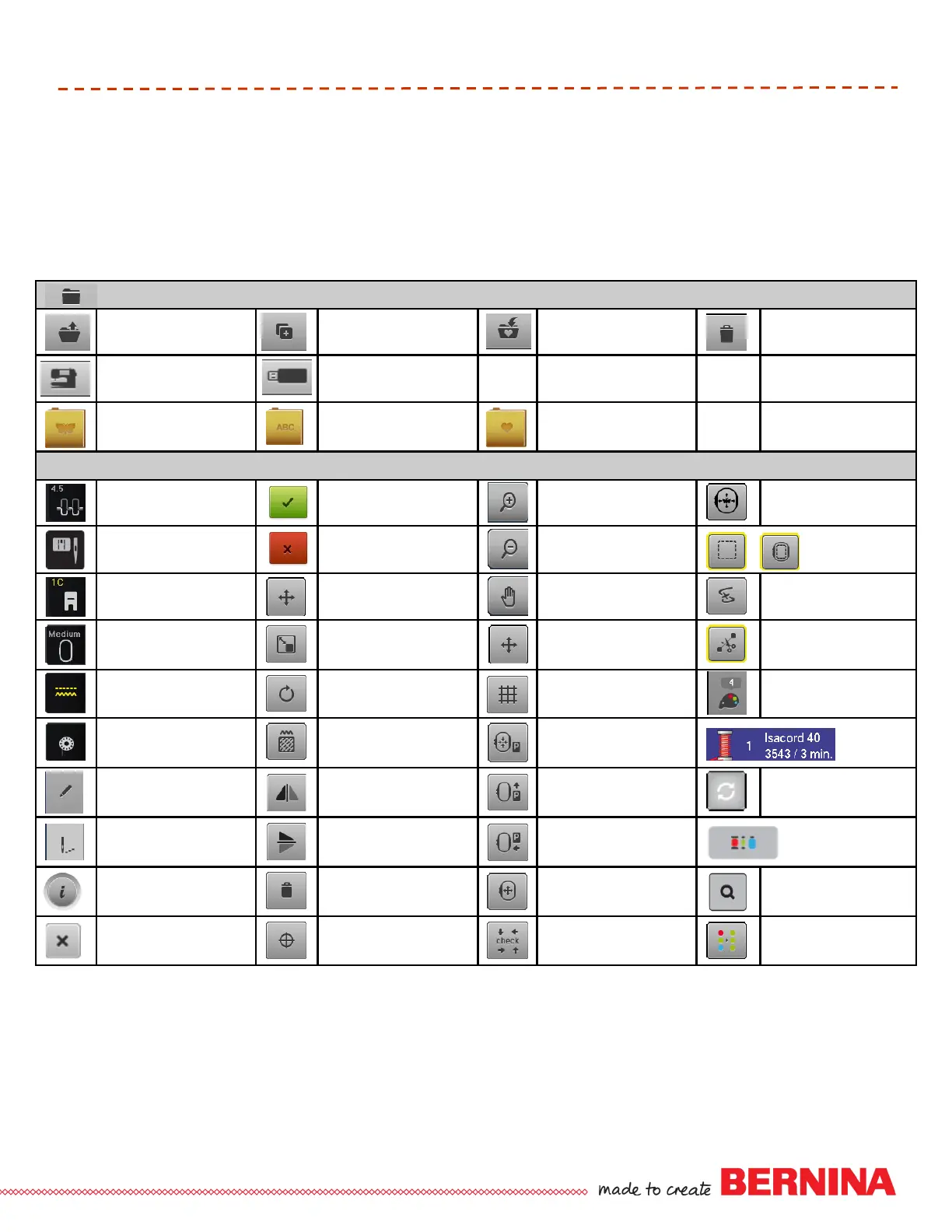
EMBROIDERY MOTIF SELECTION
Selection Overview -
Open New Motif
Selection Overview -
Add Motif
Selection Overview -
Save
Selection Overview -
Delete Motifs
Embroidery Computer -
Select Motifs from Folders
USB Stick -
Select Motifs from Stick
Embroidery Motifs Folder Alphabet Folder My Designs Folder
EMBROIDERY FUNCTIONS
Upper Thread Tension Confirm Selection
Zoom In
1 - 4x
Virtual Positioning
Security Program -
Stitch Plate & Needle
Cancel
Zoom Out
1 - 4x
Basting -
Motif/Hoop
Presser Foot Indicator Move Motif Move View of Motif
Embroidery Sequence
Control
Select Hoop
Rescale Motif
Proportionally
Move View of Motif within
the Hoop
Cut Connecting Stitches
Feed Dog Up/Down Rotate Motif Show Grid Color Numbers
Filling of Bobbin
Alter Stitch Type/ Stitch
Density
Move Hoop to the Left
Color
Information
Edit Mirror Image (Left/Right) Move Hoop to the Back
Change Color /
Thread Brand
Embroidery Menu Mirror Image (Up/Down) Park Embroidery Module
Convert Thread
Brand to Another
Information Delete Motif Move Hoop
Color Selection by
Number
Close Motif Center Check Motif Size Single/Multi-color Motif













 To Next Page