Print the raft check file
If this is your first print, you can print the raft check file to gain familiarity with the print.
The print files required are already included on the USB memory stick supplied in your toolkit.
If you do not have these files you can download them by clicking on the icon on the left. After downloading:
Unpack the files to the root of your USB stick.
The printer can only see uncompressed files at the root of the USB stick i.e. do not put them inside a folder.
Make sure materials are loaded as per "Load the filament".
Follow the section to print the appropriate raft check file for the material loaded in Extruder 1 (see table below).k. How to start a print
Material type in Extruder 1 File to print
ABS
RaftABS_CheckFile
PLA
RaftPLA_CheckFile
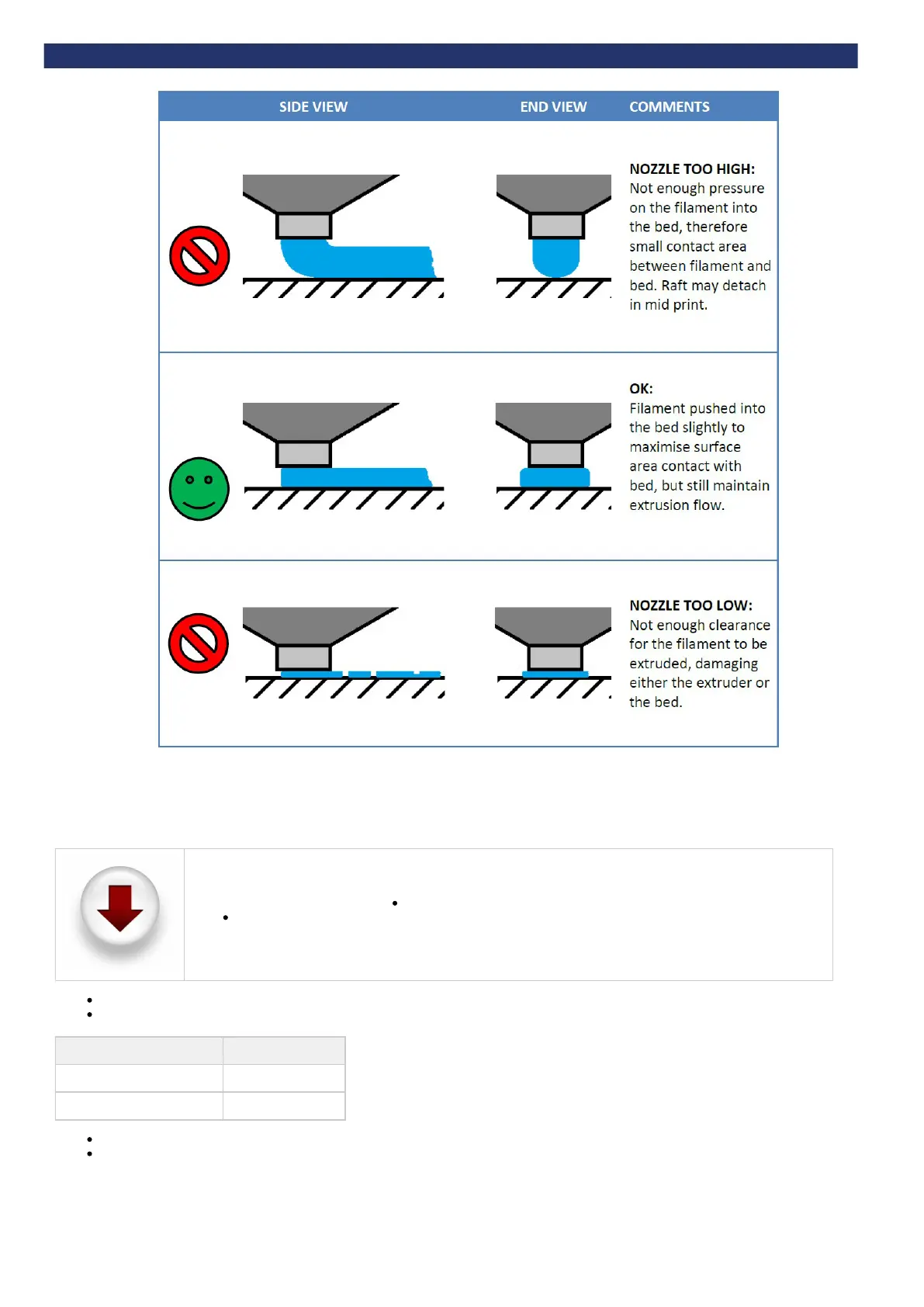
Examine each raft pad in the check file, as detailed in the following section.
Remove the raft print when complete.
Examine the raft check file


 To Next Page