Shaoxing Bibo Automatic Equipment Co., Ltd.
Tel:+86 575 88918283 Mobile:+86 133 25759139
Url: www.ourbibo.com E-Mail: bibo@ourbibo.com
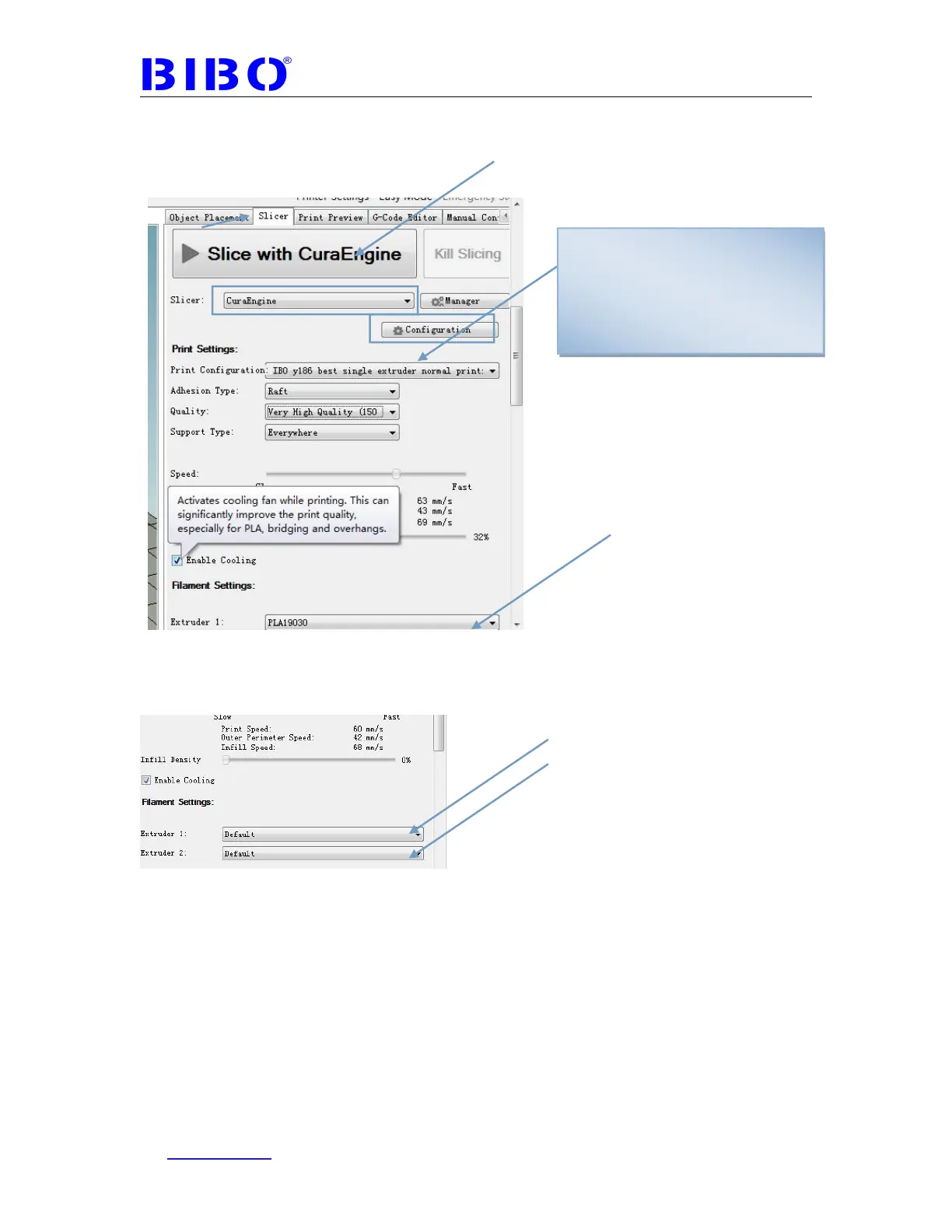
Please note that we should choose the settings at the slicer tab as the photo
below. All settings revisions on the configuration (will be showed on the left
part of the software) will be only valid when you choose the corresponding
settings profile on the right part in slicer tab.
Sometimes you choose the printing temperature in repetier host, but it has a
different printing temperature actually during printing. This problem is caused by
repetier host’s bug. You can cloose the default filament setting first and slice
it,
then choose the filament setting you want and slice it. Now you settings or
choice will be valid for the slicing. If still not ok, just restart repetier host and it will
be ok.
After finishing the settings, click “Slice with CuraEngine”.
Then go to Print Preview tab, click “Save to File” and you can see as the photo
below:
For single extruder printing, Print
Configuration should be chosen
“BIBO y186 single…”. If choose
“BIBO y186 dual”, the printing will
be not started as it is for dual
extruder printing.



 To Next Page