Shaoxing Bibo Automatic Equipment Co., Ltd.
Tel:+86 575 88918283 Mobile:+86 133 25759139
Url: www.ourbibo.com E-Mail:
bibo@ourbibo.com
software can be downloaded on https://www.teamviewer.com
Continue printing after stopping the single extruder printing by mistake
If you stop the single extruder printing by mistake, you can use this function to
save the model already printed as the following steps with photoes:
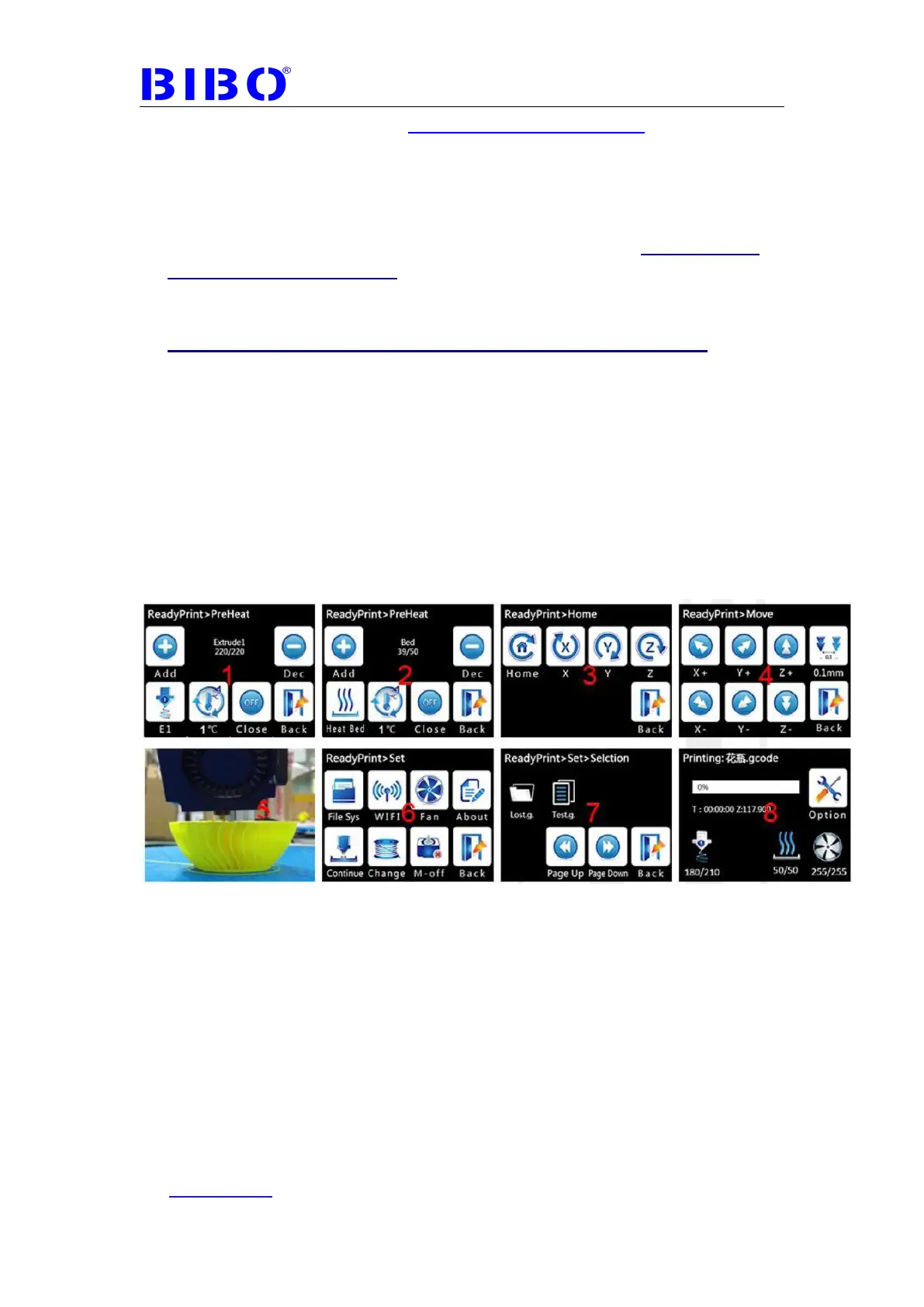
1. Preheat the extruder to arrive the target temperature and extrude it for
1mm in “Extrusion” menu on the touch screen’s main menu to active
this extruder.
2. Preheat the bed to arrive the target temperature.
3. If we have powered off the printer after stopping the printing. Please
home x, y, z axis first. Please note that if the printed object will hit the X
axis shaft after home Z axis (build plate rises), please don’t do this
step, or the printer can be damaged, and this model can’t be saved.
If we haven’t powered off the printer after stopping the printing, please
ignore this step.
4-5. Move x , y, z axis to let the actived nozzle just above the printed object.
6.Click “settings” menu on the main screen to go to “continue” button
7-8. Choose the correct printing gcode file and wait the printer to continue
the printing. If the object is very big and complicated, that means you have
to wait for more time.



 To Next Page