Shaoxing Bibo Automatic Equipment Co., Ltd.
Tel:+86 575 88918283 Mobile:+86 133 25759139
Url: www.ourbibo.com E-Mail:
bibo@ourbibo.com
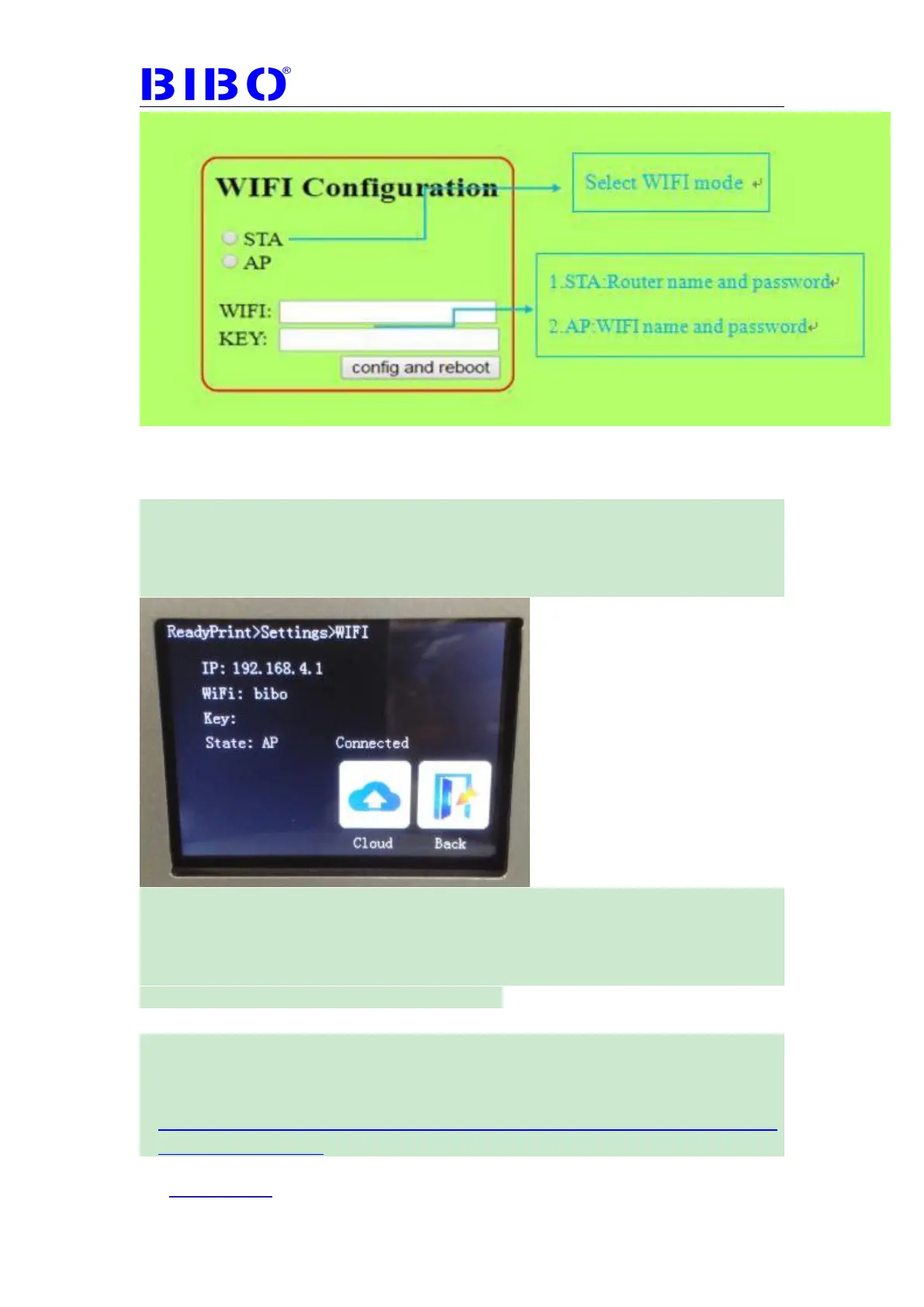
When you choose the wifi mode and type the name and password and click
config and reboot.
Now press “WIFI” button on settings menu on touch screen, waiting WIFI
name and KEY to be turned to yours, and the state be connected. Sometimes
this will take about 2 or 3 minutes (you can touch back and then touch WIFI to
reflesh the wifi state).
Let your computer or smart phone connect the wifi name you just wrote for
your printer. For example, i choose to connect the wifi "bibo" and type the wifi
password , then my computer and the printer are in the same LAN.
Use Printrun to control printer through WIFI
For Windows, Linux and Mac users, please kindly visit
http://reprap.org/wiki/Printrun
and download the printrun: For windows:
https://drive.google.com/file/d/12FWbHQL1-WARaMIkSAJmNLaDz5ZcnO8
u/view?usp=sharing



 To Next Page