A — General overview
We strongly urge you to read this Manual in its entirety before your
rst ride. Read and make sure that you understand each point in
this section, and refer to the cited sections on any issue which you
don’t completely understand.
Caution
NOTE:
Gi Fly’s features are controlled almost entirely by the Gi Fly mobile application. We recommend
that you read the Gi Fly mobile application guide in addition to this Manual. We have decided to
provide this guide online as the app is something that we are constantly improving and changing.
You can nd the most current version of the guide here:
http://giybike.com/downloads/GiFly-App-Tutorial.pdf.
B — Gi Fly System Serial Number
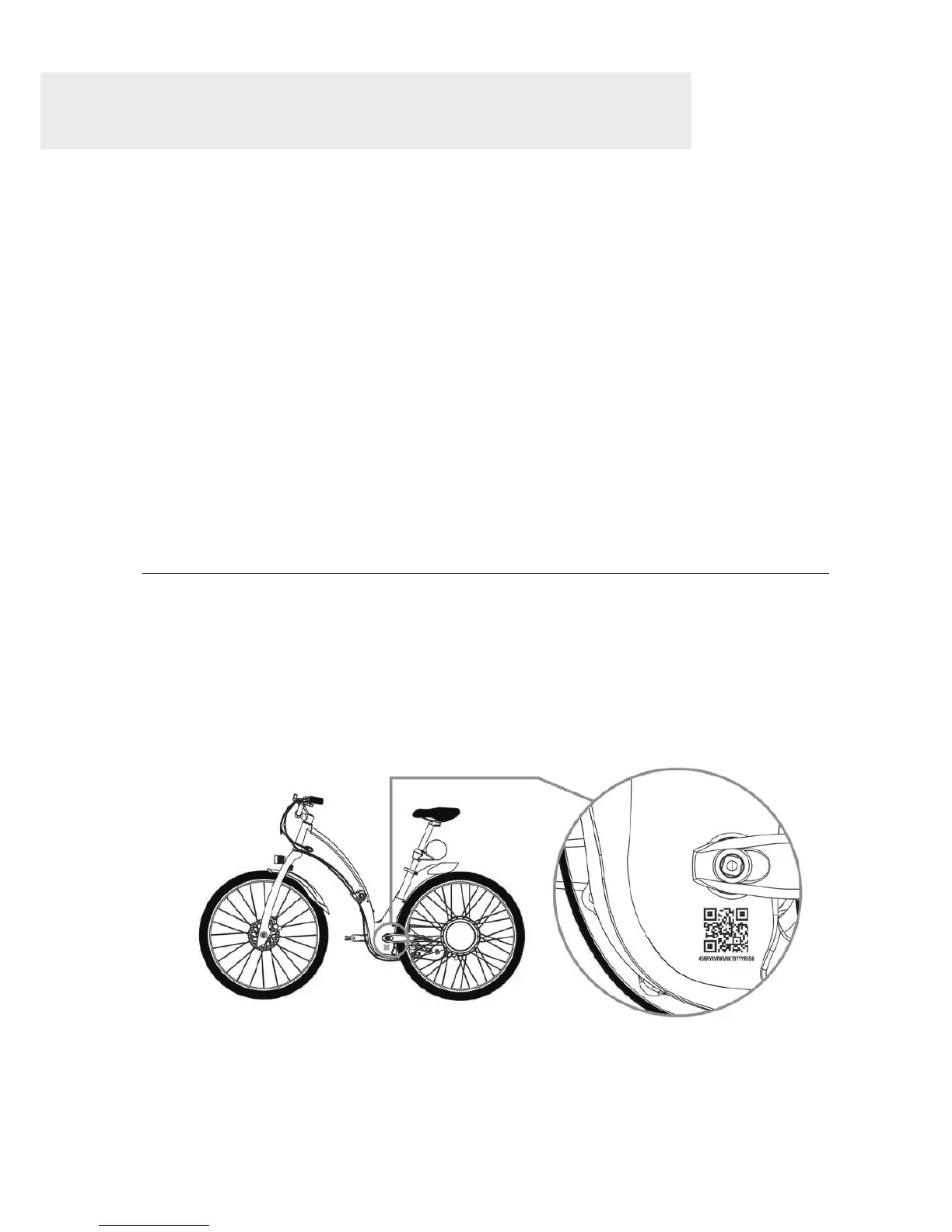
Your Gi Fly comes with a unique identier
called a System Serial Number, positioned on
the central part of the frame of the Gi Fly
(See Img. 6).
Img. 6
Your Gi Fly’s System Serial Number will be required when registering your Gi Fly with the Gi Fly
mobile app. You can scan the QR code printed on the bike via the app to activate your bike.
Alternatively, you can provide the QR code number which can be found below the QR code. See
Section 9.C Activating your Gi Fly.
28



 To Next Page