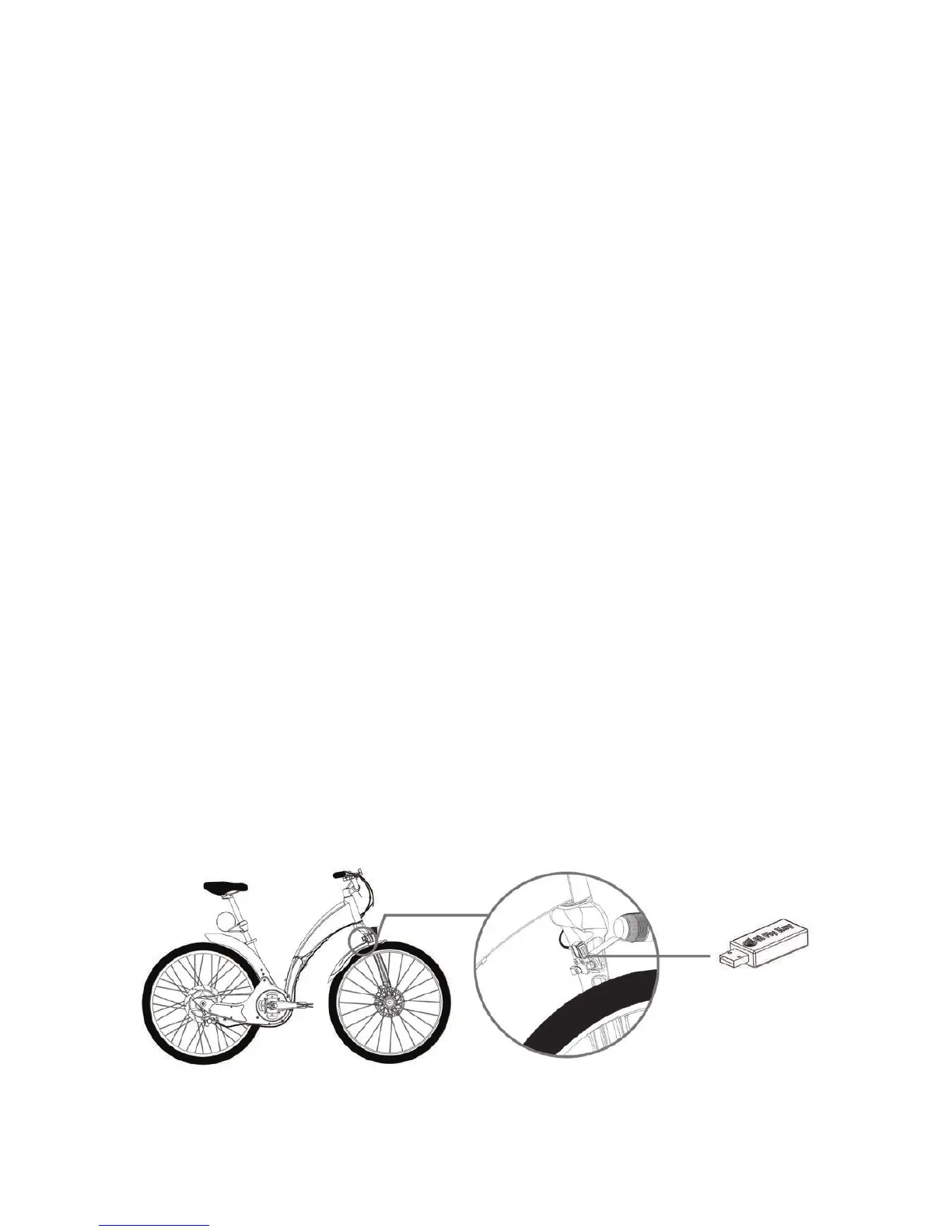
In order to use your USB key for the rst time you must rst activate
your Gi Fly via the Gi Fly mobile app. To learn how to activate your
bike please refer to Section 11.C Activating your Gi Fly.
Caution
Once you introduce your USB key to your Gi Fly, that key will only
function with that bike.
Caution
Be careful with your key! Anyone with your USB key will have access
to your bike.
Caution
Keep in mind that when you use your USB key, your Gi Fly will func-
tion with the settings last congured through the Gi Fly mobile app.
Caution
We ask that you purchase a new USB key through our website in the case that you lose your USB
key. The process to program a new USB key is the same as the process for using your USB key for
the rst time.
Using Your USB key for the rst time:
Your USB key will arrive unprogrammed. That is, you will need to introduce your USB
key to your bike in order to use it.
Introduce the USB key to your bike by inserting it into Gi Fly’s USB port. The port is
located on the front fork over the front light (See Img.13 for more detail).
Once you insert the USB key into your bike, the key will automatically associate itself
with your User ID and Serial Number and will only work with that Gi Fly. This may take
a few seconds.
Now you can use your USB key to unlock your bike in the following situations:
• If you have no battery in your smartphone.
• If you don’t have a smartphone.
• If the Gi Fly mobile app is not working.
• If you don’t want to use the Gi Fly mobile app.
1.
2.
3.
4.
Img. 13
32



 To Next Page