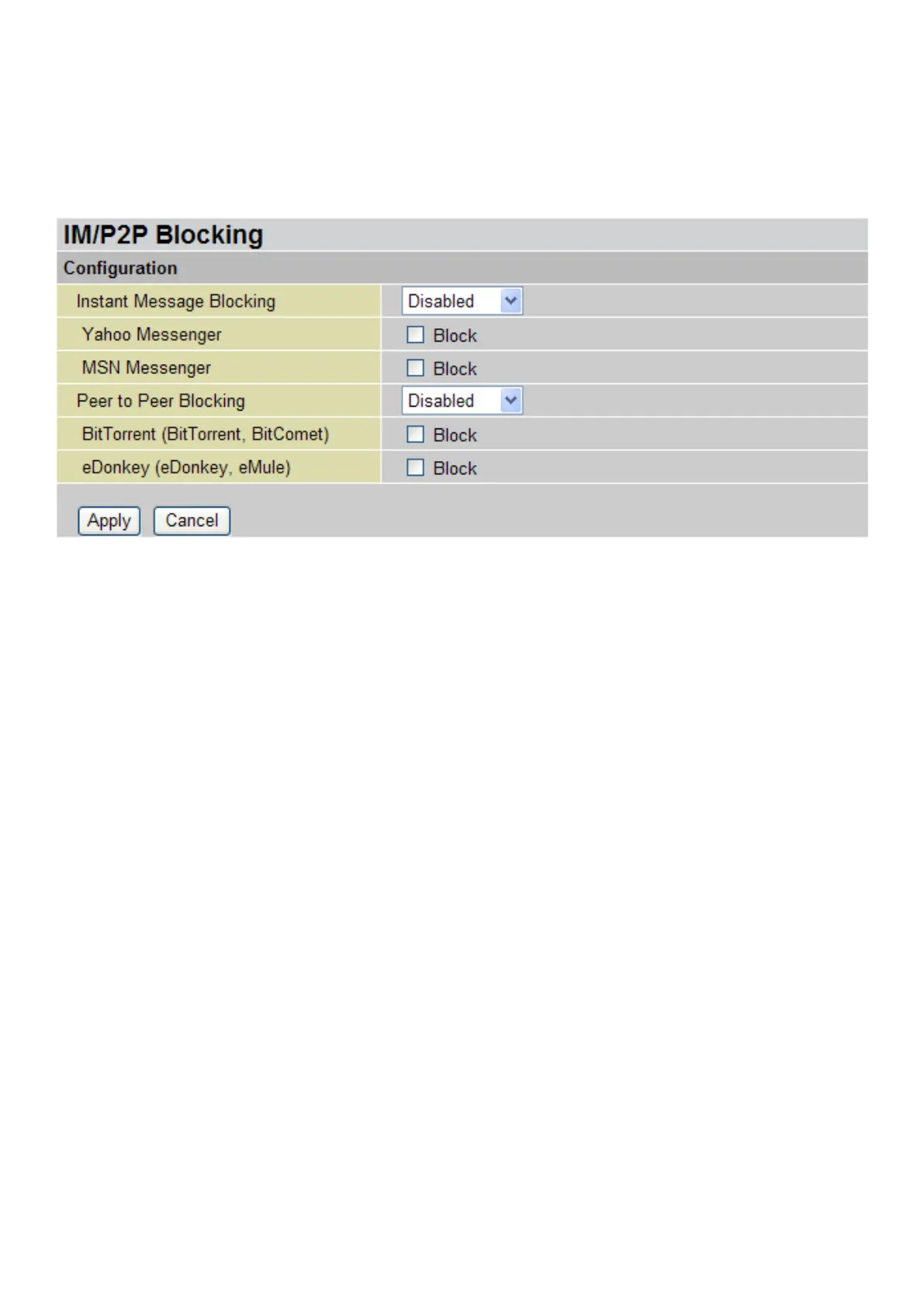
IM / P2P Blocking
IM, short for Instant Message, is required to use client program software that allows users to
communicate, in exchanging text message, with other IM users in real time over the Internet. A
P2P application, known as Peer-to-peer, is a group of computer users who share les with specic
groups of people across the Internet. Both Instant Message and Peer-to-peer applications make
communication faster and easier but your network can become increasingly insecure at the same
time. Billion’s IM and P2P blocking helps to restrict LAN PCs from accessing the commonly used IM
such as Yahoo and MSN, and P2P, BitTorrent and eDonkey applications over the Internet.
Instant Message Blocking: Default is set to Disable.
• Disabled: Instant Message blocking is not triggered. No action will be performed.
• Always On: Action is enabled.
• TimeSlot1 ~ TimeSlot16: This is the self-dened time period. You may specify the time
period to trigger the blocking, i.e. during working hours. For setup and detail, refer to Time
Schedule section.
Yahoo/MSN Messenger: Tick the checking box to block either or both Yahoo or/and MSN
Messenger. Be sure you enabled the Instant Message Blocking rst.
Peer to Peer Blocking: Default setting is Disable.
• Disabled: Instant Message blocking is not triggered. No action will be performed.
• Always On: Action is enabled.
• TimeSlot1 ~ TimeSlot16: This is the self-dened time period. You may specify the time
period to trigger the blocking, i.e. during working hours. For setup and detail, refer to Time
Schedule section.
BitTorrent / eDonkey: Tick the checking box to block either or both Bit Torrent or/and eDonkey.
Be sure you enabled the Peer to Peer Blocking rst.
Click Apply to conrm the settings.
104





 To Next Page