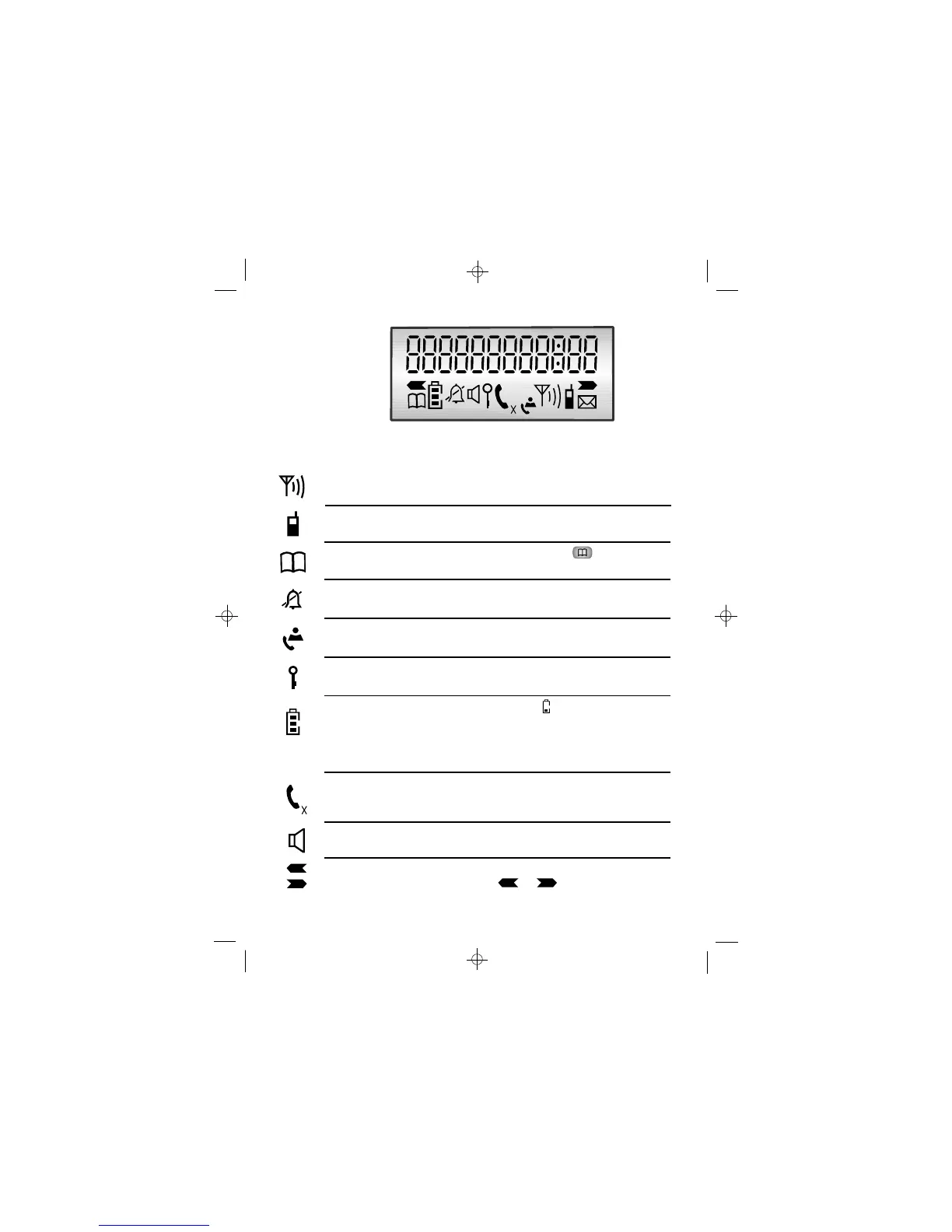
Comesonsteadilywhenyourhandsetiswithinrangeofthe
baseunit.Itflashesifyougooutofrange.
Signal
level
Whatthesymbolsmean
Appearswhenyoumakeanintercomcalltoanother
handset.
Intercom
call
AppearswhenyoupresstheMEMORYbuttontostore
anumberinmemoryortomakeacalltoastorednumber.
Memory
Indicatesthehandsetringeristurnedoff.
Flasheswhenyouhavereceivednewcall/s. Onsteadywhen
thereareonlyoldcallsinthecallslist.
CallerID
(CLIP)
Appearswhenthekeypadislocked.
Keypad
lock
Whenthisshowsnearlyempty(),putthehandseton
thechargerpodtochargethebatteries.
Whilethehandsetisonthechargerpod,thebarsonthis
symbolmovecontinuously,evenwhenthebatteriesarefully
charged.
Battery
charge
Onsteadywhenthehandsetisonanoutsidecall.Flashes
whenthereisincomingringing.
The appearswhenthemicrophoneismuted.X
Phone
AppearswhentheHandsfreefunctionisturnedon.
Speaker-
phone
RingerOff
Left/Right
arrow
Whenanumberistoolongforthedisplay,theseshow
thatyoucanpresstheorbuttonstoscroll.













 To Next Page