Biochrom Anthos Fluido-2 Microplate Washer v2.0 Page 21
7 Software Principle
7.1 Software Navigation
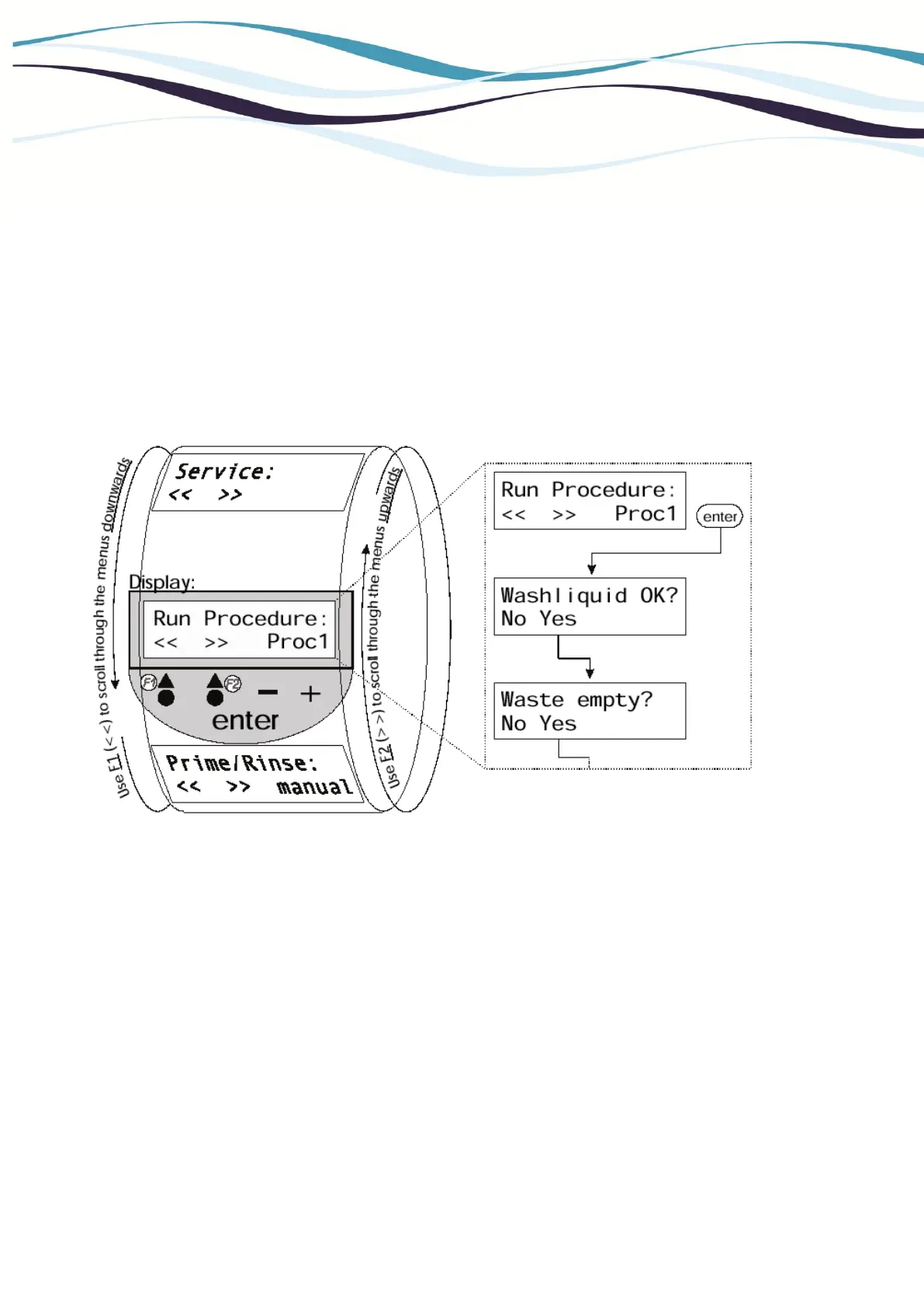
Drawing
: Software Navigation
The software was designed to make navigation through the different
menus as easy as possible. The main menus are organized like a wheel
which can be turned in both directions by means of the two first keys
(function key 1 <F1> and function key 2 <F2>). When pressing <F1> or
<F2> the next respectively the previous menu will be displayed.
The two function keys may have different functions assigned in the
various sub-menus. The current assignment is always displayed right
above the corresponding key.
The lower right of the display will show the current selection of different
options (e.g. "Proc1" for the procedure with this name). To change the
selection use the <+> and <-> keys. These keys can also be used for
numerical or alphanumerical inputs by means of in- or decreasing a value
or scrolling through the alphabet.


 To Next Page