Network Connection Manual
Ver.2.00
3. How to Connect
Both Ethernet and WLAN can be configured through the printer’s LCD Display, USB,
Ethernet or WLAN interface.
When you want to change the Ethernet or WLAN of the printer, the network settings of the
host(PC, PDA, etc) and Ethernet or WLAN of the printer must configured properly
configured so that communication can be established.
3-1 Connecting Printer
1) USB
Connect the USB cable to the printer
2) Ethernet
Connect the LAN cable to the printer
A direct cable or cross cable can be connected to the Hub or Host for use.
3) WLAN
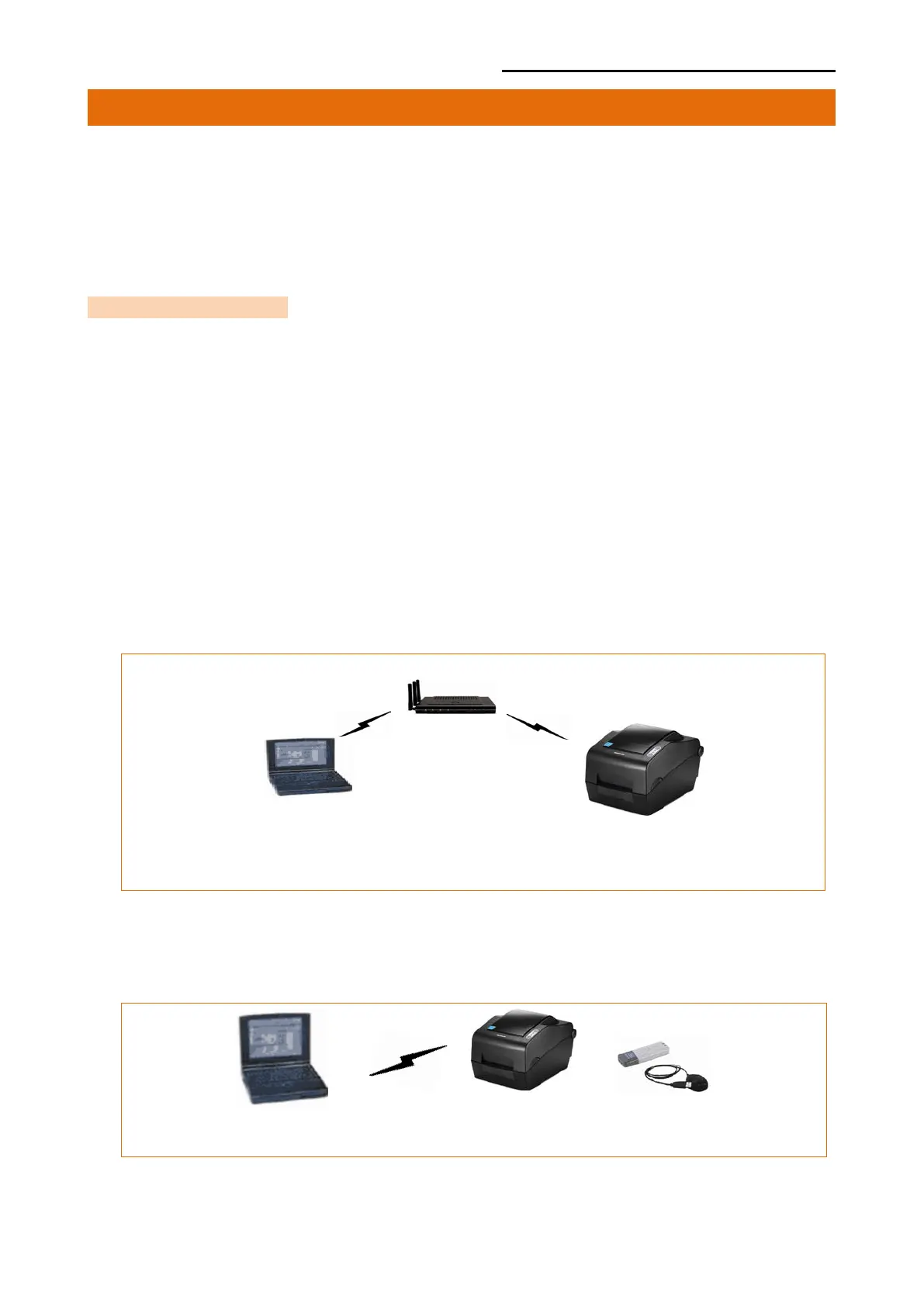
Connect to the AP(Access Point) configured in Infrastructure mode in order to connect
to the Wireless network.
Infrastructure mode
In order to configure the network between wireless terminals, connect to the
terminal in Ad-hoc Mode.
Ad-hoc mode













 To Next Page