724-746-5500 | blackbox.com
Page 23
Chapter 4: Configuring the Hardened Serial Server
4. Configuring the Hardened Serial Server
4.1 Overview of the Hardened Serial Server Software
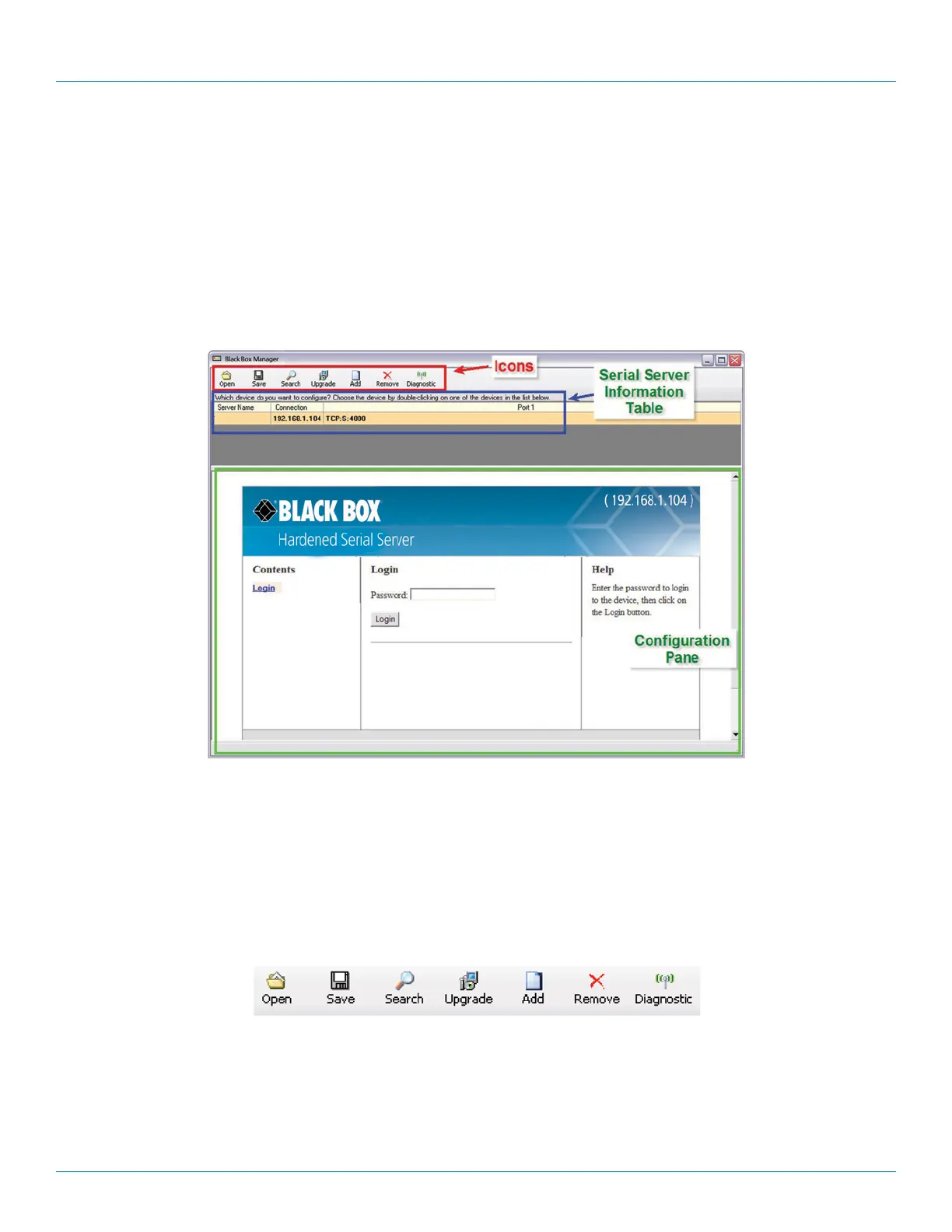
The Hardened Serial Server Software configuration window includes three areas:
• Icons
• Hardened Serial Server information table
• Configuration pane
LES421A
Figure 4-1. Hardened Serial Server Software Configuration window.
NOTE: The screen shots shown in this manual refer to the LES421A. Your screen will display the model name/number and serial num-
ber of your device (LES421A, LES422A, or LES424A). All menus, functions and options shown on the screen shots in this manu-
al apply to your LES421A, LES422A, or LES424A device.
4.1.1 Icons
Figure 4-2. Configuration Window Icons.
• Open—Open a Hardened Serial Server configuration file.
• Save—Save the current Hardened Serial Server configuration to a file.
• Search—Initiate a search for Hardened Serial Servers.
Model: LES421A
Firmware Version: 1.6.0
Hardware Version: 0
MAC Address: 00:8C:10:13:29:E6
Link Status: 100BASE-T full duplex











 To Next Page