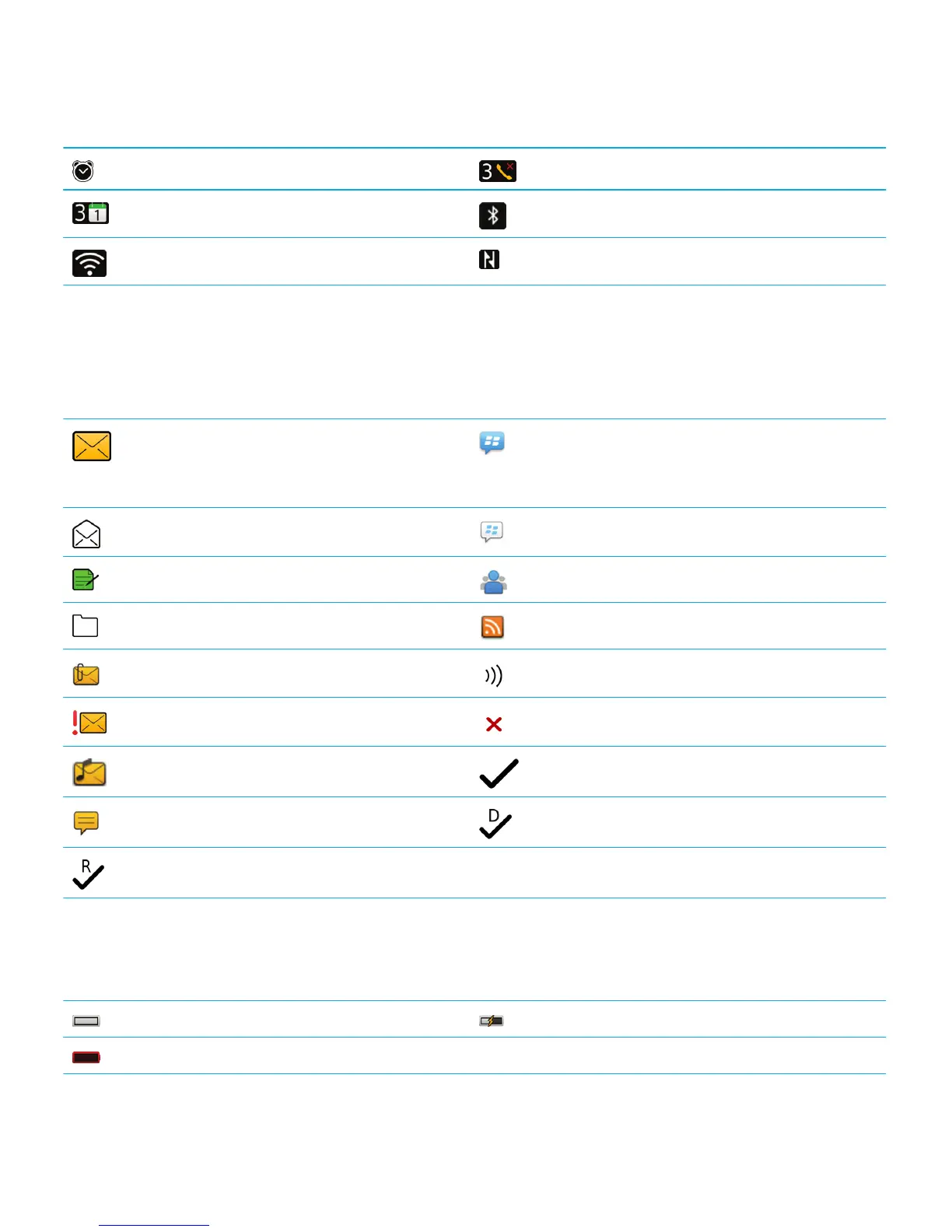
Alarm is set Missed call count
Calendar reminder count Bluetooth technology is turned on
Wi-Fi technology is turned on NFC technology is turned on
Message inbox icons
These icons indicate the type or status of each message in your inbox.
Depending on your BlackBerry smartphone model and wireless service provider, some of these icons might not appear.
Unread message New BBM item
To clear this indicator, open each chat that has
this indicator.
Read message BBM chat is open
Draft message New BBM Groups item
Filed message New RSS item
Message with an attachment Message is being sent
Message is high priority Message has not been sent
Text message with an attachment Message has been sent
Text message Message has been delivered
Message has been read
Battery power level icons
These icons appear at the top of the home screen and at the top of the screen in some applications.
Full battery Battery is charging
Low battery
User Guide Quick Help
22















 To Next Page