Blackmagic URSA Connectors22
REC
ZOOM
DISP
PGM
1
CFAST
IRIS
FOCUS
REC
IRIS
FOCUS PEAK DISP MENU SLATE
2
IRIS
SDI OUT
0
-6
-12
-18
-24
-30
-36
-42
-48
L R
SDI IN
REF IN
TIMECODE IN
TIMECODE OUT
12V
CH1
SOLO
CH1
MUTE
CH2
MUTE
CH2
SOLO
FOCUS PEAK DISP MENU SLATE
PUSH PUSHPUSH
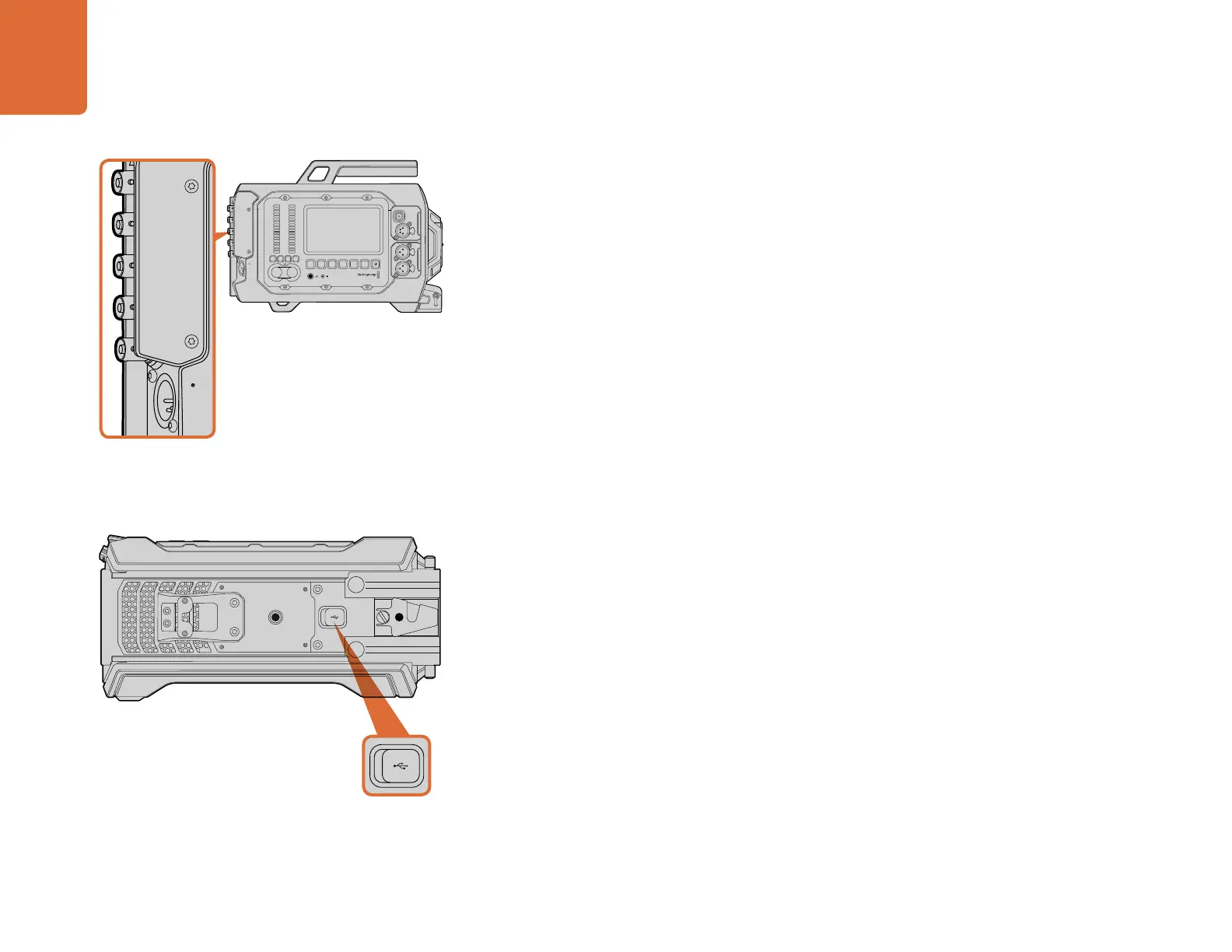
Rear Panel Connectors
SDI In
When connecting Blackmagic URSA to a switcher for live production, connect the switcher's program
output to Blackmagic URSA's 12G-SDI input. Now you can view the switcher's program feed by
pressing the PGM button on the fold out monitor. This input can also be used to connect to the
playback output of an external recorder if used. You can then select between the camera and the
external recorder by pressing the PGM button
SDI Out
Blackmagic URSA’s 12G-SDI output is used to send HD and Ultra HD 4K video to SDI equipment such
as routers, monitors, SDI capture devices, and broadcast switchers.
REF In
Synchronize Blackmagic URSA to a common reference signal, such as black burst or tri-level sync,
by connecting to the 'ref in' BNC connector. This lets you sync Blackmagic URSA to other SDI video
equipment, for example, when using multiple cameras connected to a switcher.
Timecode In
Record timecode from other professional audio and video equipment, such as audio mixers and
clapper boards by connecting them to Blackmagic URSA’s 'timecode in' BNC connector. This ensures
audio and picture can be easily synchronized during post production.
Timecode Out
Send timecode from Blackmagic URSA to other professional video equipment by connecting to the
'timecode out' BNC connector.
Power Input +12-20 V
Use the 4 pin 12-20 Volt XLR connector to plug in power from external sources, such as power outlets,
portable batteries and generators.
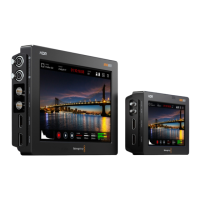
Bottom Panel Connector
USB 2.0
Use the Mini-B USB 2.0 port to connect your Blackmagic URSA to your computer and update the
internal software. Lift the rubber cover with your finger nail to access the USB port.
Use the rear panel BNC connectors to input or output timecode,
sync to an external reference signal, input or output 12G-SDI
video. Connect external power via the 4 pin XLR connector.
Connect Blackmagic URSA to your Mac or Windows computer
via the Mini-B USB 2.0 port to update the internal software.
Lift the rubber cover to access the USB port.
REC
ZOOM
DISP
PGM
1
CFAST
IRIS
FOCUS
REC
IRIS
FOCUS PEAK DISP MENU SLATE
2
IRIS
SDI OUT
0
-6
-12
-18
-24
-30
-36
-42
-48
L R
SDI IN
REF IN
TIMECODE IN
TIMECODE OUT
12V
CH1
SOLO
CH1
MUTE
CH2
MUTE
CH2
SOLO
FOCUS PEAK DISP MENU SLATE
PUSH PUSHPUSH
REC
ZOOM
DISP
PGM
1
CFAST
IRIS
FOCUS
REC
IRIS
FOCUS PEAK DISP MENU SLATE
2
IRIS
SDI OUT
0
-6
-12
-18
-24
-30
-36
-42
-48
L R
SDI IN
REF IN
TIMECODE IN
TIMECODE OUT
12V
CH1
SOLO
CH1
MUTE
CH2
MUTE
CH2
SOLO
FOCUS PEAK DISP MENU SLATE
PUSH PUSHPUSH
REC
ZOOM
DISP
PGM
1
CFAST
IRIS
FOCUS
REC
IRIS
FOCUS PEAK DISP MENU SLATE
2
IRIS
SDI OUT
0
-6
-12
-18
-24
-30
-36
-42
-48
L R
SDI IN
REF IN
TIMECODE IN
TIMECODE OUT
12V
CH1
SOLO
CH1
MUTE
CH2
MUTE
CH2
SOLO
FOCUS PEAK DISP MENU SLATE
PUSH PUSHPUSH



 To Next Page