6 Getting Started
SDI OUT
SDI IN
REF IN
TC IN
12V
Attaching the Handle
Getting started with your Blackmagic URSA or URSA Mini is as simple as attaching the handle,
mounting a lens, and powering your camera.
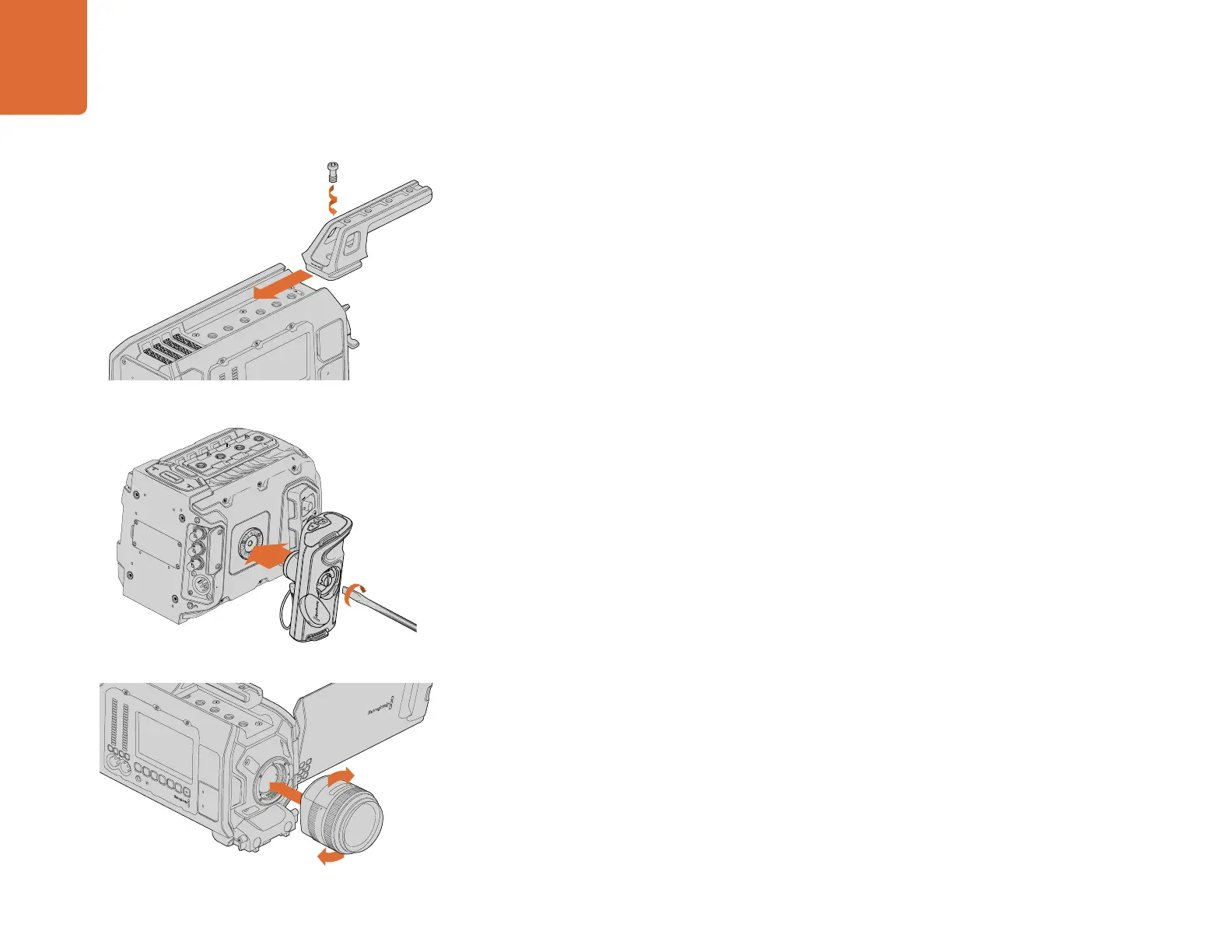
To attach Blackmagic URSA's handle to the camera body, simply slide the base of the handle along
Blackmagic URSA's handle ridges and screw the handle to one of the 3/8" mounting points. Choose
a mounting point that provides the best weight balance for your camera.
Attaching URSA Mini's side handle is easy.
Step 1. Open the plastic cap on the right side of the handle to access the tightening screw.
Step 2. Align the handle with URSA Mini's side rosette mount. Fasten the handle to suit your
desired position and tighten the side handle screw with a large flat head screw driver, or
by twisting the D ring. Close the plastic cap.
Step 3. URSA Mini is shipped with a short LANC cable so you can control your camera using the
side handle buttons. Connect the LANC cable from the side handle LANC output to the
camera's LANC input.
Attaching a Lens
To remove the protective dust cap from the EF lens mount, hold down the locking button and rotate the
cap counterclockwise until it is released. For the PL mount, rotate the PL locking ring counterclockwise.
We recommend always turning off your camera prior to attaching or removing a lens.
To attach an EF mount lens:
Step 1. Align the dot on your lens with the dot on the camera mount. Many lenses have a visual
indicator, for example a blue, red or white dot.
Step 2. Twist the lens clockwise until it locks into place.
Step 3. To remove the lens, hold down the locking button, rotate the lens counterclockwise until
its dot or indicator reaches the 12 o’clock position, and gently remove.
Getting Started
IRIS
SDI OUT
SDI OUT
REF IN
TIMECODE IN
L
R
TIMECODE OUT
+12V
CH1
SOLO
CH1
MUTE
CH2
SOLO
CH2
MUTE
FOCUS
PEAK
DISP
AUDIO IN
12V OUT
SDI OUT
0
-6
Attaching the top handle to Blackmagic URSA.
Attaching and removing an EF mount lens on
Blackmagic URSA EF.
CH2
MUTE
IRIS
FOCUS
PEAK
DISP
MENU
AUDIO IN
SDI OUT
+12V OUT
SLATE
0
-6
-12
-18
-24
-30
-36
-42
-48
CH1
SOLO
CH2
SOLO
CH1
MUTE
Attaching the side handle to Blackmagic URSA Mini.



 To Next Page