Blackmagic URSA Features24
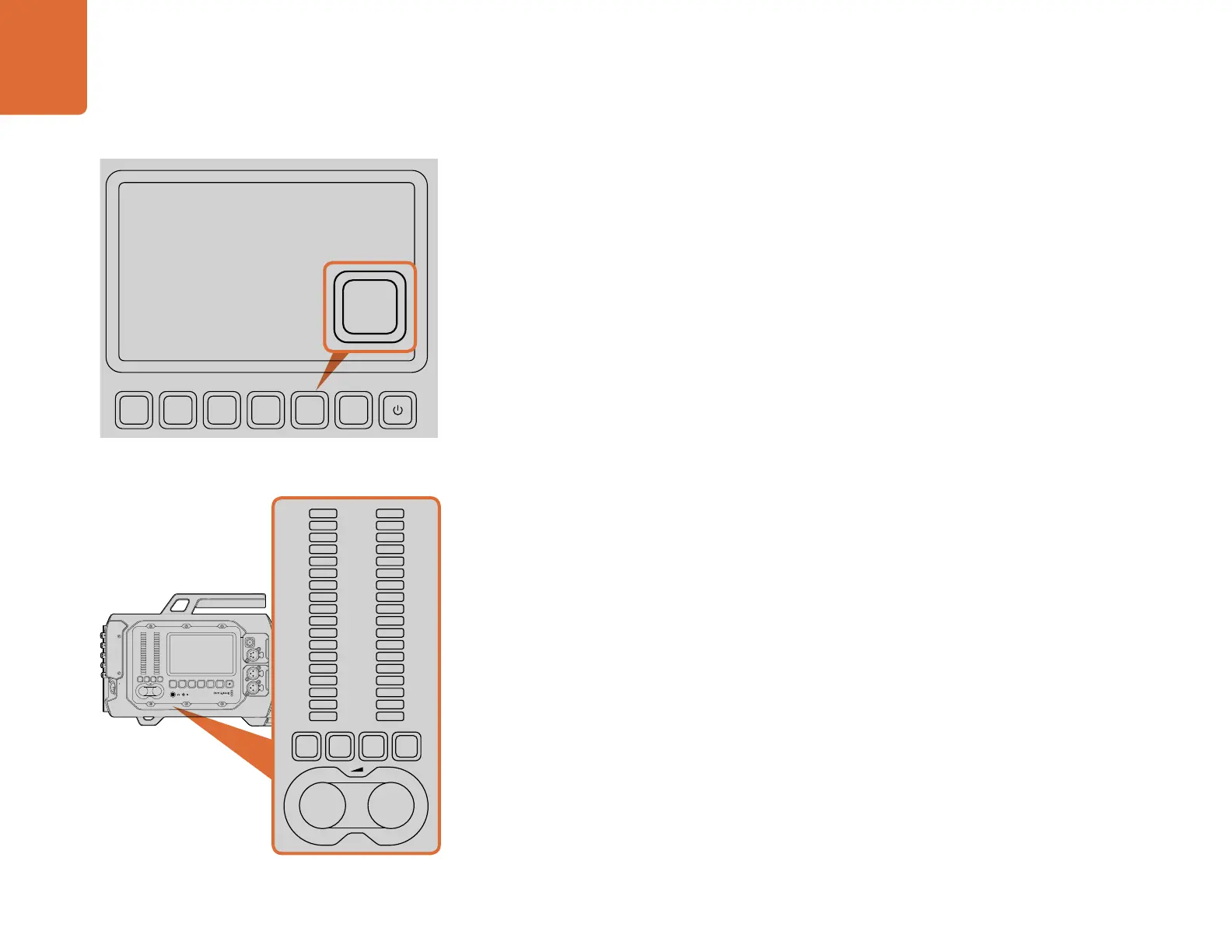
MENU Button
Press the 'menu' button to activate the settings menu on the touchscreen. Press menu again to close.
SLATE Button
Press the 'slate' button to activate the slate feature on the touchscreen. Press slate again to close.
The slate feature lets you enter metadata for your clips and set your camera ID. See the 'entering
metadata' section of this manual for more information.
POWER Button
Press and release the 'power' button to turn on your Blackmagic URSA. Press and hold to turn your
camera off.
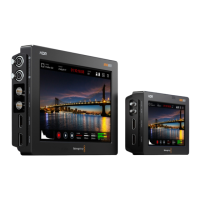
CH SOLO and MUTE Buttons
During recording and playback, these buttons let you monitor your ch 1 and ch 2 stereo audio channels
independently via headphones. For example, to monitor only ch 1 audio, press the 'ch 1 solo' button
or the 'ch 2 mute' button. Press the button again to monitor both channels.
CH 1 SOLO Button
To monitor ch 1 only, press the 'ch 1 solo' button.
CH 1 MUTE Button
To mute the audio on channel 1 and monitor only channel 2, press the 'ch 1 mute' button.
CH 2 SOLO Button
To monitor ch 2 only, press the 'ch 2 solo' button.
CH 2 MUTE Button
To mute the audio on channel 2 and monitor only channel 1, press the 'ch 2 mute' button.
Audio Level Adjustment Knobs
Turn each knob clockwise or counterclockwise to increase or decrease the recording level for each
channel of audio. As you adjust each knob you'll see the corresponding audio meters respond.
Audio Meters
The audio meters display the strength of your recorded audio. If your audio levels rise too high, your
audio peaks can be clipped and you will hear distortion in your audio.
The 'menu' button opens the touchscreen menu for access to
many of the camera settings.
Set and monitor levels of left and right audio channels using
the adjustment knobs and audio meters.
REC
ZOOM
DISP
PGM
1
CFAST
IRIS
FOCUS
REC
IRIS
FOCUS PEAK DISP MENU SLATE
2
IRIS
SDI OUT
0
-6
-12
-18
-24
-30
-36
-42
-48
L R
SDI IN
REF IN
TIMECODE IN
TIMECODE OUT
12V
CH1
SOLO
CH1
MUTE
CH2
MUTE
CH2
SOLO
FOCUS PEAK DISP MENU SLATE
REC
ZOOM
DISP
PGM
1
CFAST
IRIS
FOCUS
REC
IRIS
FOCUS PEAK DISP MENU SLATE
2
IRIS
SDI OUT
0
-6
-12
-18
-24
-30
-36
-42
-48
L R
SDI IN
REF IN
TIMECODE IN
TIMECODE OUT
12V
CH1
SOLO
CH1
MUTE
CH2
MUTE
CH2
SOLO
FOCUS PEAK DISP MENU SLATE
PUSH PUSHPUSH
REC
ZOOM
DISP
PGM
1
CFAST
IRIS
FOCUS
REC
IRIS
FOCUS PEAK DISP MENU SLATE
2
IRIS
SDI OUT
0
-6
-12
-18
-24
-30
-36
-42
-48
L R
SDI IN
REF IN
TIMECODE IN
TIMECODE OUT
12V
CH1
SOLO
CH1
MUTE
CH2
MUTE
CH2
SOLO
FOCUS PEAK DISP MENU SLATE
PUSH PUSHPUSH
REC
ZOOM
DISP
PGM
1
CFAST
IRIS
FOCUS
REC
IRIS
FOCUS PEAK DISP MENU SLATE
2
IRIS
SDI OUT
0
-6
-12
-18
-24
-30
-36
-42
-48
L R
SDI IN
REF IN
TIMECODE IN
TIMECODE OUT
12V
CH1
SOLO
CH1
MUTE
CH2
MUTE
CH2
SOLO
FOCUS PEAK DISP MENU SLATE
PUSH PUSHPUSH



 To Next Page