Putting into operation
15
3.9 Switching on the appliance
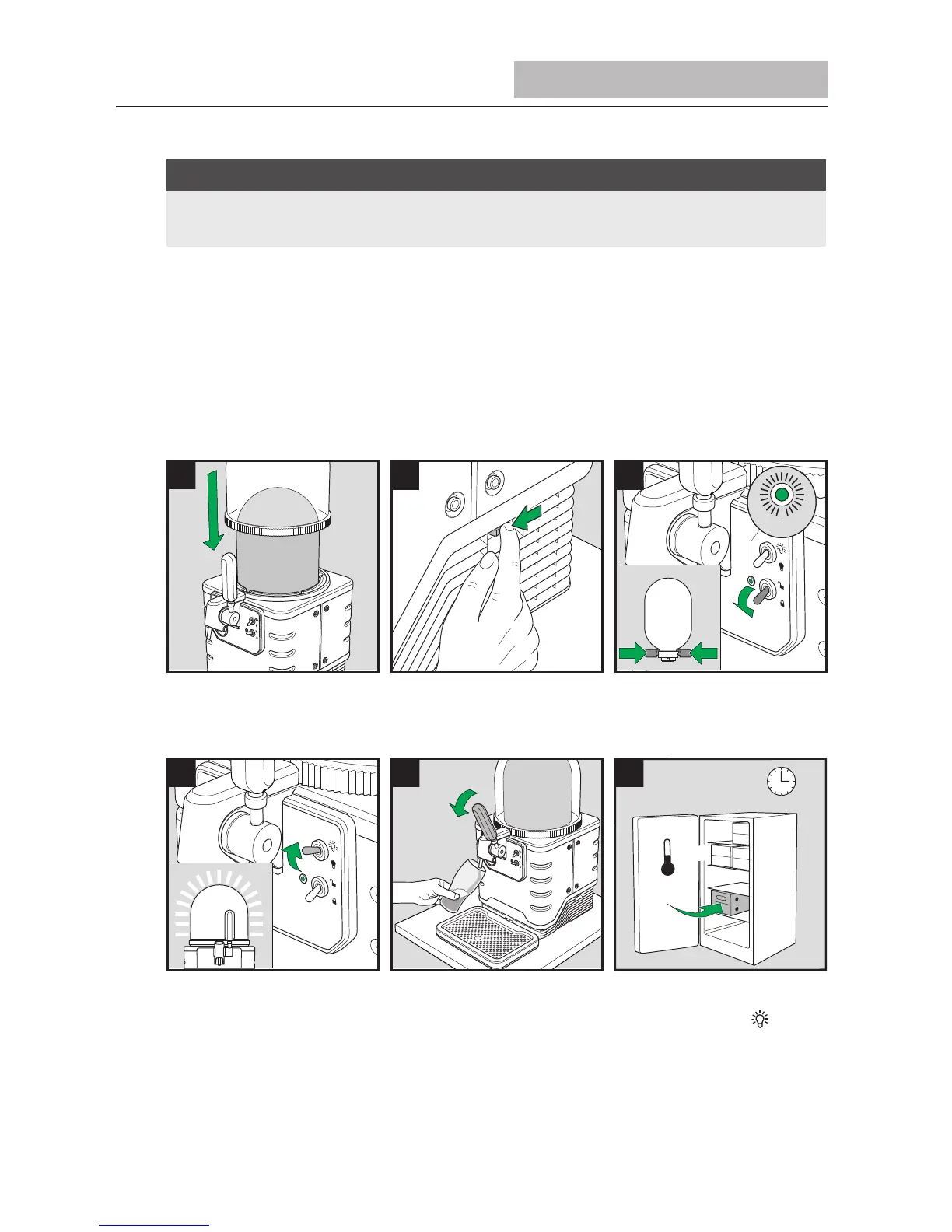
Place the dome onto the appliance. This also keeps the contents cool and
makes it possible to light up the appliance (Figure 24).
Switch on the appliance by pressing the ON/OFF switch on the right of the
appliance (Figure 25).
Now use the toggle switch (C) to set the keg locking to “Close“. The indicator light
(D) next to this will flash green till the keg is locked. You will hear the locking
mechanism of the appliance and then see the indicator light change to a
continuous green light (Figure 26+35).
The keg is now locked and the pump audibly generates positive pressure in the
keg. Once the pump switches off after around 30 seconds, the beer is cooled
actively. The cooling fan is the only thing that can now be heard.
The appliance is ready for use. You also have the option of activating the toggle
switch for the dome lighting (E) in order to switch on the effect lighting (Figure
27).
Dispense a small amount of beer to test that the appliance is functioning correctly
(Figure 28).
Make sure there are enough pre-cooled kegs in your cold storage (Figure 29).
■
■
■
NOTE
Each time prior to switching on, make sure that the appliance is properly set
up and securely connected.
►
■
■
■


 To Next Page