93
Application notes
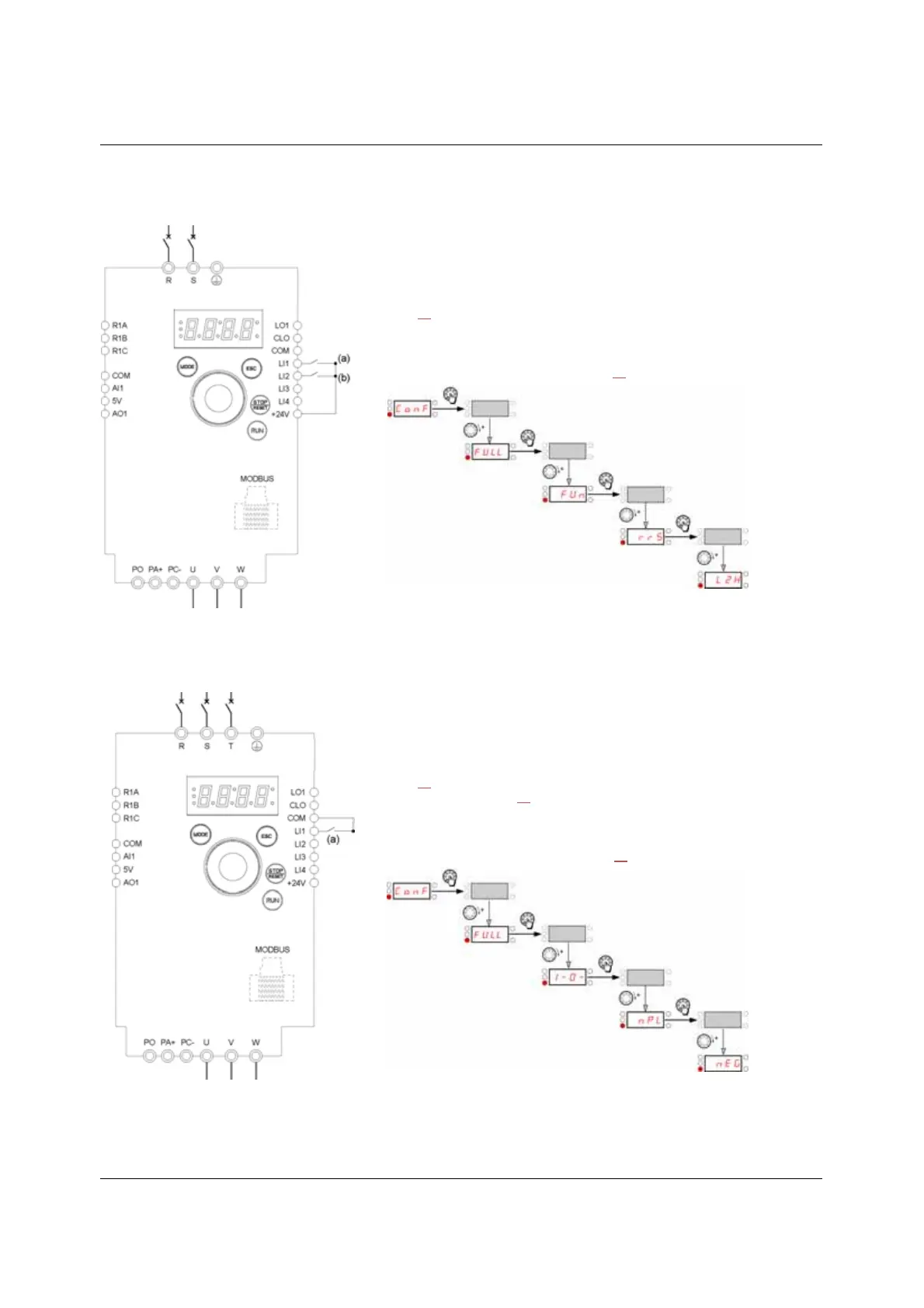
2-wire control (source)
3-wire control (sink)
(a): Run Forward (b): Run Reverse
1. Connect the ground terminal to the grounding screws located below the output
terminals.
2. Connect the power terminals.
3. Connect the logic inputs.
4. Turn on the drive without giving a run command.
5. Assign factory settings to the drive, Factory / recall customer parameter set FCS
page 45
set to InI.
6. Set the motor parameters (in COnF mode) only if the factory configuration of the
drive is not suitable.
7. Perform an auto-tuning.
8. Set Reverse direction rrS parameter page 64
to LI2H
9. Start
(a): Run Forward
1. Connect the ground terminal to the grounding screws located below the output
terminals.
2. Connect the power terminals.
3. Connect the logic inputs.
4. Turn on the drive without giving a run command.
5. Assign factory settings to the drive, Factory / recall customer parameter set FCS
page 45
set to InI.
6. Set tCC to 3C see page 47
7. Set the motor parameters (in COnF mode) only if the factory configuration of the
drive is not suitable.
8. Perform an auto-tuning.
9. Set Logic inputs type nPL parameter page 50
to nEG
10. Start



 To Next Page