MenuSelect Control for Models BCX 14 and BX 14
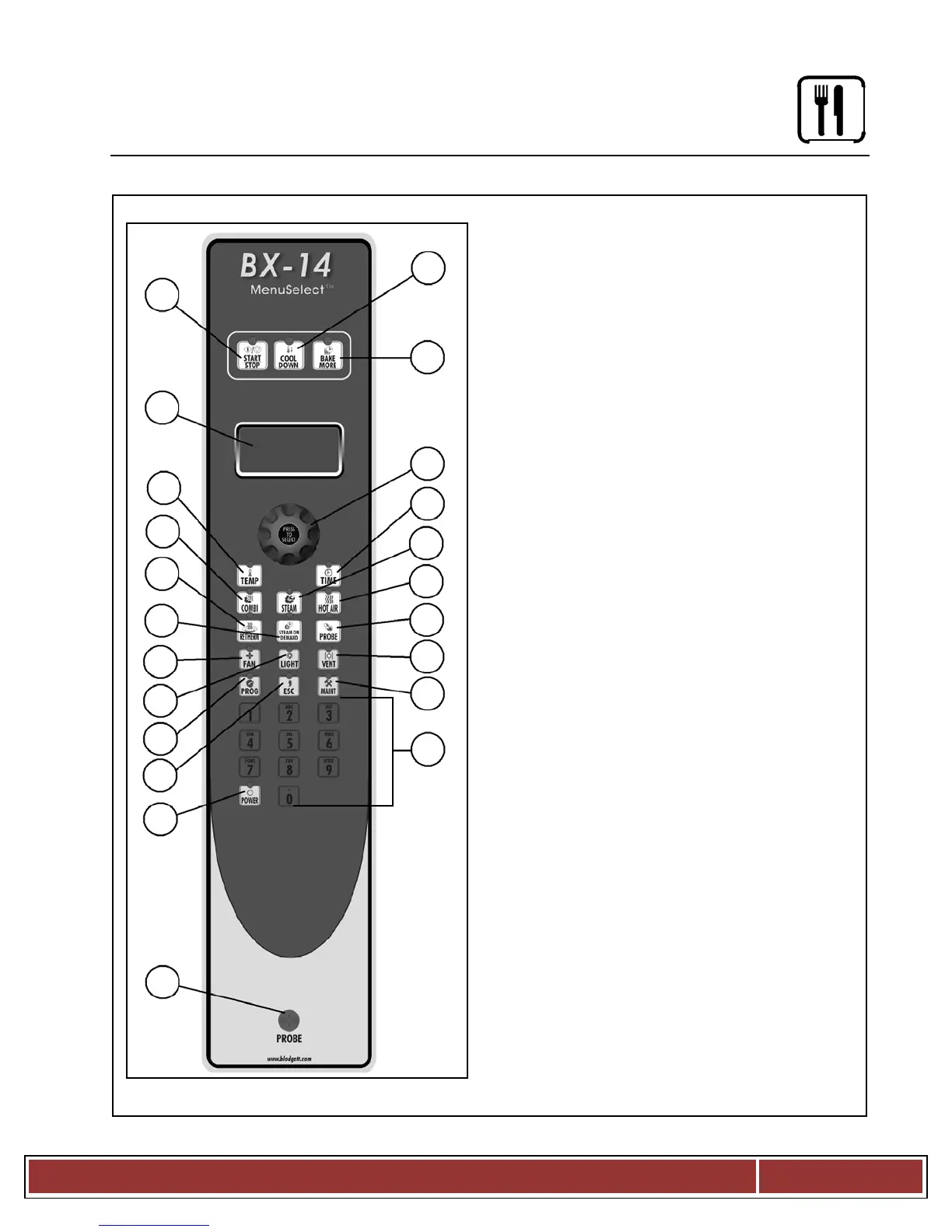
START/STOP KEY press to start, cancel or
COOL DOWN KEY initiates oven cool down
BAKE MORE KEY press at the end of a bake
cycle to add additional bake time in one
DISPLAY displays time or temperature and
other information related to oven function and/
DIAL used to enter set points, time, and pro
Programmable settings. Also used to select
TEMP KEY used to set or change the bake
TIME KEY used to set or change the bake
COMBI KEY press to enter combi mode
STEAM KEY press to enter steam mode
10.
HOT AIR KEY press to enter hot air mode
RETHERM KEY press to enter Retherm
mode, this mode uses steam to reheat frozen
or precooked product. Retherm has a
temperature limit of 250 300_F.
STEAM ON DEMAND KEY used to initiate
PROBE KEY press to use core probe cooking
FAN KEY press to select the fan speed
LIGHT KEY press to turn the lights on and off.
VENT KEY press to manually open and close
PROGRAM KEY press to enter product pro
gramming and save programmed settings.
18.
ESCAPE KEY press to back up one step
MAINTENANCE KEY press to enter manager
programming and save programmed settings
ALPHA/NUMERIC KEYPAD used to program
POWER KEY used to place control in and out
CORE PROBE CONNECTION plug core
temperature probe in here when using


 To Next Page