Blodgett Oven
Page 1
Operation
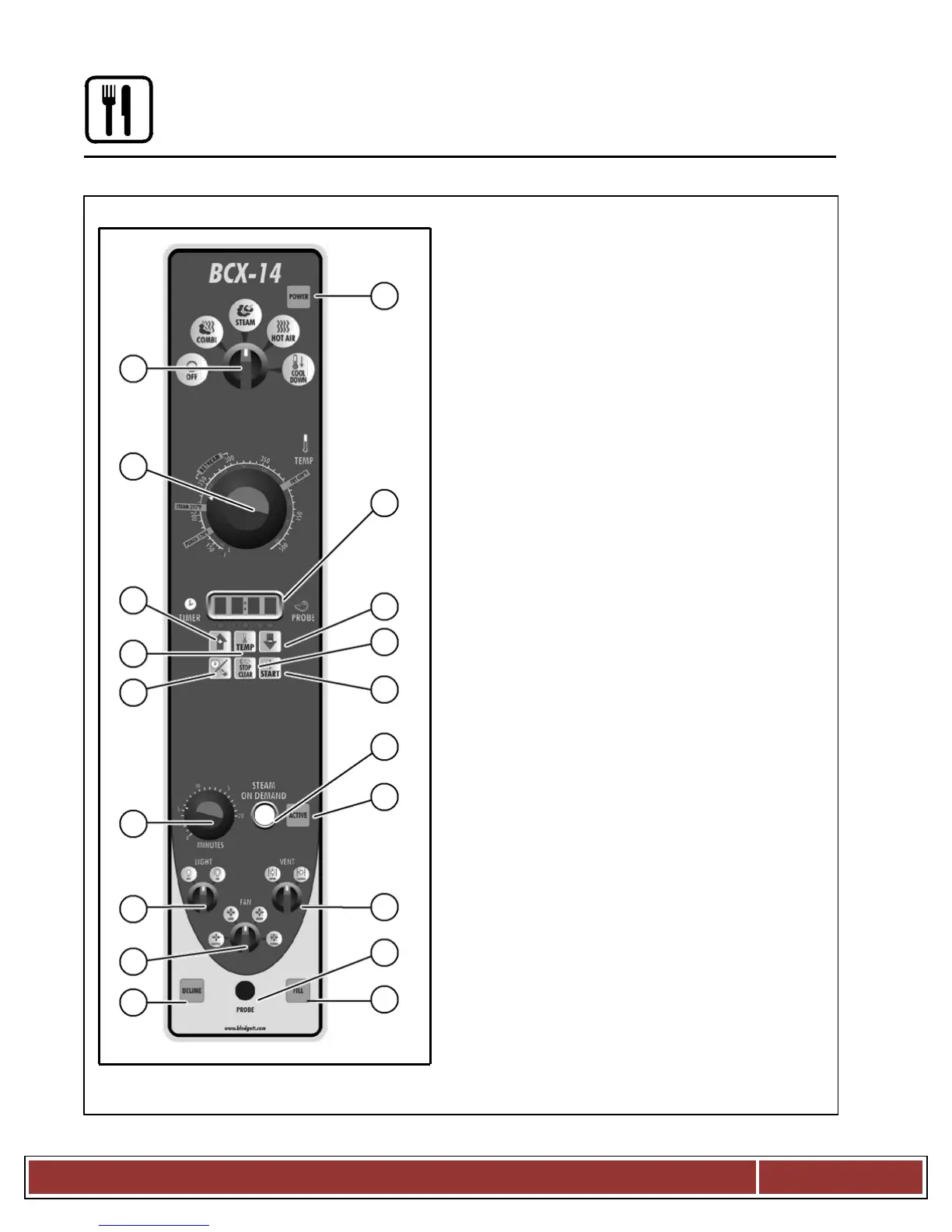
Standard Controls for Models BCX 14 and BX 14
CONTROLS IDENTIFICATION
1. POWER ON LAMP - when lit indicates
power to the unit is turned on.
2. MODE SELECTOR SWITCH - turns power to
the oven on or off. Allows selection of
Steam, Hot Air, Combi or Cool Down Modes.
3. TEMPERATURE DIAL - used to set
desired cooking temperature.
4. DISPLAY - displays time and temperature
in formation.
5. UP & DOWN ARROW KEYS - press to
enter values in the display.
6. ACTUAL TEMP KEY - press to display the
actual probe temperature during core cooking
or actual cavity temperature in timer mode.
7. TIME/PROBE TOGGLE KEY - used to
select either timer or probe cooking.
8. CLEAR/STOP KEY - use to clear or stop
the timer and silence the buzzer.
9. START KEY - press to start the timer.
10. STEAM ON DEMAND TIMER - used to set
duration for steam on demand.
11. STEAM ON DEMAND SWITCH - used to
initiate steam injection cycle.
12. STEAM ON DEMAND LAMP - lights when
steam on demand is activated.
13. LIGHTS SWITCH - used to turn the lights
on and off.
14. CAVITY VENT SWITCH - used to open or
close vent to release steam from cavity.
15. FAN SPEED SWITCH - used to select fan
speed.
16. PROBE CONNECTION - used to connect
the core temperature probe to the control.
17. FILL LAMP - illuminated until the steam
generator is filled with water.
NOTE: Model BX 14 ovens do not have a
fill lamp.
18. DELIME LAMP (BCX 14 ovens only) -
Flashes when steam generator deliming
is needed. Remains steady when deliming
process is active.
CLEAN LAMP (BX 14 ovens only) - Flashes
when the unit has been in use for a
preprogrammed time and needs to be clean


 To Next Page