5. IoT Controller
5.1. Communication Principle
The IoT controller supports WiFi and Bluetooth dual-mode communication,
allowing connectivity between the EP760 ESS and BLUETTI App. Everything about
the system, including power generation and consumption, alarms, and operating
status, can be uploaded to the BLUETTI server via the WiFi network. By registering
the EP760 ESS with your BLUETTI account, you’re able to monitor and control this
unparalleled power plant anytime and anywhere.
Table 5-1
Communication
WiFi
Bluetooth
Standard
Standard
Note
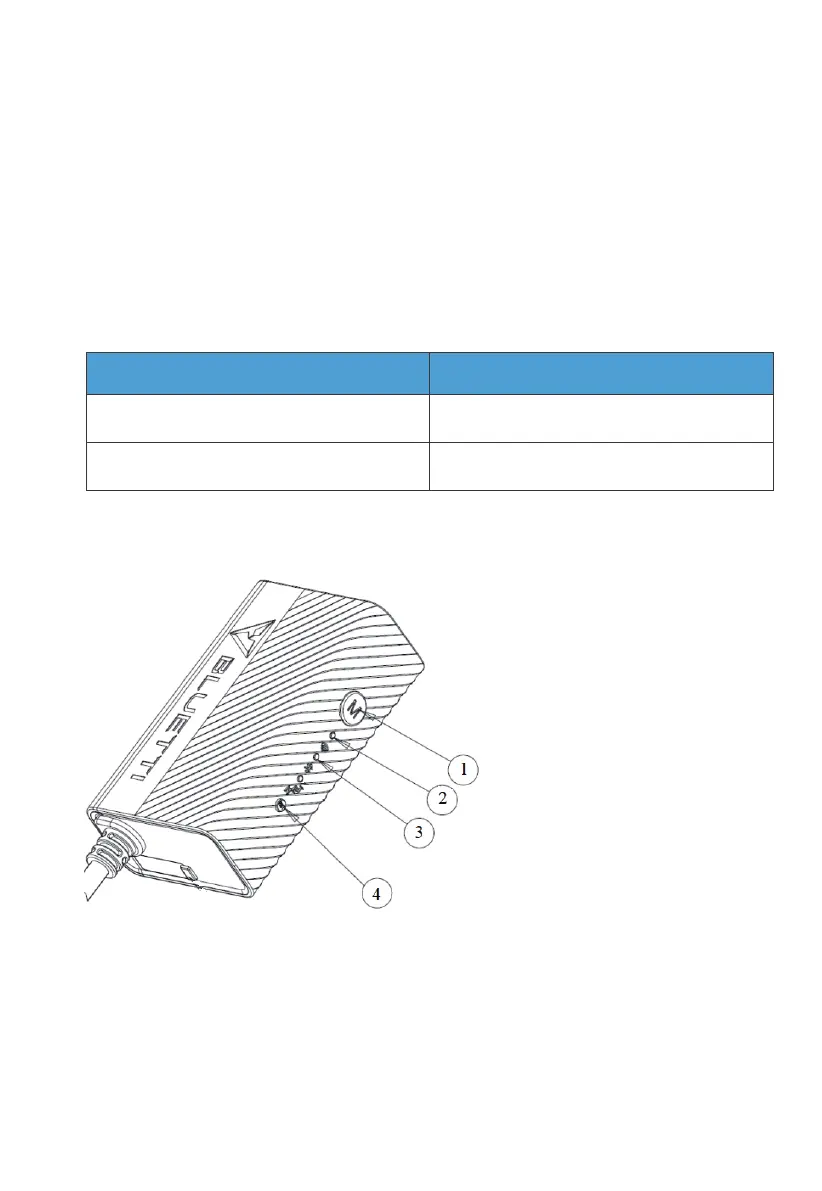
5.2 IoT Controller Overview
1.Menu Button.
To factory reset the controller,
press and hold this button for
about 5s till all LED indicators flash.
2. WiFi Indicator.
Flash till the controller
connected to WiFi.
3. Bluetooth Indicator.
Flash till the controller
connected to Bluetooth.
4.Reboot Button.
Press to reboot the controller.
JUST POWER ON32



 To Next Page