JUST POWER ON52
6.6.3 Connect Battery Power Cables
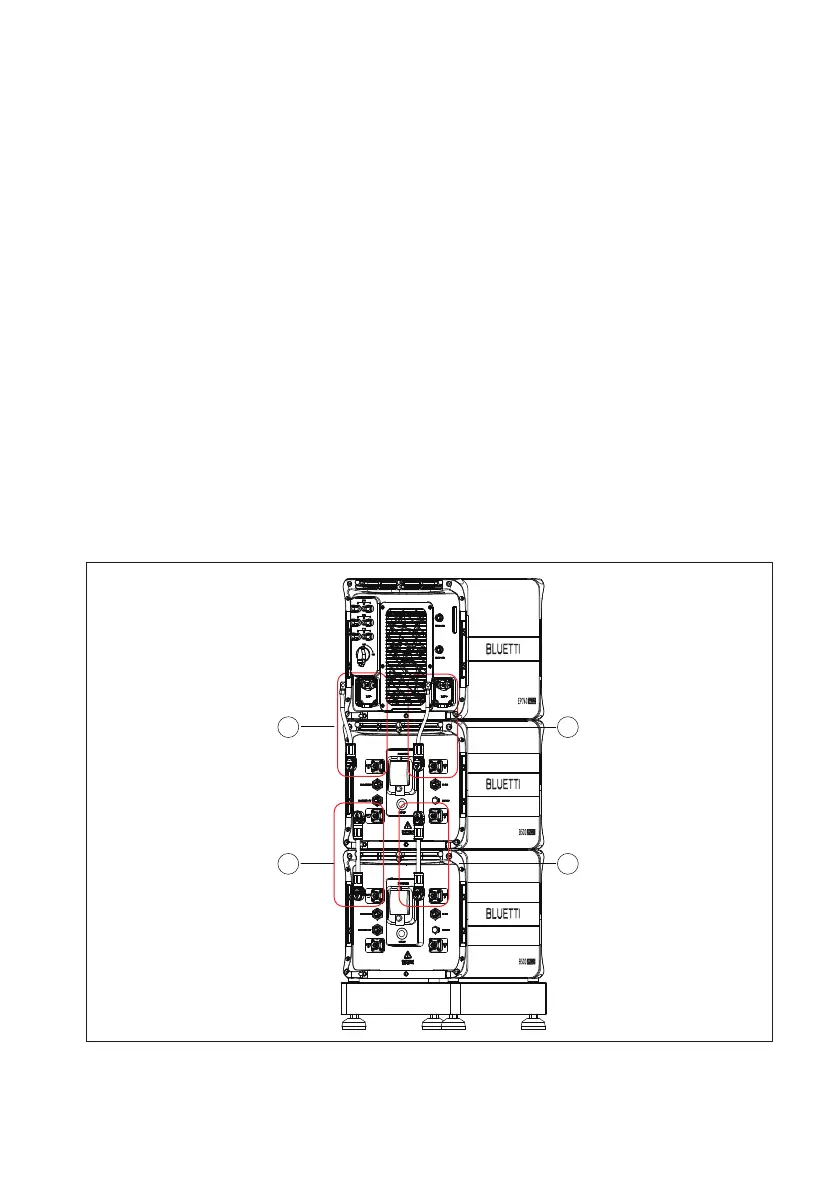
Step 1:Connect two B500 battery packs via the battery expansion cables - black
cable for negative terminals, red for positive terminals. See “①” “②” of Figure 6-9-1
and 6-9-2.
Step 2:Connect the top B500 to EP760 inverter via the battery power cables - black
cable for negative terminals, red for positive terminals. See “③” “④” of Figure 6-9-1
and 6-9-2.
• Fix the black battery power cable to the EP760 inverter BAT- terminal with M8
screws.
• Secure the black protection cover with M4 screws. See Figure 6-9-3.
• Connect the other end of the cable to the B500 BAT- terminal.
• Repeat to connect the red battery power cable. See Figure 6-9-4.
Recommended torque: Less than 6Nm for M8 screws, 1.2Nm for M4 screws.
Step 3:Check that the cables are properly connected.
Figure 6-9-1
1
2
4
3



 To Next Page