Detailed assembly instructions Detailed assembly instructions
28
29
Speedmachine Owners Manual
Seatpost assembly
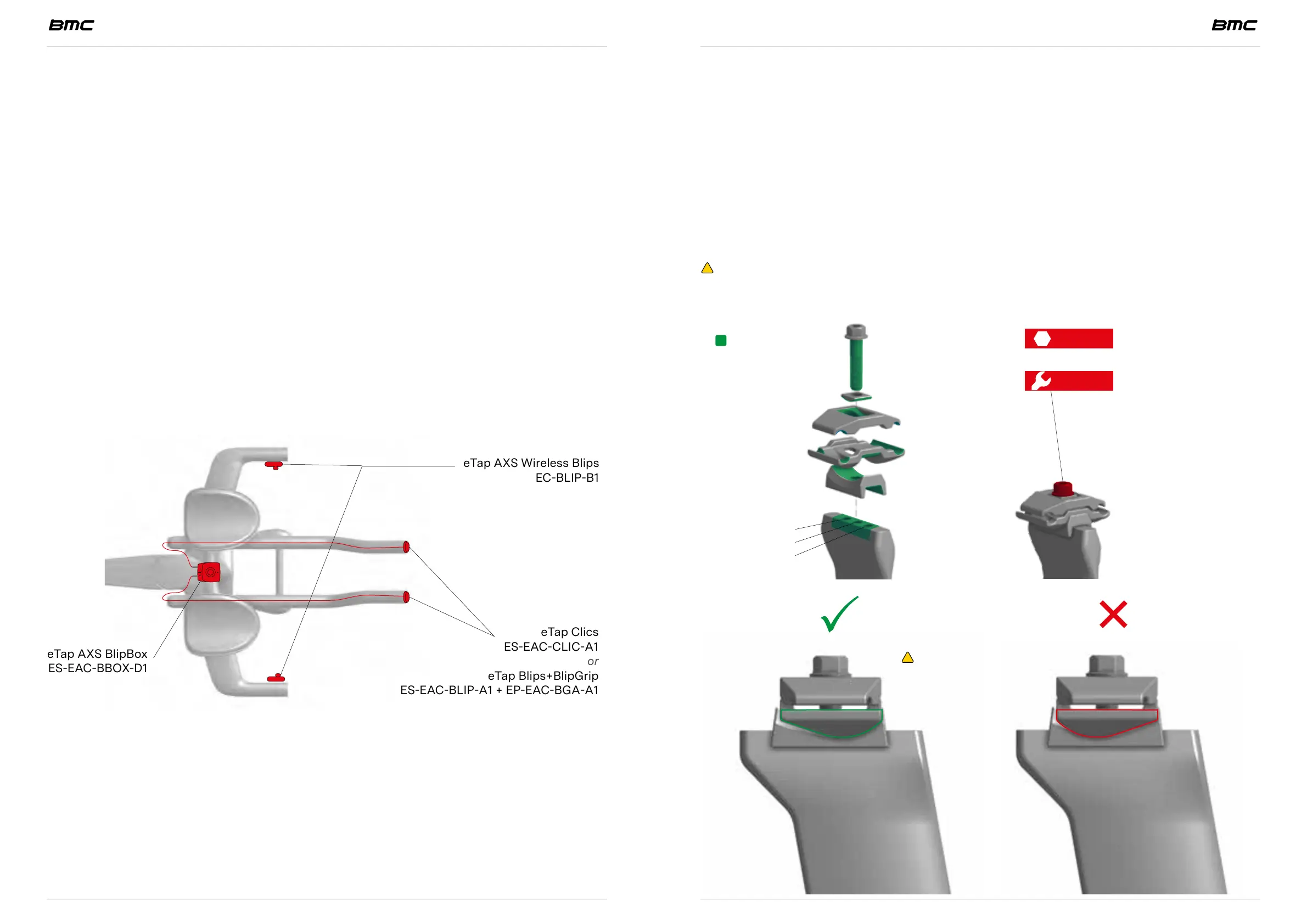
Saddle clamp installation
• Install saddle clamp on your desired seatpost using one of the 3 offsets available.
• For more details, please refer back to the previous paragraph “Seatpost”, page 12.
and “SPEEDMACHINE Gen1 Owners Manual - V1 - September 2023 - English”, page 3.
• Pre-install the clamp support, the lower clamp, the upper clamp, the washer and finally
pre-install the M8x35 bolt. Only tighten by hand at this point.
• Install your saddle by clamping the rails between the 2 clamps and adjust the saddle set-
back and tilt before clamping the M8x35 saddle clamp bolt.
• Tighten to 16 Nm using either a hex 6mm or a 11mm flat wrench.
WARNING: Always tighten to torque as Triathlon and TT saddle and position are ap-
plying a lot of force on the saddle clamp. Not respecting this recommendation may result
in getting the saddle loose, loosing control of the bike and eventually falling.
0mm offset
+12.5mm offset
+25.0mm offset
6 16 Nm
16 Nm
11
or
Grease
SRAM AXS
Please always refer to the latest SRAM product information for your groupset.
The following information is a guide with basic principles.
Installation option A: full wireless system
By only using the eTap AXS Wireless Blips (EC-BLIP-B1) paired with the eTap AXS Blip-
Box (ES-EAC-BBOX-D1), you don’t need any electronic wire to be routed through the
frame or cockpit.
In a full wireless system, the eTap AXS BlipBox is only necessary for pairing.
Once paired, you can choose to either attach the eTap AXS BlipBox to the base bar or
extension bridge -or- store it somewhere safe at home as you will not need it for the
bike to function normally.
Installation option B: mix wired and wireless
You could prefer the shape of the eTap Clics (ES-EAC-CLIC-A1) on the extensions and
the eTap AXS Wireless Blips (EC-BLIP-B1) one the base bar. These shifters need to be
connected and paired with the eTap AXS BlipBox (ES-EAC-BBOX-D1).
The eTap AXS BlipBox can either be attached to the to the base bar or extension
bridge.
eTap AXS Wireless Blips
EC-BLIP-B1
eTap Clics
ES-EAC-CLIC-A1
or
eTap Blips+BlipGrip
ES-EAC-BLIP-A1 + EP-EAC-BGA-A1
eTap AXS BlipBox
ES-EAC-BBOX-D1
WARNING: Always respect
the orientation of the lower
clamp as illustrated.



 To Next Page