15
P063GUI001 - User guide eCelsius Performance Connect.1 - EN
To install ePerf Mobile, please:
- Launch the Android Play Store
- Search the ePerf Mobile application from BodyCAP Company
- Before to launch ePerf Mobile application, please ensure that the options Bluetooth &
Localization are activated
- During the rst use of the application you have to authorize the application to access to the
position of the device.
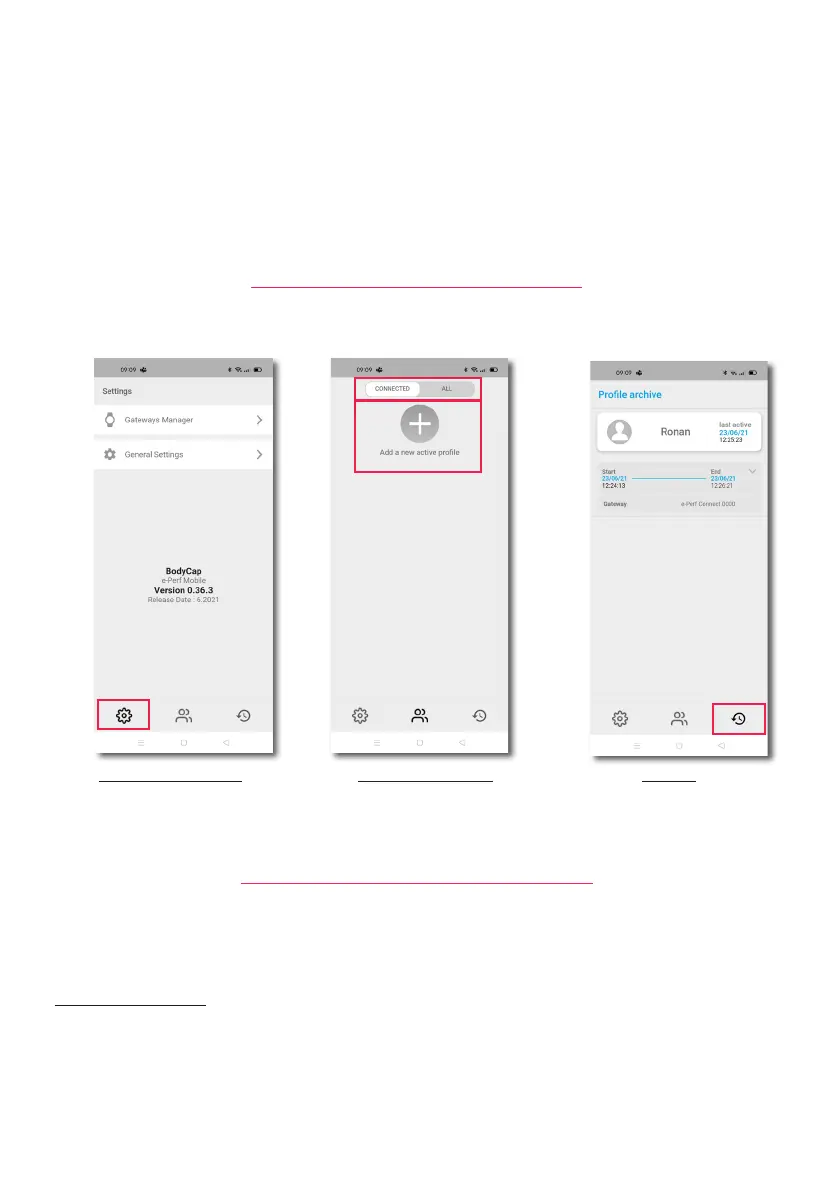
Display the parameters Display active proles Archives
Main page for data visualization Old data visualization
The application is based on 3 functionalities reprensented at the bottom of the screen with logos.
MAIN VIEW OF THE APPLICATION
Figure 5: Main screen of the ePerf Mobile Application
ePerf Connect & ePerf Mobile peering
To communicate, the ePerf Connect device and the ePerf Mobile application have to be paired. To do so, the
application will guide you in the sucessive actions.
1- Creation / prole use: A prole corresponds to a subject that intend to use an ePerf Connect device. You
have to create a new prole (+) or to use an existing prole in the available list, allowing to identify the couple
ePerf Connect device/subject. For a new prole, you may ll up to 16 characters (gures, letters, lowercase,
uppercase, special characters).
Note: 2 proles can not have the same name to avoid any confusion.
Prol lter
Add a new
prole



 To Next Page