19
P063GUI001 - User guide eCelsius Performance Connect.1 - EN
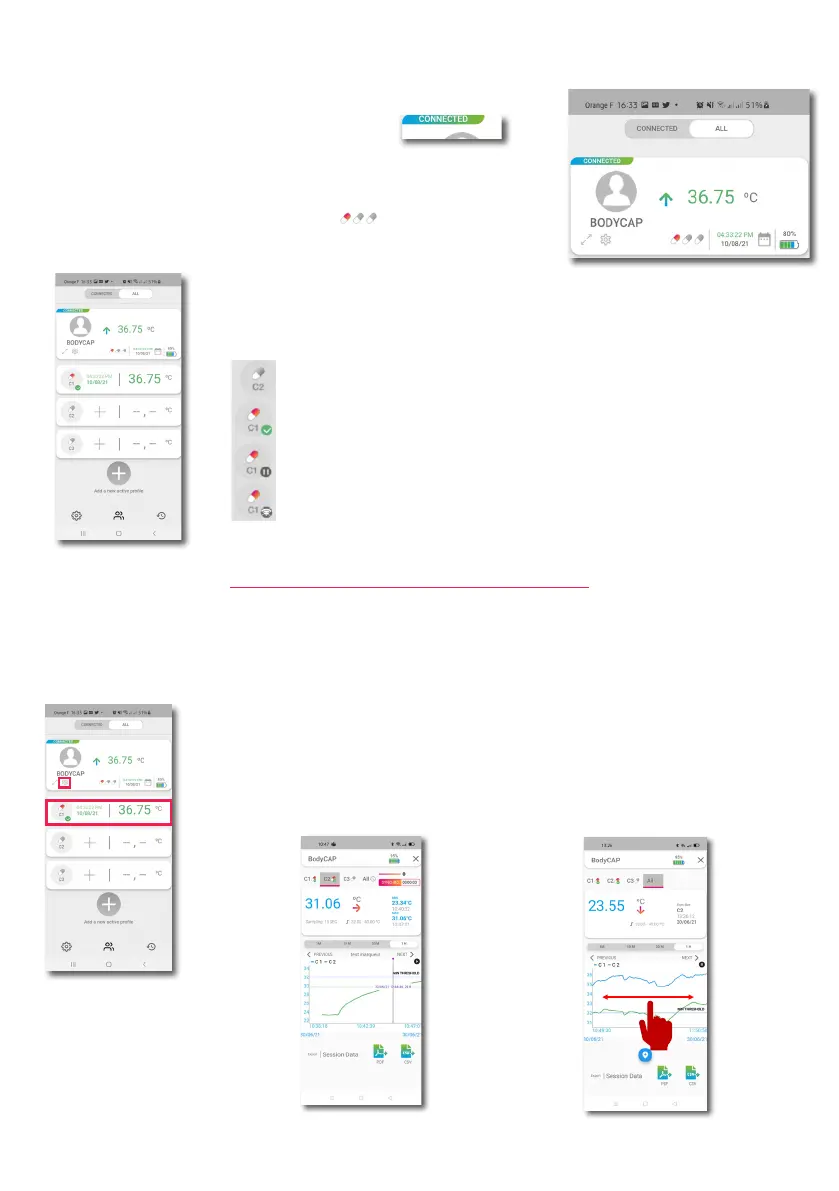
The temperature of the prole is the last temperature received for all the capsule
associated to the ePerf Connect device. If the detail of the capsules is displayed,
each capsule will displayed its own data and its status. The capsule symbol may
be accompanied by one of this icon:
Free slot
Capsule activated on the slot
Slot busy with a capsule in ‘‘Pause’’ mode
Slot busy with an active capsule but presenting a RF communication
issue between the ePerf Connect device and the capsule
The information related to the main screen are the following:
- The prole name (BODYCAP)
- BLE connexion status active/inactive (connected)
- The last data collected (36.75°C) with the capsules associated
- The date and time for this data (04:33 PM 10/08/2021)
- The battery level of the ePerf Connect device (80%)
- The number of capsule associated (1 red )=> click on the capsules
allows to display the status for each capsule (extend/fold up the status)
Display the graph with all the capsule associated to
the ePerf Connect device (C1/C2/C3)
Display the graph only for C1
The capsules temperature data may be displayed graphically. To do so, please click on one of the capsule
temperature data displayed to visualize the corresponding graph or click on the double arrows below the
prole name to display the graphic including all the capsules associated.
It is possible to navigate on the screen by sweeping the nger on the active plage (to the right or to the left)
CONSULT TEMPERATURE GRAPHICS
Graphic exemple for the pill C1
Graphic exemple for all the pills associated
to the ePerf Connect device (Pill C1 + C2



 To Next Page