18
P063GUI001 - User guide eCelsius Performance Connect.1 - EN
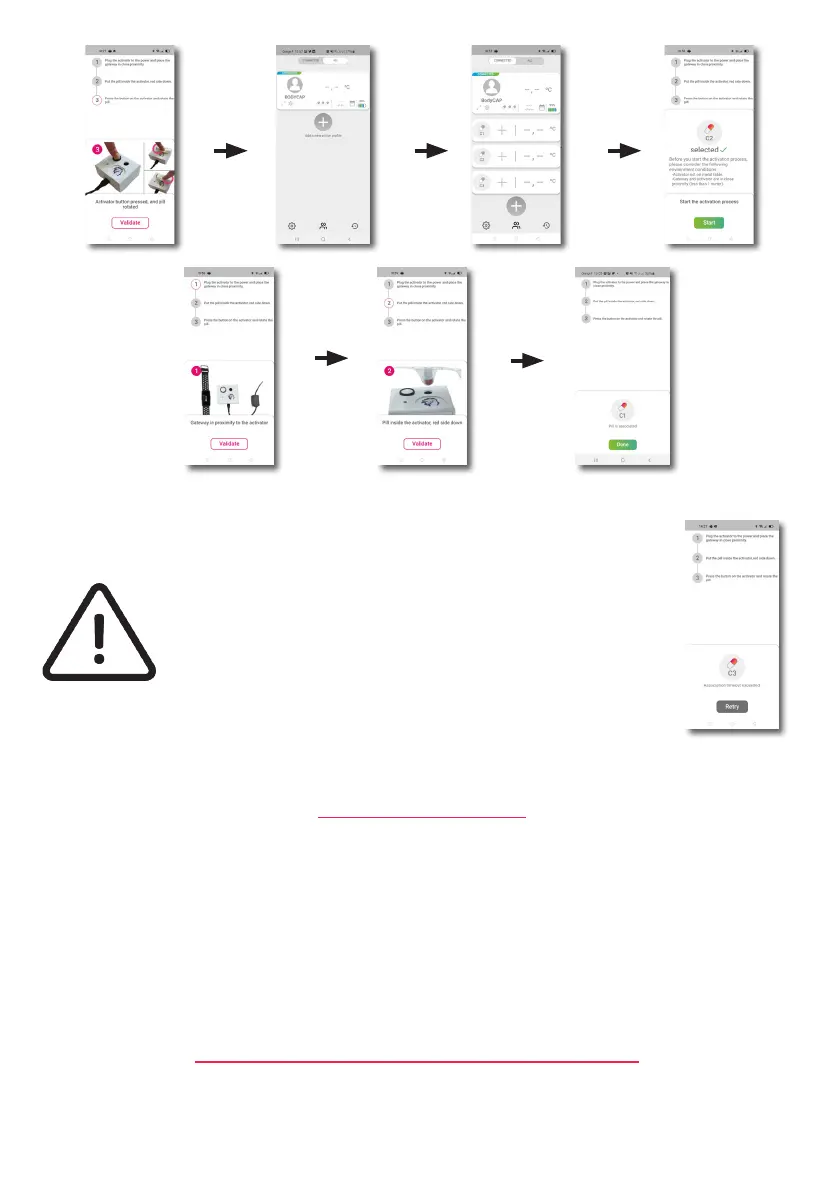
The capsule to associate has to be placed into the hole of the activator, red part down. Once the capsule is
activated and associated to the ePerf Connect device, the data collected are displayed on the ePerf Mobile
Application.
To activate an additional capsule, run again the activation process with a new capsule. It is possible to
associate up to 3 capsules in parallel with the same ePerf Connect device.
If the LED of the Activator stops ashing and that the message
‘‘Retry’’ appears on the screen of the ePerf Mobile application,
please check the right positioning of the eCelsius Performance
capsule in the hole of the Activator and/or slightly rotate the
capsule into the hole, click on the ‘‘Retry’’ button of the application
to launch again the activation process and press again the button
of the activator.
The eCelsius Performance capsule is now ready to be swallowed by the subject, with a glass of water, to
measure gastrointestinal temperature.
Please follow the use claims and contraindications introduced on the page 8. The signaletic bracelet (Fig.
2) has to be worn just after capsule ingestion. The ePerf Connect device has to be worn by the subject in
order to collect and transmit the temperature to the Application.
If the ePerf Connect device is worn as a wristwatch, the sense is not relevant but to have more comfort to
read the time, we may recommand to place the BodyCap logo on the arm side and not on the hand side.
To consult the temperature data collected, the ePerf Connect device and the Android device have to be able
to communicate through BLE. Select the prole that you want to visualize.
CAPSULE INGESTION
CONSULT TEMPERATURE DATA IN REAL TIME



 To Next Page