29
P063GUI001 - User guide eCelsius Performance Connect.1 - EN
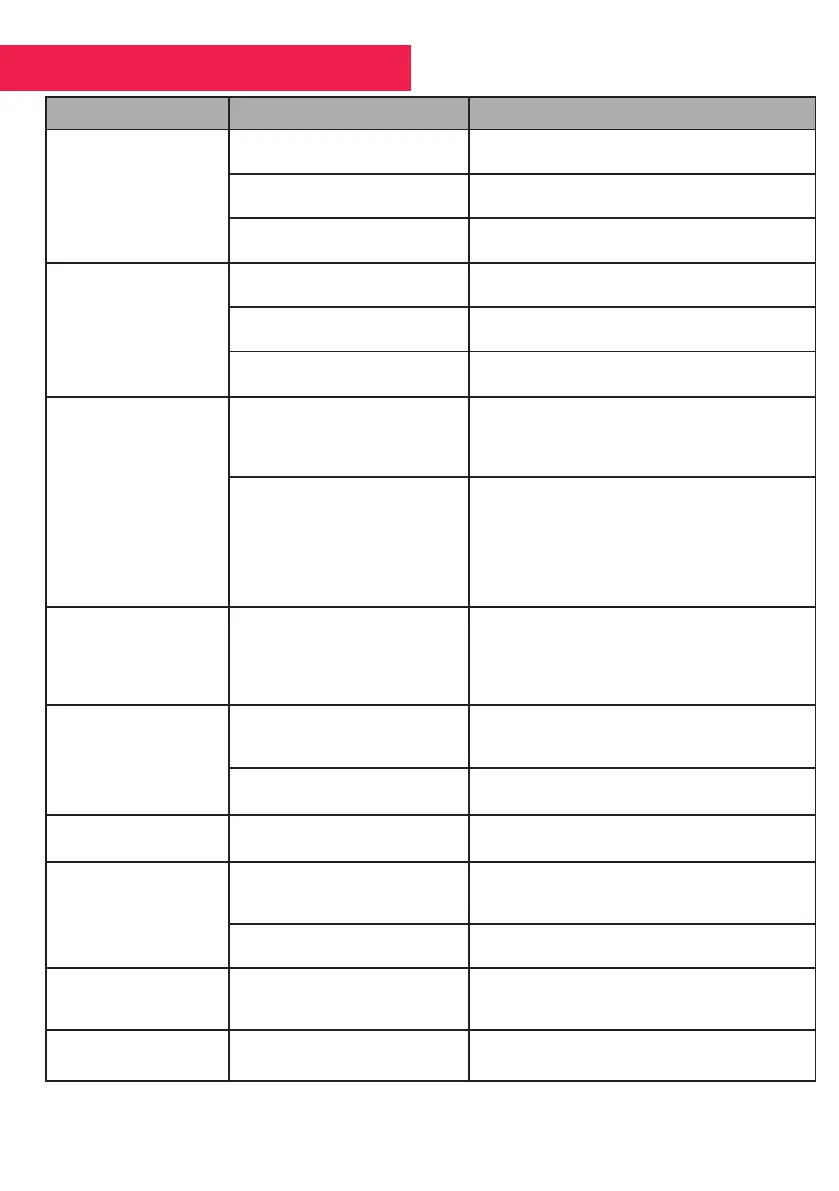
6. FAILURES GUIDE
Issue Probable cause Solution
ePerf Connect
does not turn on
The battery of the ePerf Connect
is discharged
Connect the ePerf Connect to a power source via
the dedicated cable
The ePerf Connect device is at
the end-of-life
The manufacturing date is on the label.
The ePerf Connect may require
maintenance
Please ship back the device to your distributor or
the manufacturer
The LED on the activator
does not turn on.
L ’activateur is not properly
connected to the power source
Please ensure that the connections
are correct and that the power source is on
The activator is at the end-of-life
The manufacturing date is on the
label. It is warrentee for 2 years
The activator may required
maintenance
Please ship back the monitor to your
distributor or the manufacturer
The RF communication
ePerf Connect - capsule
does not work
The distance is too important
Please enure that the capsule is
within the communication range of
the ePerf Connect, check the time/date of
the last data received
The pill is not associated
Follow carrefully the activation
procedure.If the association is dicult, check
that the pill is within range of the ePerf Connect
or turn the pill into the activator hole.
ePerf Mobile shows the number of capsules
associated
Automatic
synchronization
does not work
The ePerf Connect is on charge
Unplug the cable from the ePerf Connect and
wear the device to the wrist.
Please ensure that the capsule is close enough to
the device, and check the date & time of the last
received data on the ePerf Mobile
Inappropriate autonomy
of the ePerf Connect
Battery not charged
Plug the ePerf Connect and wait few minutes
before to try to turn it on again
Battery is at the end-of-life Discard the device with a certied organism.
Innappropriate capsule
autonomy
Used batteries Check the date on the blister
The communication
between ePerf Connect -
ePerf Mobile
does not work
Bluetooth of the ePerf Connect
device already connected to
another Android device
The screen of the ePerf Connect display a BLE
logo indicating the active connexion
The ePerf Connect device is not
paired to the Android device
Please follow the BLE peering process
The Cyan LED
does not swith on
or does not ash
Faulty power supply
Please check the power supply or connect the
ePerf Connect with the dedicated cable
Association of the pill
non-functional
3 pills maximum per ePerf
Connect
Please check that a ePerf Connect slot is free



 To Next Page