25
P063GUI001 - User guide eCelsius Performance Connect.1 - EN
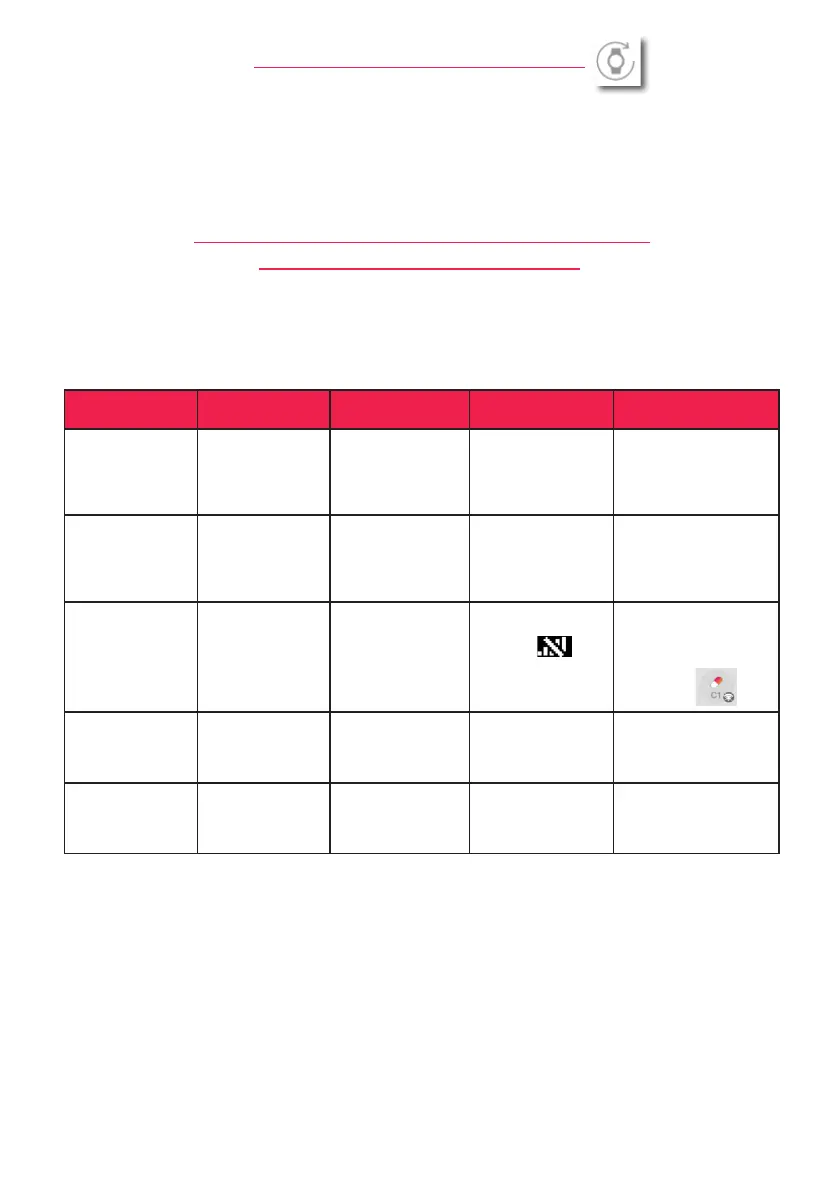
Tableau 1: Alert system
Function managed Alert condition
Delay related
to the Alert
Alert mode
for ePerf Connect
Alert mode
for ePerf Mobile
Capsule battery
Remaining capsule
autonomy should
allow around 500
measurements
maximum
30 secondes maxi-
mum in case of real
time communication
Flashing LED
Notication & display
in the ePerf connect
Parameters
ePerf Connect
battery
ePerf Connect
battery is low or
critical
Immediate
Flashing LED and
symbol on the ePerf
Connect screen
Notication in case of
low battery, % of battery
displayed on the general
screen of each ePerf
Connect connected
Communication
loss between
capsule and ePerf
Connect
ePerf Connect
device does not
receive anymore the
real tom data from
the capsule since
5min.
30 periods
Flashing LED and
symbol on
the screen of ePerf
Connect device
Notication and number
of mission data dis-
played.
Symbol on the capsule
status
Full memory
The ePerf Connect
device does not
enough memory to
ensure data storage
Immediate Flashing LED
Notication & info dis-
played in
the ePerf Connect
device parameters
Internal error alert
The ePerf connect
device is faulty
Immédiate,
the usability of the
device is limited
Flashing LED +
message displayed on
the screen
ePERF CONNECT DEVICE UPDATE
It is possible to turn off the ePerf Connect device using the ePerf Mobile application. To do so, please go
to the device settings (see paragraph above) and press the corresponding button.The device has to be
connected to the application. Once the command is sent, the device displays a shutdown message and will
shut down after a few seconds. Please nally select ‘‘Update the device’’ and follow the steps.
eCELSIUS PERFORMANCE CONNECT SYSTEM
ALERTS SYSTEM VISUALIZATION
The ePerf Connect device shows 5 alert categories.
The triggering and displaying conditions are summarized in the table below.



 To Next Page