In the event of a malfunction, the appliance applies a Safety block or Safety
stop, depending on the type of error/fault that has occurred, as signalled on
the DSP display.
Error message
DHW sensor open
ERROR 33
Key to
press
Description Display
A
TWICE
C
A
3 TIMES
C
A
ONCE
C
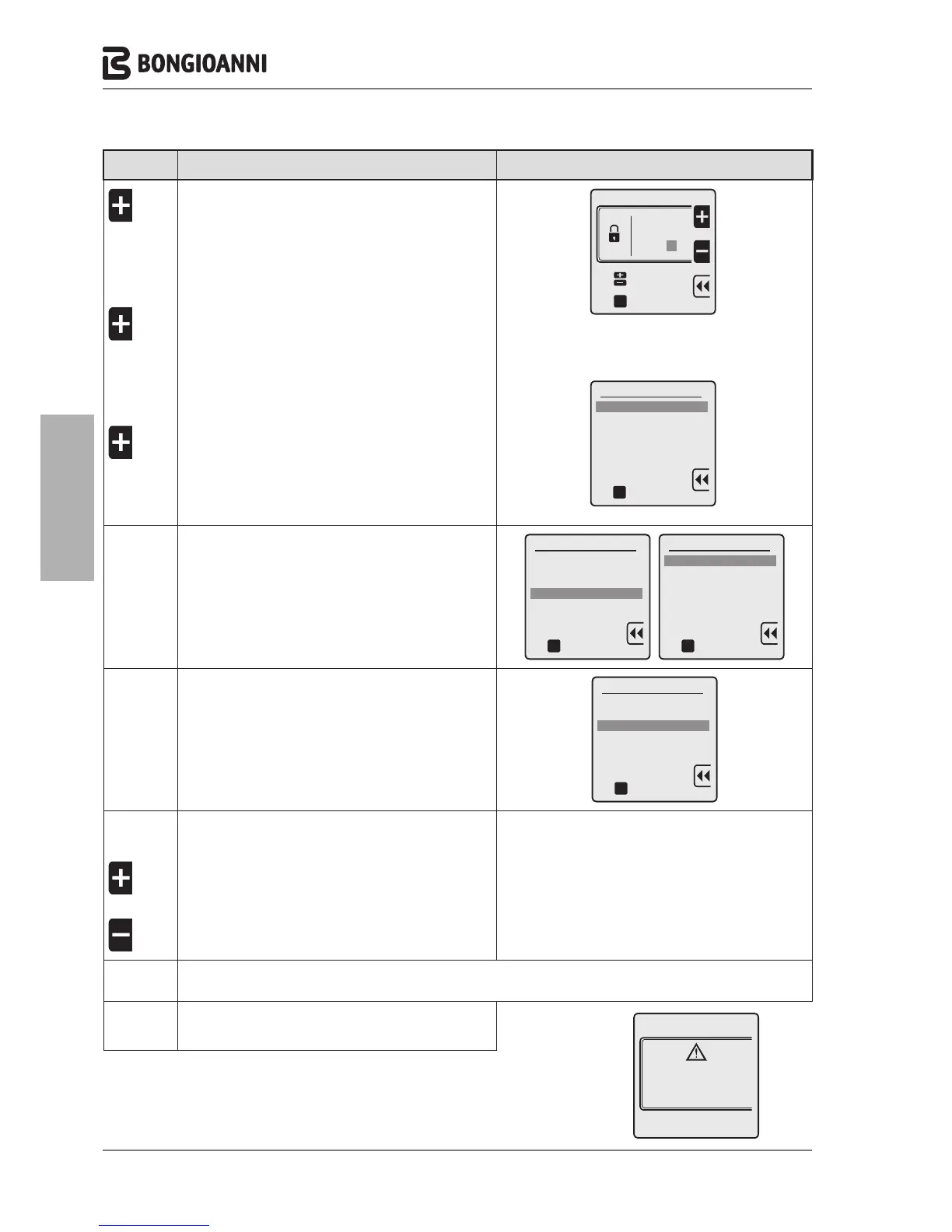
To enter the PASSWORD “231”:
to enter the first digit “2”
to confirm and move to the second digit
to enter the second digit “3”
to confirm and move to the third digit
to enter the third digit “1”
to confirm the password and enter the menu
2 3 1
oK
Technician menu
Insert code
to select
to confirm
oK
Technician menu
1. ADVANCED CH SETTINGS
2. ADVANCED DHW SETTINGS
3. SYSTEM SETTINGS
4. DIAGNOSTICS
5. USER SETTINGS
6. CASCADE
7. RESTORE FACTORY SETTINGS
to confirm
D
3 TIMES
C
to select "4. DIAGNOSTICS"
to confirm and access the selected line
Technician menu
1. ADVANCED CH SETTINGS
2. DOMESTIC HOT WATER
3. SYSTEM SETTINGS
4. DIAGNOSTICS
5. USER SETTINGS
6. CASCADE
7. RESTORE FACTORY SETTINGS
oK
to confirm
Diagnostics
1. Boiler information
2. Lockout history
3. Manual test
oK
to confirm
D
TWICE
C
to select "3. Manual test"
to confirm
Diagnostics
1. Boiler information
2. Lockout history
3. Manual test
oK
to confirm
C
A
OR
A
to start the test
(maximum duration 15 minutes)
to increase or decrease the power
(from 0 to 100%)
Perform all checks as described in section “OPERATIONAL CHECKS - CALIBRATION AFTER gas type
changes” page 50
C
to deactivate the MANUAL TEST function
- 48 -



 To Next Page